Stripe Payment Processor
Overview
The Stripe task enables global payment processing through the Stripe payment gateway. It supports charging stored payment methods for recurring transactions and generating payment links for one-time payments.
Stripe is ideal for businesses serving international customers, offering support for 135+ currencies, diverse payment methods (cards, digital wallets, bank transfers), and global coverage across 45+ countries.
Type Number: 40
Category: Integration - Payment Processing
Geographic Focus: Global (180+ countries)
How It Works
Stripe integrates with your BaseCloud CRM through two distinct payment workflows:
- Charge Account: Uses Stripe Payment Intents API to charge stored payment methods from billing_accounts
- Create Payment Link: Generates a hosted Stripe payment page through multi-step process (product → price → payment link)
graph TB
    A[Stripe Task Triggers] --> B{Action Type?}
    B -->|charge_account| C[Lookup Client]
    C --> D[Find Active Billing Account]
    D --> E[Create Payment Intent]
    E --> F[Confirm with Payment Method]
    F --> G[Return Transaction Result]
    B -->|create_payment_link| H[Create Product]
    H --> I[Create Price]
    I --> J[Create Payment Link]
    J --> K[Return Payment URL]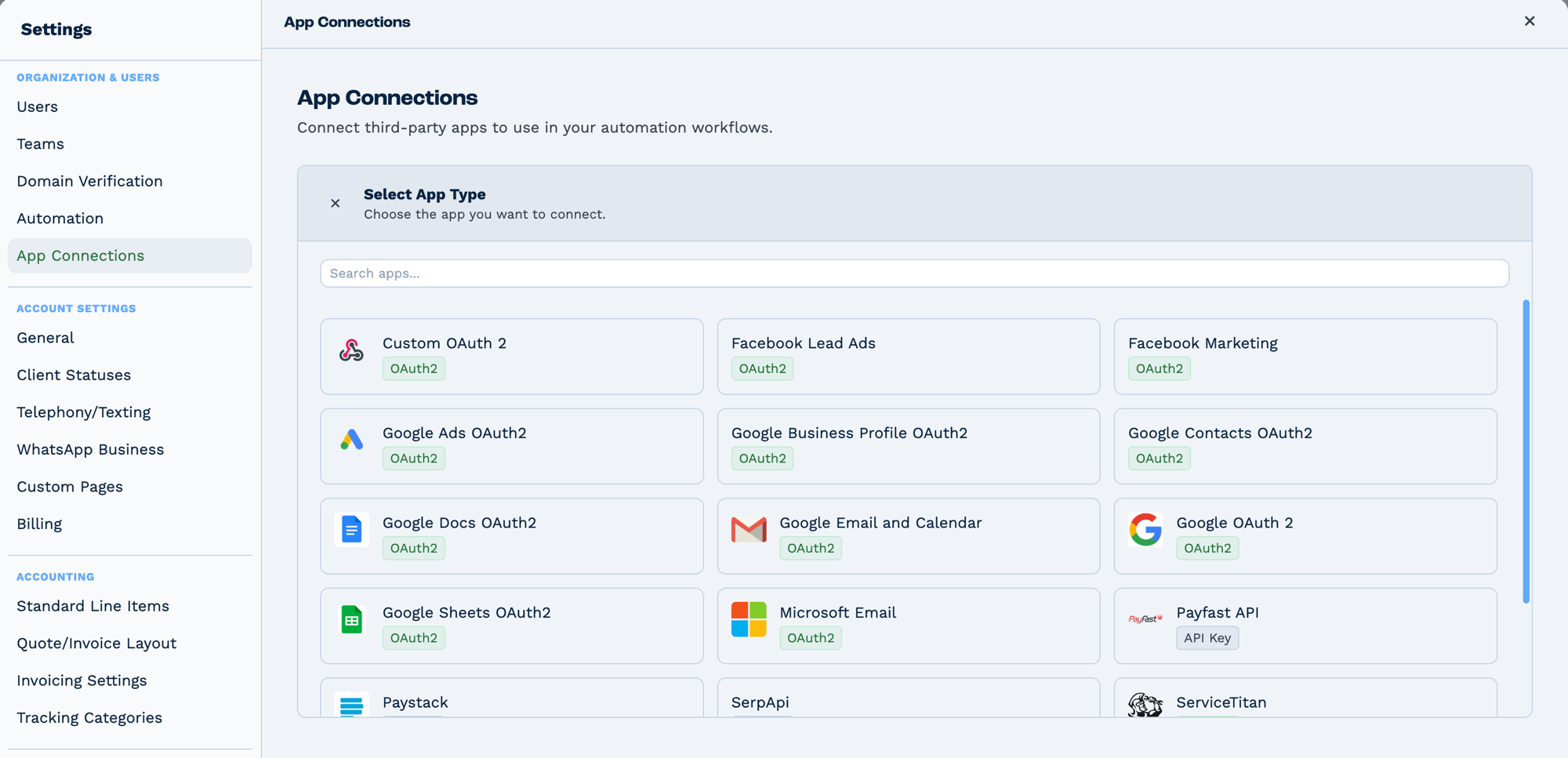
Connections live in Settings → App Connections, not on the task. Connect the app once and every task that needs it can use it. The badge on each tile says how it authenticates — OAuth2 sends you to the provider to sign in, API Key expects a key you paste in.
Prerequisites
Required: Stripe App Connection
Before using this task, configure a Stripe app connection:
- Get Stripe API Keys:
- Log into your Stripe Dashboard
- Navigate to Developers > API keys
- Copy your Secret Key (starts with
sk_live_orsk_test_) -
Copy your Publishable Key (starts with
pk_live_orpk_test_) -
Create App Connection:
- Go to Settings > App Connections in BaseCloud
- Create new connection with Type ID = 9 (Stripe)
- Store credentials as JSON:
- Reference Connection:
- Use the
app_connection_idin your task configuration - Store connection ID in a variable for reusability
Required for charge_account: Billing Account Setup
To charge stored payment methods, clients must have active billing accounts:
- Stored in
billing_accountstable - Status must be "Active"
- Contains Stripe
payment_method_id(stored inauthorization_codefield) - Contains Stripe
customer_id(stored incustomer_codefield) - Associated with client via
owner_id - Created after customer's first successful payment
Configuration
Builder fields
The Field column is the label as it appears in the task builder; Key is the name the value is stored under and referenced by.
| Field | Key | Type | Default | Notes |
|---|---|---|---|---|
| Stripe Connection | app_connection_id |
app-connection | – | |
| Action | action |
select | charge_account |
Options: Charge Account · Create Payment Link |
| Client ID | o_client_id |
textarea | – | Only shown when action is charge_account |
email |
textarea | – | Only shown when action is create_payment_link |
|
| Amount | amount |
textarea | – | |
| Currency | currency |
select | USD |
Options: USD — US Dollar · ZAR — South African Rand · EUR — Euro · GBP — British Pound |
| Metadata | metadata_rows |
dyn-rows | – | Only shown when action is charge_account |
Action: charge_account
Purpose: Charge a client's stored payment method using Stripe Payment Intents.
| Field | Required | Type | Description |
|---|---|---|---|
| app_connection_id | ✅ Yes | String | Reference to Stripe app connection |
| action | ✅ Yes | String | Set to charge_account |
| o_client_id | ✅ Yes | String | Client identifier from CRM |
| currency | ✅ Yes | String | Currency code (lowercase: usd, eur, gbp, zar, etc.) |
| amount | ✅ Yes | Number | Amount in major units (e.g., 99.99 for $99.99) |
| Custom metadata | ❌ Optional | Various | Any fields with setting_1 = "metadata" |
Example Configuration:
app_connection_id: {{var_stripe_connection}}
action: charge_account
o_client_id: {{trigger_client_id}}
currency: usd
amount: {{client_subscription_amount}}
metadata_invoice_id: {{invoice_id}}
metadata_subscription_type: monthly
Important: Currency must be lowercase for Stripe API.
Action: create_payment_link
Purpose: Generate a hosted Stripe payment page for one-time payments.
| Field | Required | Type | Description |
|---|---|---|---|
| app_connection_id | ✅ Yes | String | Reference to Stripe app connection |
| action | ✅ Yes | String | Set to create_payment_link |
| ✅ Yes | String | Customer email address | |
| currency | ✅ Yes | String | Currency code (lowercase: usd, eur, gbp, etc.) |
| amount | ✅ Yes | Number | Amount in major units (e.g., 149.99 for $149.99) |
Example Configuration:
app_connection_id: {{var_stripe_connection}}
action: create_payment_link
email: {{client_email}}
currency: usd
amount: {{invoice_total}}
Output Fields
The task generates workflow variables following the pattern task_40001_<field_name>:
Common Output Fields
| Variable | Type | Description |
|---|---|---|
task_40001_run |
Boolean | Whether task executed successfully (true/false) |
task_40001_run_text |
String | Human-readable result message |
charge_account Output
{
  "task_40001_run": true,
  "task_40001_run_text": "Payment successful",
  "task_40001_id": "pi_3AbCdEfGhIjKlMnO",
  "task_40001_object": "payment_intent",
  "task_40001_amount": 9999,
  "task_40001_currency": "usd",
  "task_40001_status": "succeeded",
  "task_40001_customer": "cus_AbCdEfGhIjKl",
  "task_40001_payment_method": "pm_1AbCdEfGhIjKlMnO",
  "task_40001_client_secret": "pi_3AbC_secret_dEfGhIjKlMnOpQrS",
  "task_40001_charges_data_0_id": "ch_3AbCdEfGhIjKlMnO",
  "task_40001_charges_data_0_amount": 9999,
  "task_40001_charges_data_0_status": "succeeded",
  "task_40001_charges_data_0_payment_method_details_card_brand": "visa",
  "task_40001_charges_data_0_payment_method_details_card_last4": "4242"
}
create_payment_link Output
{
  "task_40001_run": true,
  "task_40001_run_text": "Payment link created successfully",
  "task_40001_data_payment_link_url": "https://buy.stripe.com/test_xxxxxxxxxxxxx",
  "task_40001_data_payment_link_id": "plink_1AbCdEfGhIjKlMnO",
  "task_40001_data_product_id": "prod_AbCdEfGhIjKl",
  "task_40001_data_price_id": "price_1AbCdEfGhIjKlMnO"
}
Real-World Examples
Send a payment link when a quote is accepted
CRM Trigger  (status changed to "Quote accepted")
  └─ Match to Client   look the client up
      └─ Stripe        generate a payment link
          └─ Email     send the link to the client
Charge a stored card on a schedule
Record the payment against the client
Webhook In  (Stripe payment succeeded)
  └─ Match to Client     contact_email from the payload
      └─ Workflow Note   log the payment against the client
Common Use Cases
- SaaS Subscriptions: Monthly/annual recurring billing
- E-commerce: One-time product purchases
- Digital Downloads: Software, eBooks, courses
- Memberships: Gym, professional associations
- Consulting Services: Retainer and project-based billing
- Event Tickets: Conferences, webinars, workshops
- Donations: Nonprofit one-time and recurring donations
- Marketplace Fees: Platform commissions
- Premium Features: Freemium model upgrades
- International Sales: Multi-currency transactions
Supported Currencies
Stripe supports 135+ currencies including:
Major Currencies:
- USD, EUR, GBP, CAD, AUD, JPY, CHF, SEK, NOK, DKK
Emerging Markets:
- ZAR (South Africa), MXN (Mexico), BRL (Brazil), INR (India), SGD (Singapore)
Regional:
- AED, SAR, KWD, QAR (Middle East)
- CNY, HKD, TWD, THB (Asia-Pacific)
Note:
- Currency codes must be lowercase (e.g.,
usdnotUSD) - Amount automatically converted to cents/smallest unit
- Some currencies have different decimal places (e.g., JPY has no decimals)
Troubleshooting
"No active billing account found for this client"
Cause: Client doesn't have a stored payment method.
Solutions:
- Use
create_payment_linkto collect payment details - After successful payment, Stripe creates payment_method_id
- Store in
billing_accountstable via webhook - Use
charge_accountfor future charges
"Payment status: requires_action"
Cause: Payment requires 3D Secure authentication (SCA requirement).
Solutions:
- For charge_account: Send customer the
client_secretto complete authentication - Better approach: Use
create_payment_linkwhich handles 3DS automatically - Configure Stripe Radar rules for exemptions
- Use Stripe Elements for frontend integration (outside BaseCloud)
Example handling:
If Condition ({{task_40001_status}} = "requires_action")
    Email (Action required)
        - Body: "Please authenticate: {{task_40001_client_secret}}"
"Failed to create product: ..."
Cause: Product creation step failed in create_payment_link.
Solutions:
- Check Stripe API error message in
task_40001_run_text - Verify API key has product creation permissions
- Check Stripe account status (restricted?)
- Ensure amount is positive and valid
Currency must be lowercase error
Cause: Currency field contains uppercase (e.g., USD instead of usd).
Solutions:
- Use Formatter task to convert:
{{task_20001_lowercase}} - Store currencies in lowercase in database
- Update form inputs to lowercase before workflow
Example:
Formatter
    - Input: {{trigger_currency}}
    - Operation: lowercase
    ↓
Stripe
    - currency: {{task_20001_formatted}}
Payment successful but status shows "processing"
Cause: Some payment methods (bank transfers) take time to confirm.
Solutions:
- Wait for
payment_intent.succeededwebhook - Don't grant access immediately for "processing" status
- Set up webhook listeners for status updates
- Inform customer of processing time
Amount mismatch (charged wrong amount)
Cause: Stripe expects cents but received dollars.
Verification:
- Task automatically multiplies by 100
- Input:
99.99→ Sent to Stripe:9999(cents) - Double-check amount source isn't pre-converted
Limitations & Considerations
Technical Limitations
- 3D Secure:
charge_accountmay require additional authentication - Payment Link Expiration: Links don't expire by default but can be configured
- Refunds: Not supported directly (use Stripe Dashboard or API)
- Partial Captures: Not supported in this task
- Multi-Step Process:
create_payment_linkmakes 3 API calls (slower)
Best Practices
- Test Mode: Always test with test keys first (
sk_test_,pk_test_) - Idempotency: Stripe automatically handles duplicate requests
- Error Handling: Check both
runandstatusfields - Metadata: Include reference IDs for reconciliation
- Webhooks: Essential for payment confirmations
- Currency: Always lowercase
- Amounts: Always in major units (dollars not cents)
Business Considerations
- Transaction Fees: 2.9% + $0.30 per successful charge (US rates)
- International Cards: Additional 1% fee
- Currency Conversion: Dynamic conversion available
- Chargebacks: $15 fee per dispute
- Compliance: PCI-DSS certified, handles compliance automatically
- Payout Schedule: 2-7 business days (configurable)
Billing Account Integration
Field Mapping
Stripe reuses Paystack billing account fields:
| Database Field | Paystack Usage | Stripe Usage |
|---|---|---|
| Paystack customer code | Stripe customer_id | |
| Paystack authorization code | Stripe payment_method_id | |
| Paystack signature | Unused (NULL) | |
| Type ID = 4 | Type ID = 9 |
Automatic Account Creation
Created via webhook when customer completes payment:
- Customer pays via
create_payment_link - Stripe sends
checkout.session.completedwebhook - Extract
customer(customer_id) andpayment_method - Insert into
billing_accounts:INSERT INTO billing_accounts ( owner_id, customer_code, -- Stripe customer_id authorization_code, -- Stripe payment_method_id customer_email, card_type, last4, exp_month, exp_year, status, currency, type_id ) VALUES ( {{client_id}}, 'cus_AbCdEfGhIjKl', -- from Stripe 'pm_1AbCdEfGhIjKlMnO', -- from Stripe 'customer@example.com', 'visa', '4242', '12', '2025', 'Active', 'usd', 9 );
Security Best Practices
API Key Management
✅ DO:
- Use restricted API keys with minimum permissions
- Rotate keys every 90 days
- Store in encrypted app_connection credentials
- Use separate keys per environment (test, live)
❌ DON'T:
- Hardcode keys in workflows
- Share keys between businesses
- Use same keys across dev/production
- Log keys in workflow notes
Payment Security
✅ DO:
- Validate webhook signatures using Stripe's library
- Log all payment attempts with metadata
- Implement rate limiting for payment retries
- Monitor for fraud patterns (rapid charges, geographic anomalies)
❌ DON'T:
- Store raw card numbers
- Process payments without customer authorization
- Skip amount validation
- Ignore webhook signature verification
Compliance
- PCI DSS: Stripe handles compliance (Level 1 certified)
- SCA/3DS: Enabled by default for European cards
- GDPR: Delete customer data on request via Stripe API
- SOC 2: Stripe is SOC 2 Type II certified
Comparison: Stripe vs Paystack
| Feature | Stripe | Paystack |
|---|---|---|
| Geographic Focus | Global (180+ countries) | African markets (Nigeria, Ghana, SA, Kenya) |
| Currencies | 135+ currencies | 5 currencies (NGN, GHS, ZAR, USD, KES) |
| Currency Format | Lowercase required | Any case accepted |
| Payment Link Creation | 3-step process (product/price/link) | Single API call (initialize) |
| 3D Secure | Automatic, may require action | Automatic, seamless |
| Field Names | action, customer_code, payment_method_id |
paystack_action, customer_code, authorization_code |
| Type ID | 9 | 4 |
| Best For | International businesses, multi-currency | African businesses, local currencies |
| Transaction Fees | ~2.9% + $0.30 | ~1.5% + ₦100 (Nigeria) |
Related Tasks
- Type 32 - Paystack: African market payment processor
- Type 2 - Email: Send payment receipts and confirmations
- Type 36 - PDF: Generate invoices and receipts
- Type 27 - Math Formula: Calculate prorated amounts
- Type 16 - Edit Client: Update payment status
- Type 14 - Workflow Note: Log transactions
FAQ
When should I use Stripe vs Paystack?
Use Stripe if:
- Serving international customers
- Need 135+ currencies
- Require Apple Pay, Google Pay, etc.
- Operating in US/Europe/Asia
Use Paystack if:
- Primarily African customers
- Nigeria/Ghana/South Africa focus
- Better local payment method support
- Lower fees for African transactions
How do I handle 3D Secure authentication?
For automated charges (charge_account), use create_payment_link instead when 3DS might be required. Payment links handle authentication automatically. Check for status: "requires_action" and redirect customers to complete authentication.
Can I refund payments?
Not directly through this task. Process refunds via:
- Stripe Dashboard (manual)
- Stripe API directly (requires custom integration)
- Contact BaseCloud support for refund webhook
How long until funds are available?
Standard: 2 business days (US)
International: 2-7 business days
Instant Payouts: Available for eligible accounts (fee applies)
Can customers save payment methods?
Yes, when using create_payment_link, enable "save payment method" in Stripe Dashboard settings. Saved methods automatically populate billing_accounts via webhook.
What's the difference between payment_method and customer?
- customer: Stripe Customer ID representing the buyer
- payment_method: Specific payment method (card, bank) attached to customer
- One customer can have multiple payment methods
How do I test without real charges?
Use test mode:
- API keys:
sk_test_...andpk_test_... - Test cards:
4242 4242 4242 4242(Visa success) - Test cards:
4000 0025 0000 3155(requires 3DS) - No real money charged in test mode
Can I charge in multiple currencies?
Yes, Stripe supports 135+ currencies. Each billing account tied to one currency. Customers paying in multiple currencies need separate accounts per currency, or use Stripe's dynamic currency conversion.
How do I handle subscription cancellations?
- Set the billing status to "Inactive" with an Edit Client task
- Stop automated charge workflows
- Send cancellation confirmation email
- Optional: Schedule delayed account deletion
What metadata can I include?
Any key-value pairs for tracking:
- Order IDs, invoice numbers
- Customer references
- Internal identifiers
- Custom fields for reporting
Summary
Stripe provides enterprise-grade global payment processing:
- ✅ charge_account: Charge stored payment methods via Payment Intents
- ✅ create_payment_link: Generate hosted payment pages
- ✅ Global coverage (180+ countries, 135+ currencies)
- ✅ Advanced fraud prevention (Stripe Radar)
- ✅ Comprehensive webhook support
- ✅ 3D Secure / SCA compliant
- ✅ Metadata support for detailed tracking
- ⚠️ Currency must be lowercase
- ⚠️ Payment links require 3-step creation
- ⚠️ 3D Secure may require additional action for charge_account
Perfect for international businesses, multi-currency operations, SaaS subscriptions, e-commerce, digital products, and any scenario requiring global payment processing. For African market focus, consider Paystack as regional alternative.