Match to Client Task
Overview
The Match to Client task looks up an existing client in your CRM and returns that client's details to the rest of the workflow. It is how a workflow turns an email address or a phone number arriving from outside into the CRM record it belongs to.
It is an identity lookup, not a search or a reporting tool. You give it one or more identifying values; it works through them in order and stops at the first one that matches a client.
This task does not create clients
If nothing matches, the task reports No client matched. and sets run to false. It has no
create path at all. To create a client, follow it with a
New Client task on the false branch of an If Statement.
When to use this task:
- Connect an inbound form, email, webhook or call to the client it belongs to
- Pull a client's status, origin, responsible manager or custom fields into a workflow
- Check whether a client already exists before creating one
What this task cannot do
This task is reached for regularly to do things it was not built for. Each line below is a property of the implementation, not a limitation of your configuration.
| You may want to… | This task | Use instead |
|---|---|---|
| Filter clients by Origin | Returns match_client_origin, but cannot search on it |
MySQL Query, or the API |
| Filter by deal stage / status | Returns match_client_status_id and match_client_status_label, but cannot search on them |
MySQL Query, or the API |
| Get every client that matches | Stops at the first criterion that hits and returns one client | MySQL Query |
| Count or report across many clients | Not a query tool — metadata.total_matched counts matches for the criterion that hit, nothing more |
MySQL Query, or the API |
| Create the client when none matches | No create path | New Client |
| Match on a partial or fuzzy value | Every criterion is exact, except contact_email_domain, which matches the domain part |
Normalise the value first with Formatter or Phone Formatter |
Returning a field and filtering on it are different things. Origin and status come back in the output because they belong to the client that was found. There is no way to ask this task for "all clients whose Origin is X" — it has no such input.
Quick Start
- Add Match to Client task to workflow
- Select matching field (usually email or phone)
- Enter value to search for:
{{task_12345_email}} - Choose action: "Create if not found" or "Fail if not found"
- Map additional fields for contact creation
- Save and test
Simple Example:
Match By: Email
Search Value: {{task_55123_email}}
Action: Create contact if not found
First Name: {{task_55123_first_name}}
Last Name: {{task_55123_last_name}}
Matching Strategies
Criteria are tried in the order they appear on the task and the first one that finds a client wins. They are alternatives, not conditions that combine — there is no AND across criteria.
flowchart TD
    A[Criterion 1] -->|hit| Z[Return that client]
    A -->|no hit| B[Criterion 2]
    B -->|hit| Z
    B -->|no hit| C[Criterion 3]
    C -->|hit| Z
    C -->|no hit| N[No client matched]
Order them most reliable first. An email address identifies one client; a company name or an email domain often identifies several, and the task will return whichever the database returns first.
By email — the most reliable
contact_email matches a linked contact's address exactly, after sanitising. If the value is not a
valid email the criterion is skipped and the task moves on.
By email domain — identifies a company, not a person
contact_email_domain takes the part after @ and matches contacts whose address shares that
domain. This is the only criterion that is not an exact match on the whole value.
Use it as a fallback after contact_email, and expect metadata.total_matched above 1 — every
contact at that company matches, and the task returns one of them.
By phone — format-tolerant, not fuzzy
contact_cell_number and contact_landline_number normalise the value to E.164 first, then try
exact matches against known format variants, falling back to a partial match only if those miss.
Different formats of the same number match; different numbers do not.
If the value cannot be parsed as a phone number, the task writes a note into run_text and skips
that criterion rather than failing.
By company name — exact only
company_name is an exact match on the client's company name. It is not case-insensitive fuzzy
matching and it does not handle abbreviations: "Acme Trading" will not match "Acme Trading (Pty) Ltd".
By ID
client_id matches BaseCloud's own ID. o_client_id matches the external ID you store on the
client, which is usually the right key when syncing with another system.
By custom field
client_field_id_<id> matches any client custom field by that field's ID, taken from
Clients → open a client → Custom Fields.
Unresolved variables are rejected, not matched
A custom field criterion whose value still contains { or } is skipped. If an upstream
variable did not resolve, the leftover braces stop it silently rather than matching nothing —
check the value in the task's OUTPUT panel if a custom field match never hits.
By registration date
date_registered matches the client's registration timestamp, YYYY-MM-DD HH:MM:SS. Give the row
a ± minutes window to match approximately:
A badly formatted timestamp, or a window that is not a positive number, is reported in run_text
and the criterion is skipped.
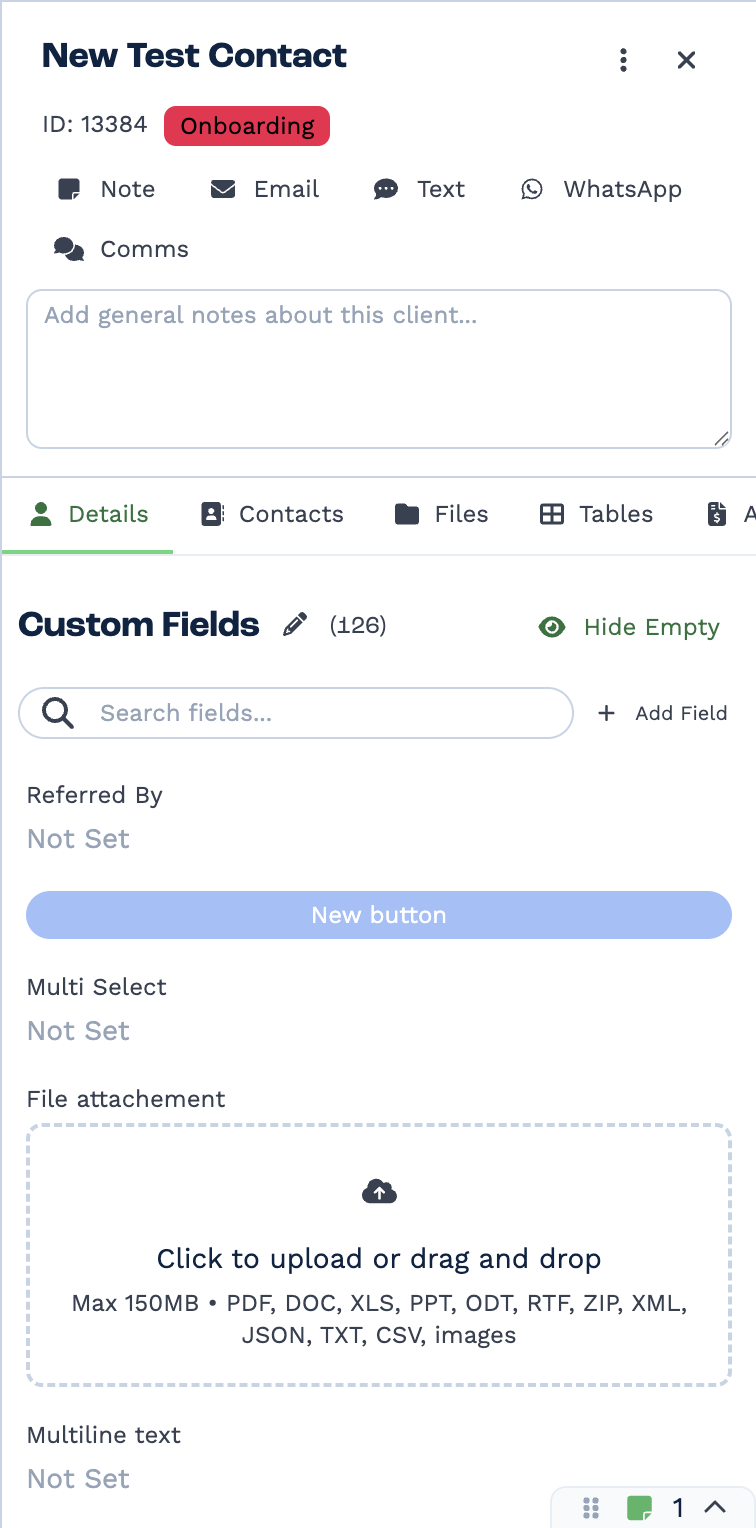
Custom fields are defined per tenant on the client record itself — the pencil edits the set, Add Field creates one. The name you give a field here is the name you reference from a task.
Inputs
Builder fields
The Field column is the label as it appears in the task builder; Key is the name the value is stored under and referenced by.
| Field | Key | Type | Default | Notes |
|---|---|---|---|---|
| Matching Criteria | _rows |
client-match-rows | – |
Every input is a match criterion. Add one row per criterion you want to try. A new task starts
with contact_email and contact_cell_number; the rest you add yourself.
Criteria are evaluated in the order they appear on the task, and evaluation stops at the first one that matches a client. Order is therefore significant: put your most reliable identifier first. A criterion whose value resolves to empty is skipped.
| Key | Type | Required | What it matches |
|---|---|---|---|
contact_email |
string | no | A linked contact's email address. Exact match after sanitising; skipped if the value is not a valid email. |
contact_email_domain |
string | no | The domain part of a linked contact's email — pass a full address, the task takes everything after @. The only non-exact criterion. |
contact_cell_number |
string | no | A linked contact's cell number. Normalised to E.164 first; if the value is not a valid number the task says so in run_text and skips the criterion. |
contact_landline_number |
string | no | A linked contact's landline, normalised the same way. |
company_name |
string | no | The client's company name. Exact. |
client_id |
number | no | BaseCloud's own client ID. |
o_client_id |
string | no | Your external / original client ID, if you store one. |
client_field_id_<id> |
string | no | Any client custom field, by that field's ID — for example client_field_id_42. On a hit, criteria reports Custom Field: 42. |
date_registered |
timestamp | no | The client's registration timestamp, format YYYY-MM-DD HH:MM:SS. Optionally give a ± minutes window in the row's setting; a non-numeric or non-positive window, or a badly formatted timestamp, is reported in run_text and the criterion is skipped. |
Custom field criteria are how you match on your own identifiers
client_field_id_<id> is the general escape hatch — any custom field on the client can be a
match key. The <id> is the custom field's ID from Clients → open a client → Custom Fields.
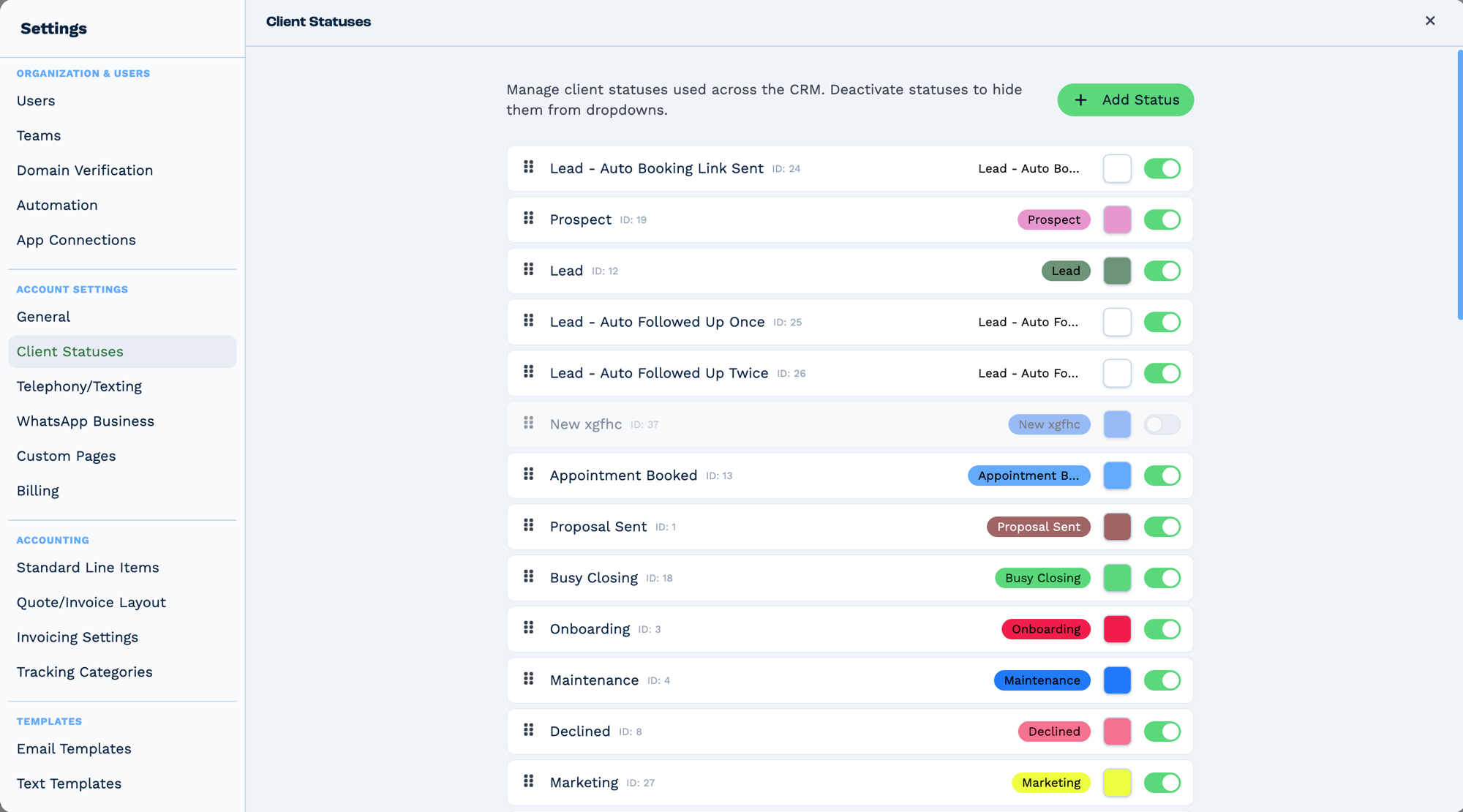
Statuses are defined per tenant in Settings → Client Statuses, so the list differs between accounts — a status that exists in one tenant may not exist in another. Each carries a numeric ID, and that ID is what a task reads and writes; the label is only what people see. Deactivating a status hides it from dropdowns without removing it from records that already hold it.
Outputs
Field names below are exactly as the task emits them. Reference them as
{{task_<ID>_<field>}} — for example {{task_46171_match_client_status_label}}.
Always emitted
| Field | Type | Example | Notes |
|---|---|---|---|
run |
boolean | true |
false when nothing matched. |
run_text |
string | Successfully matched client. |
On failure, No client matched. Also carries per-criterion skip messages and the over-cap warning. |
status |
number | 1 |
1 when a client was matched, 0 when not. |
criteria |
string | contact_email |
Which criterion produced the match. For a custom field, Custom Field: 42. Empty when nothing matched. |
client_matched |
boolean | true |
Whether a client was found. |
metadata |
object | see below | Match counts and the capped match list. |
Emitted only when a client matched
| Field | Type | Example | Notes |
|---|---|---|---|
match_client_id |
number | 10482 |
The matched client's BaseCloud ID. |
match_client_name |
string | Acme Trading |
Company name. |
match_client_o_client_id |
string | CRM-8891 |
Your external ID, empty if unset. |
match_client_origin |
string | Website |
The client's origin — the first_contact field. Returned, not searchable. |
match_client_status_id |
number | 3 |
Status ID. |
match_client_status_label |
string | Active customer |
Human-readable status. Empty if the status row cannot be resolved — the lookup is non-fatal. |
match_client_responsible_manager |
number | 57 |
The responsible user's ID. |
match_client_responsible_manager_name |
string | Thabo Nkosi |
Empty if the user cannot be resolved. Non-fatal by design, so treat empty as "unknown", not "unassigned". |
match_client_responsible_manager_email |
string | thabo@example.com |
Same, empty if unresolved. |
contact_ids |
string | 881,882,883 |
Comma-separated IDs of every contact linked to the client. A string, not an array — split it before looping. |
billing_addressed_to |
string | Accounts Payable |
|
company_address_1 … company_address_5 |
string | 12 Long Street |
The five company address lines. Empty lines are returned as empty strings. |
billing_address_1 … billing_address_5 |
string | PO Box 44 |
The five billing address lines. |
The matched contact, when a client matched
The task also returns one contact belonging to the matched client, under a nested match
object. Flattening joins the names with _, so you reference them as match_contact_*:
| Field | Type | Example | Notes |
|---|---|---|---|
match_contact_id |
number | 881 |
The contact's ID. |
match_contact_name |
string | Thandi |
First name. |
match_contact_surname |
string | Mokoena |
Surname. |
match_contact_email |
string | thandi@acme.co.za |
|
match_contact_cell_number |
string | +27821234567 |
|
match_contact_landline_number |
string | +27123456789 |
Empty string when the contact has none. |
match_client_id (nested twin) |
number | 10482 |
match.client_id, the same value as the top-level field. |
Which contact you get depends on how the client was found. When an email or phone criterion
wins, it is the contact that carried the matching value — the one the workflow was looking for.
When a client-level criterion wins (client_id, o_client_id, company_name,
client_field_id_<id> or date_registered) there is no such contact, so the task returns the
client's first linked contact.
These fields were absent on client-level criteria before 2026-09-23
Until then only the contact criteria emitted them, so a task that changed which criterion won
— including one that changed by itself, because an upstream value started resolving — silently
dropped every match_contact_* reference downstream. Blank WhatsApp template parameters and
empty To addresses were the usual symptom. All criteria now return a contact.
Custom fields, when a client matched
Every client custom field is emitted as a group of fields keyed by the field's ID:
| Field | Type | Notes |
|---|---|---|
custom_field_<id>_id |
number | The stored value's row ID. |
custom_field_<id>_label |
string | The field's label. |
custom_field_<id>_access_level |
number | The field's access level. |
custom_field_<id>_value |
string | The value. |
Two field types add more:
- Attachment fields also emit
custom_field_<id>_value_file_name,_value_urland_value_size. - Multi-client fields also emit
custom_field_<id>_client_ids(comma-separated IDs) andcustom_field_<id>_value_text(the matching company names, comma-separated). If that name lookup fails,_value_textis left empty and the task still succeeds.
metadata
{
  "total_matched": 3,
  "matches": [{ "client_id": 10482 }],
  "warning": "Too many matches found. Please refine your search criteria."
}
| Key | Meaning |
|---|---|
total_matched |
How many clients matched the criterion that hit. Not capped — a true count. |
matches |
The matching rows, capped at 50. A 400-match criterion reports total_matched: 400 and 50 entries here. |
warning |
Present only when total_matched exceeds 50. run_text also gains a warning in that case. |
total_matched above 1 means your criterion is not unique
The task still returns a single client. If total_matched is large, the criterion identified a
group rather than a record — company name and email domain do this often.
Emitted only when the date filter ran
| Field | Type | Notes |
|---|---|---|
date_filter_applied |
boolean | Present when date_registered was used with a minutes window. |
date_filter_minutes |
number | The ± window in minutes that was applied. |
Real-World Examples
Connect a form submission to its client
Form Submission (trigger)
  └─ Match to Client
        contact_email:        {{task_55001_email}}
        contact_cell_number:  {{task_55001_phone}}
  └─ If Statement   run is true
      ├─ true  ─ Email        to {{task_15001_match_client_responsible_manager_email}}
      └─ false ─ New Client   create the record, then continue
Email first, phone as the fallback. The If Statement is what handles "not found", because the match task cannot create.
Route an inbound call to the account manager
Call Connect Trigger
  └─ Match to Client
        contact_cell_number: {{task_50001_caller_number}}
  └─ If Statement   run is true
      └─ Workflow Note
            log against client {{task_15001_match_client_id}}
            assigned to {{task_15001_match_client_responsible_manager}}
Sync from an external system by its own ID
Webhook In (trigger)
  └─ Match to Client
        o_client_id: {{task_29001_customer_id}}
  └─ Edit Client
        client: {{task_15001_match_client_id}}
o_client_id is the right key here: it identifies exactly one client, where an email might match
several contacts at the same company.
Branch on the client's status
Webhook In (trigger)
  └─ Match to Client
        contact_email: {{task_46001_email}}
  └─ If Statement   {{task_15001_match_client_status_label}} equals "Active customer"
      ├─ true  ─ SMS    send the renewal offer
      └─ false ─ Email  send the win-back message
This is how you act on status. The match task returns it; the branching happens in an If Statement afterwards, because status cannot be a match criterion.
Look up by your own membership number
Where 42 is the custom field's ID from Clients → open a client → Custom Fields.
Handling several matches
A criterion can match many clients. The task still returns one, and tells you how many it saw.
| Signal | Meaning |
|---|---|
metadata.total_matched = 1 |
The criterion identified exactly one client. This is what you want. |
metadata.total_matched > 1 |
The criterion identifies a group. You get one of them, and which one is not something you control. |
metadata.total_matched > 50 |
metadata.matches is capped at 50 entries and metadata.warning is set. total_matched is still the true count. |
To make a match unique, use a more specific criterion — email or an ID rather than a domain or a company name. Adding more criteria does not narrow a match: they are alternatives, and an earlier one that hits stops the rest from ever running.
If what you actually need is every client matching a condition, this is the wrong task — see What this task cannot do.
Best Practices
- Put your most reliable criterion first. Evaluation stops at the first hit, so order is the main thing you control.
- Prefer identifiers over names. Email,
client_idando_client_ididentify one record. Company name and email domain frequently identify several. - Normalise before matching. Run a Phone Formatter on numbers and a Formatter on text so the value you match on is consistent.
- Check
runbefore using the output. On no match, everymatch_client_*field is absent, not empty — a downstream task referencing them gets nothing. - Treat an empty
match_client_status_labelor..._manager_nameas "unknown". Those lookups are non-fatal and leave the field empty rather than failing the task. - Split
contact_idsbefore looping. It is a comma-separated string, not an array. - Watch
metadata.total_matched. A value above 1 is the early warning that your criterion is not unique.
Troubleshooting
| Symptom | Cause and fix |
|---|---|
No client matched. |
No criterion hit. Check each value actually resolved — an unresolved {{variable}} becomes empty and is skipped. |
| A custom field criterion never matches | The value still contains { or }, so it was rejected. Fix the upstream variable. |
Cell number "…" is not a valid phone number format. in run_text |
The value could not be parsed as a phone number, so that criterion was skipped. Normalise it with Phone Formatter first. |
Invalid timestamp format "…" in run_text |
date_registered needs YYYY-MM-DD HH:MM:SS. |
Invalid time range "…" in run_text |
The ± window must be a positive number of minutes. |
| The wrong client comes back | The criterion matched several clients — check metadata.total_matched. Use a more specific criterion; adding more criteria will not help, because the first hit wins. |
Warning: N clients matched this criteria |
More than 50 matched. metadata.matches is capped; total_matched is accurate. Narrow the criterion. |
| Status or manager name is empty on a successful match | Those resolutions are non-fatal. The IDs (match_client_status_id, match_client_responsible_manager) are still populated. |
| Expected a client to be created | This task never creates. Add a New Client task on the false branch of an If Statement. |
Frequently Asked Questions
Does this task create a client if none matches? No. It has no create path. Follow it with New Client on the false branch of an If Statement.
Can I match on Origin, status or deal stage? No. Those come back in the output for the client that was found, but they cannot be searched on. See What this task cannot do.
Can I require two criteria to match at once? No. Criteria are alternatives and the first hit wins. To require a second condition, follow the task with an If Statement testing one of the returned fields.
Can I get all clients that match, rather than one? No. Use a MySQL Query task, or the API.
Does it match contacts or clients?
It matches clients, sometimes by looking through their linked contacts. The output describes the
client; contact_ids lists that client's contacts.
Is matching case-sensitive? Email is sanitised before matching. Company name is an exact match — treat it as unreliable for anything but data you control.
What happens to criteria after the first hit? They never run. That is why ordering matters and why a later, more specific criterion cannot correct an earlier, looser one.
Related Tasks
- Get Contact - Retrieve contact by ID
- New Client - Create contact without searching
- Edit Client - Update contact fields
- If Task - Conditional logic based on match results
- Loop Task - Batch contact matching