Payment received: thank you and update
Marking an invoice paid is usually followed by three small jobs: thank the client, update their status, tell accounts. This workflow does all three.

Before you start
- Invoices created in BaseCloud
- A client status for paid clients
The workflow
| Step | Task | Type | What it does |
|---|---|---|---|
| 1 | Invoice paid | CRM Trigger | Starts when an invoice is marked as paid |
| 2 | Fetch invoice | Accounting | Fetches the invoice for its number, total and link |
| 3 | Thank-you email | Thanks the client and sends a copy | |
| 4 | Move to Paid | Edit a Client | Moves the client to Paid |
| 5 | Accounts log | Workflow Note | Records it for accounts, already marked done |
About the variables
Values such as {{task_36445_…}} carry the number of the task they come from, so yours will
differ. Do not type them: click into a field and pick the value from an earlier task.
1. Invoice paid
Task: CRM Trigger. Starts when an invoice is marked as paid.
| Field | Set it to |
|---|---|
| Trigger Type | Quote / Invoice Change |
| Target Field | Quote/Invoice Marked as paid |
2. Fetch invoice
Task: Accounting. Fetches the invoice for its number, total and link.
| Field | Set it to |
|---|---|
| Action | Fetch Quote / Invoice |
| Quote / Invoice ID | {{task_36445_inv_id}} |
3. Thank-you email
Task: Email. Thanks the client and sends a copy.
| Field | Set it to |
|---|---|
| Outgoing Email User | Wendy Darling |
| Client | {{task_36445_client_id}} |
| To | {{all_contacts}} |
| Subject | Payment received, thank you |
Body
Hi,
We have received your payment of ${{task_36446_quote_invoice_total}} for invoice {{task_36446_quote_invoice_o_id_full}}. Thank you.
A copy for your records: {{task_36446_document_url}}
Kind regards,
Accounts
4. Move to Paid
Task: Edit a Client. Moves the client to Paid.
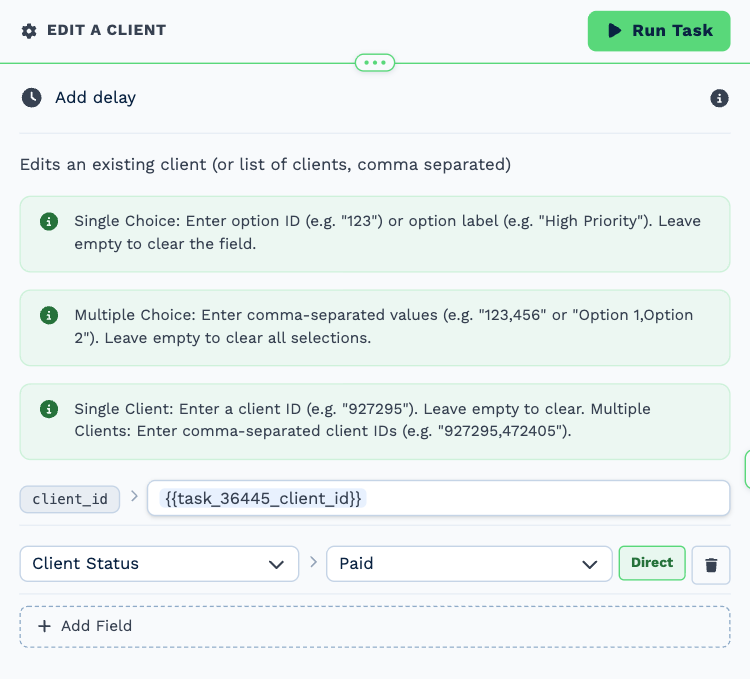
| Field | Set it to |
|---|---|
| Client | {{task_36445_client_id}} |
| Client Status | Paid |
5. Accounts log
Task: Workflow Note. Records it for accounts, already marked done.
| Field | Set it to |
|---|---|
| Action | Create Note |
| Client ID | {{task_36445_client_id}} |
| Note Type | Note |
| Priority | Low |
| Due Date | Now |
| Tag Users | Tiger Lily |
| Mark above users as | Done |
Message
Invoice {{task_36446_quote_invoice_o_id_full}} paid (${{task_36446_quote_invoice_total}}). Thank-you email sent and status moved to Paid.
Make it yours
- Add a review request a few days later.
- Skip the status change for clients on a maintenance plan with an If Statement.