New lead: reply fast and follow up
Every business has this one. An enquiry comes in, and the first hour decides whether it becomes a customer. This workflow replies at once, puts the lead in front of sales, and checks two days later that somebody actually moved it on.

Before you start
- A website form that posts to BaseCloud
The workflow
| Step | Task | Type | What it does |
|---|---|---|---|
| 1 | Contact form | Website Form | Starts when the contact form is submitted |
| 2 | Create the lead | Create New client | Creates the client and contact, or reuses a known client |
| 3 | Instant reply | Sends an instant, honest reply | |
| 4 | Note for sales | Workflow Note | Puts the enquiry in the sales Inbox |
| 5 | Wait 2 days | Delay | Waits two working days |
| 6 | Check status | Match to Client(s) | Reads the client’s status as it is now |
| 7 | Still new? | If Statement | Continues only if the client is still a New Lead |
| 8 | Nudge manager | Workflow Note | Tells the manager the lead has not moved |
About the variables
Values such as {{task_36437_…}} carry the number of the task they come from, so yours will
differ. Do not type them: click into a field and pick the value from an earlier task.
1. Contact form
Task: Website Form. Starts when the contact form is submitted.
This task has no settings to fill in.
2. Create the lead
Task: Create New client. Creates the client and contact, or reuses a known client.
| Field | Set it to |
|---|---|
| Match Before Creating | Contact email = {{task_36437_email}} |
| Client Status | New Lead |
| Responsible Manager | Wendy Darling |
| Client Name | {{task_36437_name}} |
| Contact First Name | {{task_36437_name}} |
| Contact Email | {{task_36437_email}} |
| Contact Cell Number | {{task_36437_phone}} |
3. Instant reply
Task: Email. Sends an instant, honest reply.
| Field | Set it to |
|---|---|
| Outgoing Email User | Wendy Darling |
| Client | {{task_36438_match_client_id}} |
| To | {{task_36437_email}} |
| Subject | Thanks for getting in touch |
Body
Hi {{task_36437_name}},
Thanks for your message. A real person will reply within two working hours.
If it is urgent, call us and mention your enquiry.
Kind regards,
The Neverland team
4. Note for sales
Task: Workflow Note. Puts the enquiry in the sales Inbox.
| Field | Set it to |
|---|---|
| Action | Create Note |
| Client ID | {{task_36438_match_client_id}} |
| Note Type | Note |
| Priority | High |
| Due Date | Now |
| Tag Users | Peter Pan |
Message
New website enquiry
{{task_36437_message}}
Call or email back within two working hours.
5. Wait 2 days
Task: Delay. Waits two working days.
| Field | Set it to |
|---|---|
| Delay Type | Specified Time |
| Days | 2 |
6. Check status
Task: Match to Client(s). Reads the client’s status as it is now.
| Field | Set it to |
|---|---|
| Action | Match to Client |
| Find the client by | Client ID = {{task_36438_match_client_id}} |
7. Still new?
Task: If Statement. Continues only if the client is still a New Lead.
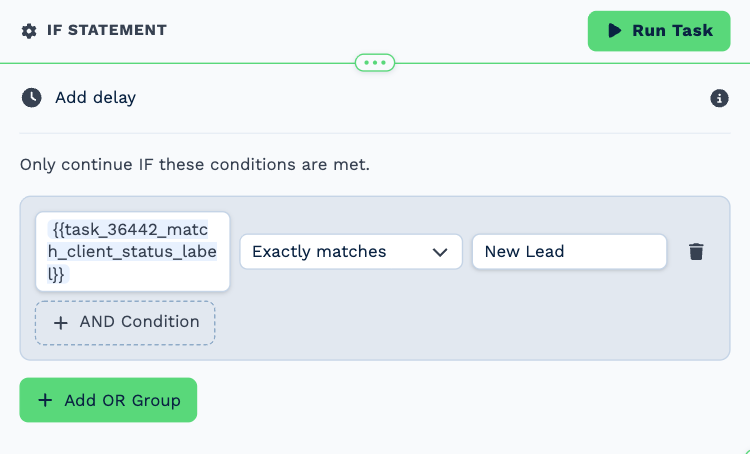
| Field | Set it to |
|---|---|
| Condition | {{task_36442_match_client_status_label}} exactly matches New Lead |
8. Nudge manager
Task: Workflow Note. Tells the manager the lead has not moved.
| Field | Set it to |
|---|---|
| Action | Create Note |
| Client ID | {{task_36438_match_client_id}} |
| Note Type | Note |
| Priority | High |
| Due Date | Now |
| Tag Users | Wendy Darling |
| Message | This lead came in two days ago and is still a **New Lead**. Has anyone spoken to them? |
Make it yours
- Replace the single salesperson with a Round Robin Select task.
- Add a text to the lead alongside the email.