Grain Trigger
Overview
The Grain Trigger starts a workflow each time Grain records a meeting. Grain joins your Zoom, Google Meet and Microsoft Teams calls, records them and writes AI notes. This trigger brings each new recording into BaseCloud a few moments after Grain adds it, with:
- the title, the link to the recording, when it started and how long it lasted,
- who recorded it and who was in it, and which of them are from outside your company,
- Grain’s AI summary and action items, and
- the client the meeting was with, when BaseCloud can tell.
Each recording starts the workflow once.
When to use this trigger:
- File a summary of every sales call on the right client, without anyone writing it up.
- Turn Grain’s action items into workflow notes for your team.
- Draft a follow-up email for the salesperson straight after a discovery call.
- Move a client to the next status once the first meeting has happened.
- Tag recordings in Grain by what BaseCloud knows about the client.
flowchart TD
    A[Grain records a meeting] --> B[Trigger starts the workflow]
    B --> C[Wait a few minutes for Grain's notes]
    C --> D[Read the recording again with the Grain task]
    D --> E[AI writes the summary and next steps]
    E --> F[Note on the client]
Connecting Grain
The trigger reads your recordings through a Grain connection. Add one from the Grain account field on the trigger by choosing + New Connection, or under Settings → App Connections. See App connections.
- In Grain, open Settings › Integrations › API and create an access token. Copy it.
- In BaseCloud, choose Grain, give the connection a name, paste the token into Grain access token and save.
BaseCloud checks the token with Grain when you save. A token Grain does not accept is refused straight away, so you know before any workflow relies on it.
Which token to use:
| Token | Whose recordings the trigger sees |
|---|---|
| Workspace token | Everyone’s recordings in your Grain workspace. Only Grain admins can create one, on Grain plans that include the Workspace API. |
| Personal token | Only the recordings the person who created it can see in Grain. |
Grain’s Free plan does not include API access, so you need a paid Grain plan to connect.
When the connection is saved, BaseCloud asks Grain to tell it about each new recording. Deleting the connection stops that again.
Configuration
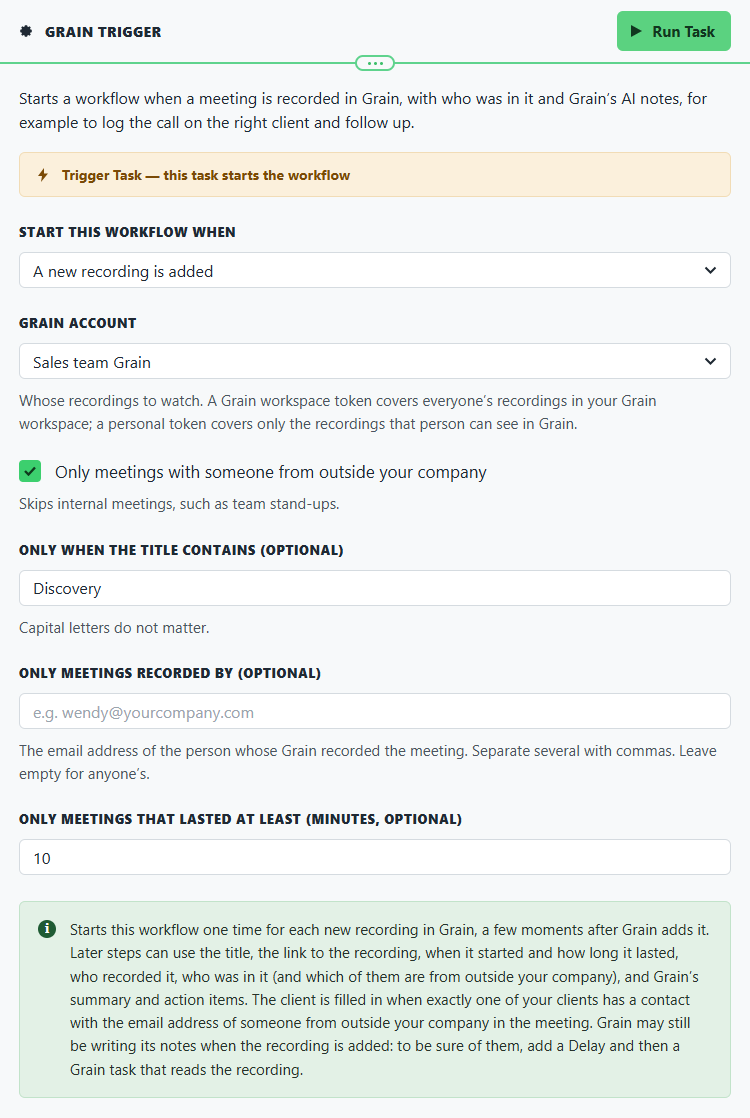
Builder fields
The Field column is the label as it appears in the task builder; Key is the name the value is stored under and referenced by.
| Field | Key | Type | Default | Notes |
|---|---|---|---|---|
| Start this workflow when | trigger_event |
select | recording_added |
Options: A new recording is added |
| Grain account | app_connection_id |
app-connection | – | |
| Only meetings with someone from outside your company | external_only |
checkbox | 0 |
|
| Only when the title contains (optional) | title_contains |
text | – | |
| Only meetings recorded by (optional) | recorder_emails |
text | – | |
| Only meetings that lasted at least (minutes, optional) | min_minutes |
number | – |
Choose the Grain connection to watch under Grain account. Every other setting is optional and narrows which recordings start the workflow:
- Only meetings with someone from outside your company skips internal meetings such as team stand-ups. Grain decides who is from outside your company.
- Only when the title contains checks the meeting’s title; capital letters do not matter.
- Only meetings recorded by takes the email address of the person whose Grain recorded the meeting. Separate several with commas.
- Only meetings that lasted at least skips short recordings, such as a call that never really started.
How it behaves
- It starts a few moments after Grain adds the recording. Grain tells BaseCloud about each new recording as it happens; there is nothing to wait for on BaseCloud’s side.
- Each recording starts the workflow once. If you have two Grain connections that can both see a meeting, for example two salespeople who each connected their own Grain, a workflow on each connection starts for it.
- The client is filled in only when it is clear. BaseCloud looks for a contact whose email address belongs to someone from outside your company in the meeting. When exactly one client has such a contact, that client is filled in. When none or several do, the client fields are left empty, so a meeting is never filed on the wrong client.
- Grain may still be writing its notes. Grain writes the summary and action items after the meeting, and they can still be empty when the recording is first added. To be sure of them, add a Delay of a few minutes and then a Grain task set to Read a recording. It gives the same details with Grain’s latest notes, and the transcript.
- Nothing from before the connection was made is picked up. Only recordings Grain adds after you connect start the workflow.
Output Fields
The recording
| Field | Description |
|---|---|
recording_id |
The recording’s identifier in Grain. The Grain task uses it to find the recording again. |
title |
The meeting’s title, for example Discovery call: Neverland Home. |
url |
The link to the recording in Grain. |
start_datetime |
When the recording started. |
end_datetime |
When it ended. |
duration_minutes |
How long it lasted, in minutes, for example 32.5. |
duration_seconds |
How long it lasted, in seconds. |
scheduled_start |
When the meeting was booked to start, when it came from a calendar invitation. |
source |
Where Grain recorded it, for example zoom. |
media_type |
The kind of recording, for example video. |
thumbnail_url |
A still picture from the recording, when there is one. |
meeting_type |
The meeting type Grain gave it, for example Sales call. |
tags |
The recording’s tags in Grain, separated by commas. |
teams |
The Grain teams it belongs to, separated by commas. |
Who recorded it and who was in it
| Field | Description |
|---|---|
recorder_name |
The name of the person whose Grain recorded the meeting. |
recorder_email |
Their email address. |
recorder_emails |
Everyone who recorded it, separated by commas, when more than one person did. |
participants |
Everyone in the meeting, as a list. Each has a name, an email and a scope: internal for your own company, external for someone from outside it, or unknown. |
participant_count |
How many people were in the meeting. |
participant_names |
Everyone’s names, separated by commas. |
participant_emails |
Everyone’s email addresses, separated by commas. |
has_external_participants |
true when someone from outside your company was in the meeting. |
external_participant_names |
The names of the people from outside your company. |
external_participant_emails |
Their email addresses. |
first_external_name |
The first person from outside your company. Handy for a greeting. |
first_external_email |
The first email address of someone from outside your company. |
Grain’s AI notes
| Field | Description |
|---|---|
summary |
Grain’s summary of the meeting. Can be empty when the recording is first added. |
action_items |
Grain’s action items, as a list. Each has its text, a status and the assignee’s name. |
action_items_text |
The action items as ready-to-use lines, one per item, with who it is for in brackets. |
The client
| Field | Description |
|---|---|
client_id |
The client the meeting was with, or empty. |
client_name |
That client’s name. |
client_matched |
true when a client was filled in, false when it was not. |
The connection
| Field | Description |
|---|---|
app_connection_id |
The Grain connection the recording came from. |
grain_user_id |
The Grain user the recording was announced for. |
trigger_event |
recording_added. |
trigger_label |
New recording. |
{{task_ID_run_text}} |
Grain trigger executed successfully. |
Times are in UTC.
Testing
In the trigger’s Input panel, select Load my recordings to bring in your latest recordings from Grain that match the trigger’s settings. Pick one and run the rest of the workflow on it.
Load my recordings also checks that Grain is set to tell BaseCloud about new recordings, and sets that up again if it is not. If it cannot, the message says why.
You can also add a test record by hand. With nothing pasted in, BaseCloud fills in a made-up sales call (Wendy Darling talking to Peter Pan) so you can map the fields of later steps before your first real recording.
Running later steps by hand does the real thing. If a step writes on a client or sends an email, test with a client you are happy to change.
Real-World Examples
File every sales call on the client
Grain Trigger                 only meetings with someone from outside the company
  └─ Delay                    15 minutes, so Grain can finish its notes
      └─ Grain                Read a recording, with the transcript
          └─ If Statement     client_matched equals true
              └─ AI Prompt    summarise the call and list next steps
                  └─ Workflow Note   on client_id, with the link to the recording
The Grain meeting follow-up example sets this up step by step.
Draft the follow-up email for the salesperson
Grain Trigger                 title contains "Discovery"
  └─ Delay                    15 minutes
      └─ Grain                Read a recording, with the transcript
          └─ AI Prompt        draft a follow-up email to first_external_name
              └─ Email        send the draft to recorder_email to check and send
Send the draft to the salesperson, not to the customer. They know what was said in the room.
Mark recordings of meetings with existing clients
Grain Trigger                 only meetings with someone from outside the company
  └─ If Statement             client_matched equals true
      └─ Grain                Add a tag: customer
Best Practices
- Use a workspace token if you can. One connection then covers the whole team’s meetings. With personal tokens, each salesperson connects their own Grain.
- Wait for Grain’s notes. Read the recording again after a short Delay
rather than relying on
summaryandaction_itemsfrom the trigger itself. - Check
client_matchedbefore writing on a client. Send meetings without a client to a person, or let them pass. - Keep your clients’ contacts up to date. The client is found from the email addresses of the people in the meeting, so a contact without an email address cannot be matched.
- Skip what you do not need. Only meetings with someone from outside your company and a minimum length keep internal meetings and false starts out of your clients’ history.
Troubleshooting
| What you see | What to do |
|---|---|
| Saving the connection says Grain did not accept the access token | Copy the token again from Settings › Integrations › API in Grain. If it was deleted there, create a new one and paste that. |
| A new recording did not start the workflow | Check the workflow is switched on and the recording passes the trigger’s settings. Then open the trigger’s Input panel and select Load my recordings: it sets Grain up again to tell BaseCloud about new recordings, or says why it cannot. |
| Load my recordings says no recent recordings match | None of your latest recordings passes the trigger’s settings. Loosen them, or record a meeting first. |
| A recording you expected is missing | A personal token only sees the recordings its own Grain user can see. Use a workspace token, or connect that person’s Grain too. |
summary or action_items is empty |
Grain had not finished its notes yet. Add a Delay and a Grain task set to Read a recording. |
| The client is empty | No client has a contact with the email address of someone from outside your company in the meeting, or more than one client does. Check the contacts’ email addresses. |
| Grain says it is busy | Grain limits how many requests it takes at once. Try again in a minute; a workflow step waits and tries again by itself. |
Related
- Grain: read, tag or rename a recording from a workflow.
- Grain meeting follow-up: a complete workflow to copy.
- App connections