Code Task
Overview
The Code Task executes custom JavaScript code within your workflow. Use it for complex calculations, data transformations, conditional logic, and operations that aren't available in standard tasks.
When to use this task:
- Complex mathematical calculations
- Advanced data transformation and parsing
- Custom business logic implementation
- JSON manipulation and restructuring
- String processing and formatting
- Array operations and filtering
- Date/time calculations
- API response processing
Key Features:
- Full JavaScript ES6+ support
- Access to all workflow variables
- Return multiple output fields
- NPM libraries available
- Timeout protection
- Error handling and debugging
- Synchronous execution
Outputs
Your script's returned object is merged into the output, so every key you return becomes a field. The fields below are always present in addition to those.
Reference fields as {{task_<ID>_<field>}}.
| Field | Type | Notes |
|---|---|---|
task_id |
string | This task's own ID. |
isolated |
boolean | Always true — the script ran in an isolated context. |
Always emitted
| Field | Type | Notes |
|---|---|---|
run |
boolean | Whether the task succeeded. |
run_text |
string | What happened, including the reason on failure. |
Quick Start
Builder fields
The Field column is the label as it appears in the task builder; Key is the name the value is stored under and referenced by.
| Field | Key | Type | Default | Notes |
|---|---|---|---|---|
| Code Language | action |
select | javascript |
Options: Custom Javascript · Custom Python |
| Code Editor | Code |
monospace | – |
- Add Code task to workflow
- Write JavaScript code
- Access workflow data via
inputobject - Return results via
returnstatement - Test execution
- Save
Simple Example:
// Calculate discount
const total = parseFloat(input.task_46001_order_total);
const discount = total > 100 ? total * 0.1 : 0;

return {
  discount_amount: discount,
  final_total: total - discount,
};
Accessing Workflow Data
The input Object
All workflow variables are available in the input object:
Syntax:
Example:
// From Match to Client task (ID: 15001)
const email = input.task_15001_email;
const firstName = input.task_15001_first_name;
const contactId = input.task_15001_contact_id;

// From Webhook In task (ID: 46001)
const orderTotal = parseFloat(input.task_46001_total);
const items = JSON.parse(input.task_46001_items || '[]');
Type Conversion
Workflow variables come as strings. Convert as needed:
Numbers:
const age = parseInt(input.task_15001_age);
const price = parseFloat(input.task_46001_price);
const quantity = Number(input.task_46001_quantity);
Booleans:
const isVIP = input.task_15001_is_vip === 'true';
const hasDiscount = Boolean(input.task_46001_discount_code);
Dates:
JSON:
const metadata = JSON.parse(input.task_46001_metadata || '{}');
const items = JSON.parse(input.task_46001_items || '[]');
Handling Missing Data
Always handle potentially undefined values:
// Safe access with defaults
const phone = input.task_15001_phone || '';
const score = parseInt(input.task_15001_score) || 0;
const tags = input.task_15001_tags || 'Unknown';

// Check before using
if (input.task_15001_email) {
  const email = input.task_15001_email.toLowerCase();
}

// Optional chaining (ES2020)
const value = input.task_15001?.custom_field ?? 'default';
Returning Data
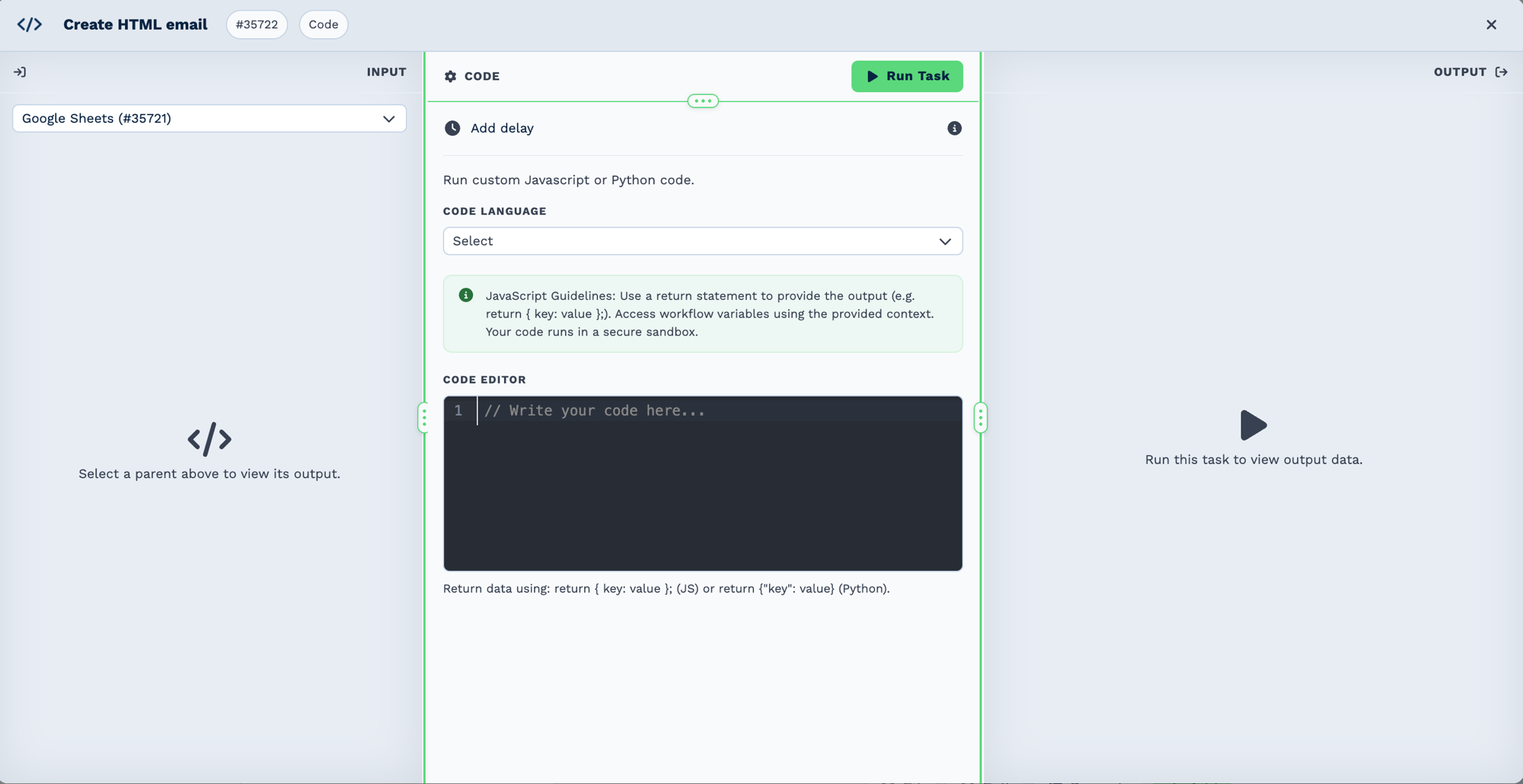
Whatever you return becomes the task's output, and each key becomes a field later tasks can reference. Return nothing and the task produces nothing to work with.
Return Object
Return an object with your output fields:
Example:
return {
  calculated_total: 150.5,
  is_eligible: true,
  status_message: 'Approved',
  processed_date: new Date().toISOString(),
};
Access in next task:
Multiple Return Values
Return as many fields as needed:
const subtotal = 100;
const tax = subtotal * 0.15;
const shipping = 10;
const total = subtotal + tax + shipping;

return {
  subtotal: subtotal,
  tax: tax,
  tax_rate: 0.15,
  shipping: shipping,
  total: total,
  currency: 'ZAR',
};
Return Arrays
const emails = ['john@example.com', 'jane@example.com'];

return {
  email_list: JSON.stringify(emails),
  count: emails.length,
};
Note: Stringify arrays/objects for return.
Return Early
Exit function early based on conditions:
// Validation check
if (!input.task_15001_email) {
  return {
    error: true,
    message: 'Email required',
  };
}

// Continue with normal logic
const email = input.task_15001_email.toLowerCase();
return {
  email: email,
  domain: email.split('@')[1],
};
Common Operations
String Manipulation
const name = input.task_15001_name;

return {
  uppercase: name.toUpperCase(),
  lowercase: name.toLowerCase(),
  title_case: name.replace(/\b\w/g, l => l.toUpperCase()),
  initials: name
    .split(' ')
    .map(n => n[0])
    .join(''),
  length: name.length,
  first_word: name.split(' ')[0],
};
Array Operations
const items = JSON.parse(input.task_46001_items);

return {
  total_items: items.length,
  first_item: items[0],
  last_item: items[items.length - 1],
  item_names: items.map(i => i.name).join(', '),
  total_price: items.reduce((sum, i) => sum + i.price, 0),
  expensive_items: items.filter(i => i.price > 50).length,
};
Date Calculations
const orderDate = new Date(input.task_46001_order_date);
const today = new Date();
const daysSince = Math.floor((today - orderDate) / (1000 * 60 * 60 * 24));

return {
  order_date: orderDate.toISOString(),
  days_since_order: daysSince,
  is_recent: daysSince <= 7,
  formatted_date: orderDate.toLocaleDateString('en-ZA'),
};
Mathematical Calculations
const quantity = parseInt(input.task_46001_quantity);
const price = parseFloat(input.task_46001_price);
const discount = parseFloat(input.task_46001_discount) || 0;

const subtotal = quantity * price;
const discountAmount = subtotal * (discount / 100);
const tax = (subtotal - discountAmount) * 0.15;
const total = subtotal - discountAmount + tax;

return {
  quantity: quantity,
  unit_price: price.toFixed(2),
  subtotal: subtotal.toFixed(2),
  discount_percent: discount,
  discount_amount: discountAmount.toFixed(2),
  tax: tax.toFixed(2),
  total: total.toFixed(2),
};
Conditional Logic
const score = parseInt(input.task_15001_lead_score);
const status = input.task_15001_status;
const tags = input.task_15001_tags || '';

let rating, priority;

if (score >= 80) {
  rating = 'Hot';
  priority = 1;
} else if (score >= 50) {
  rating = 'Warm';
  priority = 2;
} else {
  rating = 'Cold';
  priority = 3;
}

const isVIP = tags.includes('VIP') || tags.includes('Premium');
const needsFollowUp = rating === 'Hot' || isVIP;

return {
  lead_rating: rating,
  priority: priority,
  is_vip: isVIP,
  needs_followup: needsFollowUp,
  recommended_action: needsFollowUp ? 'Call immediately' : 'Email follow-up',
};
JSON Processing
const rawData = JSON.parse(input.task_46001_webhook_data);

// Extract nested fields
const customerId = rawData.customer?.id || 'unknown';
const items = rawData.order?.items || [];
const shipping = rawData.order?.shipping?.address || {};

// Transform structure
const simplified = {
  customer_id: customerId,
  customer_email: rawData.customer?.email,
  order_total: items.reduce((sum, item) => sum + item.price * item.quantity, 0),
  item_count: items.length,
  shipping_city: shipping.city,
  shipping_country: shipping.country,
};

return simplified;
Real-World Examples
Work out something no other task covers
Whatever your script returns becomes fields on the task, so returning
{ score: 42, tier: 'gold' } gives you {{task_42001_score}} and {{task_42001_tier}}.
Reshape an awkward payload
Webhook In
  └─ Code           flatten the nested items array into one list
      └─ Loop       over the returned array, action: array
Parse something a formatter cannot
Email Trigger
  └─ Code       pull the fields out of the message body
      └─ New Client   create the record from the returned values
Reach for a standard task first
Text Formatter, Regex, Math Formula and Merge Data cover most of what scripts get used for, and they are easier to change later.
Available Libraries
Standard JavaScript
Full ES6+ support:
- Array methods (map, filter, reduce, etc.)
- Object methods (keys, values, entries, etc.)
- String methods (split, replace, trim, etc.)
- Math functions
- Date operations
- JSON parse/stringify
- Regular expressions
Lodash
Utility library available as _:
const _ = require('lodash');

const items = JSON.parse(input.task_46001_items);

return {
  unique_tags: _.uniq(items.map(i => i.tag)),
  grouped: _.groupBy(items, 'category'),
  max_price: _.maxBy(items, 'price')?.price || 0,
  chunk_size: _.chunk(items, 10).length,
};
Moment.js
Date manipulation (use built-in Date when possible):
const moment = require('moment');

const date = moment(input.task_46001_date);

return {
  formatted: date.format('YYYY-MM-DD'),
  from_now: date.fromNow(),
  is_past: date.isBefore(moment()),
  day_of_week: date.format('dddd'),
};
Best Practices
Performance
- Keep code simple - Complex operations slow workflow
- Avoid large loops - Process in batches if needed
- Cache calculations - Don't recalculate same values
- Use built-in methods - Faster than custom implementations
- Limit external library use - Adds overhead
Error Handling
- Try-catch blocks - Handle JSON parsing errors
try {
  const data = JSON.parse(input.task_x_field);
} catch (e) {
  return { error: true, message: e.message };
}
- Validate inputs - Check for undefined/null
- Return error flags - Indicate failure in output
- Provide error messages - Help debug issues
- Set defaults - Use fallback values
Code Quality
- Comment complex logic - Explain why, not what
- Use descriptive names -
leadScorenotls - Keep functions focused - One task per Code task
- Format consistently - Readable code is maintainable
- Test thoroughly - Verify edge cases
Security
- Sanitize input - Don't trust external data
- Avoid eval() - Never use eval() or Function()
- Limit scope - Only access needed data
- Don't log sensitive data - Avoid console.log of passwords/keys
- Validate outputs - Ensure safe data types
Troubleshooting
Code Not Executing
Check:
- Syntax errors in code?
- Missing return statement?
- Timeout exceeded? (max 30 seconds)
- Task enabled in workflow?
View execution history for error details
Undefined Values
Error: Cannot read property 'X' of undefined
Causes:
- Input field doesn't exist
- Previous task didn't run
- Typo in field name
Solution:
Type Errors
Error: NaN or incorrect calculations
Cause: Didn't convert string to number
Solution:
Return Not Working
Check:
- Return statement exists?
- Returning object (not array/string directly)?
- No code after return?
// ✓ Correct
return { field: value };

// ✗ Wrong
return value; // Must be object
return [1, 2, 3]; // Must be object
Frequently Asked Questions
Can I make API calls from Code task?
No, Code task runs synchronously. Use Webhook Out task for API calls, then Code task to process response.
What's the timeout?
30 seconds maximum execution time.
Can I use async/await?
No, Code task is synchronous only.
Can I access previous Code task outputs?
Yes: input.task_42001_output_field
Can I import NPM packages?
Limited selection available (lodash, moment). Contact support for additional libraries.
How do I debug?
- View execution history
- Check error messages
- Add intermediate return values
- Test code in browser console first
Can I modify workflow variables?
No, you can only read inputs and return new outputs.
Related Tasks
- Variable Task - Store Code task results
- If Task - Conditional logic (simpler alternative)
- Loop Task - Process arrays from Code task
- MySQL Query - Database operations alternative
- Webhook Out - External API calls before Code task