Grain Task
Overview
The Grain task works on one meeting recording in Grain. It is the companion to the Grain Trigger: the trigger tells you a meeting was recorded, this task reads it again or changes it.
| What to do | What it does |
|---|---|
| Read a recording | Gives later steps the recording’s details, who was in it, the client it was with, Grain’s latest AI summary and action items, and the transcript. |
| Add a tag | Adds a tag to the recording in Grain. |
| Remove a tag | Takes a tag off the recording in Grain. |
| Rename a recording | Gives the recording a new title in Grain. |
When to use this task:
- Read Grain’s notes a few minutes after the meeting, once Grain has finished writing them.
- Hand the transcript to an AI Prompt to summarise the call or draft a follow-up.
- Tag recordings by what BaseCloud knows, such as
customer,trialor the client’s status. - Rename a recording after the client, so it is easy to find in Grain.
Configuration
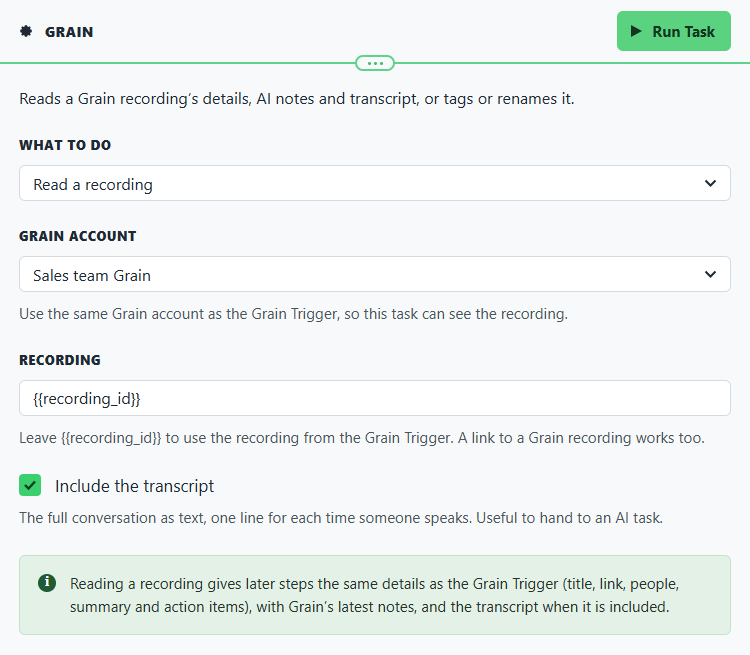
Builder fields
The Field column is the label as it appears in the task builder; Key is the name the value is stored under and referenced by.
| Field | Key | Type | Default | Notes |
|---|---|---|---|---|
| What to do | action |
select | get_recording |
Options: Read a recording · Add a tag · Remove a tag · Rename a recording |
| Grain account | app_connection_id |
app-connection | – | |
| Recording | recording_id |
text | {{recording_id}} |
|
| Include the transcript | include_transcript |
checkbox | 1 |
Only shown when action is get_recording |
| Tag | tag |
text | – | Only shown when action is add_tag, remove_tag |
| New title | title |
text | – | Only shown when action is rename_recording |
- Grain account: use the same Grain connection as the Grain Trigger, so the task can see the recording. A personal token only sees the recordings its own Grain user can see. See Connecting Grain.
- Recording: leave
{{recording_id}}to use the recording from the Grain Trigger. You can also pick the recording ID from an earlier step, or paste a link to a Grain recording. - Include the transcript: the whole conversation as text, one line each time someone speaks,
such as
Peter Pan: We need it before the next quarter.Useful to hand to an AI task. Leave it ticked unless you only need the notes. - Tag: letters, numbers and dashes. Spaces become dashes, so
follow upis saved asfollow-up. A#at the start is dropped. - New title: the recording’s new name. You can build it from earlier steps, for example
Discovery call: {{task_ID_client_name}}.
Output Fields
Read a recording
Reading a recording gives the same fields as the Grain Trigger, with Grain’s latest notes:
| Field | Description |
|---|---|
recording_id |
The recording that was read. |
title, url, start_datetime, end_datetime, duration_minutes, duration_seconds |
The recording’s title, link, times and length. |
recorder_name, recorder_email |
Who recorded it. |
participants, participant_names, participant_emails |
Who was in it. |
has_external_participants, external_participant_names, external_participant_emails, first_external_name, first_external_email |
Who was from outside your company. |
summary |
Grain’s summary of the meeting. |
action_items, action_items_text |
Grain’s action items, as a list and as ready-to-use lines. |
client_id, client_name, client_matched |
The client the meeting was with, found the same way as on the trigger. |
transcript |
The whole conversation as Speaker: words lines. Only when Include the transcript is ticked. |
{{task_ID_run_text}} |
Grain recording read successfully. |
Add or remove a tag
| Field | Description |
|---|---|
recording_id |
The recording that was tagged. |
tag |
The tag as Grain saved it, for example follow-up. |
{{task_ID_run_text}} |
Grain tag added successfully. or Grain tag removed successfully. |
Rename a recording
| Field | Description |
|---|---|
recording_id |
The recording that was renamed. |
title |
Its new title. |
{{task_ID_run_text}} |
Grain recording renamed successfully. |
Real-World Examples
Summarise the call once Grain has finished its notes
Grain Trigger                 only meetings with someone from outside the company
  └─ Delay                    15 minutes
      └─ Grain                Read a recording, with the transcript
          └─ AI Prompt        summarise transcript and list next steps
              └─ Workflow Note   on client_id
See Grain meeting follow-up for every setting.
Tag meetings with existing customers
Name recordings after the client
Grain Trigger
  └─ If Statement             client_matched equals true
      └─ Grain                Rename a recording: "{{task_ID_client_name}}: {{task_ID_title}}"
Best Practices
- Wait a few minutes before reading. Grain writes its notes after the meeting. A Delay of 10 to 15 minutes before Read a recording gives it time.
- Use the transcript for your own summaries. Grain’s summary is general. An AI task given the transcript can pull out exactly what your business needs, such as budget, timing or objections.
- Keep tags short and consistent.
follow-upandfollowupare two different tags in Grain.
Troubleshooting
| What you see | What to do |
|---|---|
| No Grain connection is selected, or it was deleted | Pick the Grain connection on the task again. |
| “… is not a Grain recording” or “No recording is set” | Leave Recording as {{recording_id}}, pick the recording ID from the Grain Trigger, or paste a link to the recording in Grain. |
| Grain could not find that recording, or this token cannot see it | The connection on this task cannot see the recording. Use the same Grain connection as the Grain Trigger, or a workspace token. |
| Grain did not accept the access token | The token was deleted or replaced in Grain. Create a new one in Grain (Settings › Integrations › API) and paste it into the connection under Settings → App Connections. |
| “… cannot be a Grain tag” | Use only letters, numbers and dashes in the tag. |
| No new title is set | Fill in New title, or check the earlier step it is built from had a value. |
summary or action_items is empty |
Grain had not finished its notes yet. Make the Delay before this task longer. |