Xero Accounting
Overview
The Xero Accounting task integrates BaseCloud CRM with Xero (cloud accounting platform), enabling OAuth-authenticated contact and invoice management across multiple organizations with automatic token refresh.
Key Features:
- 8 OAuth Actions: Full CRUD for contacts and invoices
- Multi-Tenant Support: Manage multiple Xero organizations
- Auto Token Refresh: Automatic OAuth token renewal
- Tracking Categories: Two-level project/department tracking
- Contact Auto-Create: Automatic contact creation in invoices
- Global Coverage: 180+ countries, 160+ currencies
- Pagination: Handle large datasets efficiently
- Advanced Filtering: OData-style where clauses
Use Cases:
- Multi-organization invoicing from single CRM
- Automated contact synchronization
- Project-based billing with tracking
- Invoice status monitoring and reconciliation
- Bulk reads that fetch every page automatically
Prerequisites
1. Xero Account & App
Xero Requirements:
- Active Xero subscription (any plan)
- Xero Developer account: https://developer.xero.com
- OAuth 2.0 app created in Xero Developer Portal
App Setup:
- Create app at https://developer.xero.com/app/manage
- Note Client ID and Client Secret
- Add redirect URI:
https://your-basecloud-domain.com/oauth/xero/callback - Scopes required:
accounting.contacts(read/write contacts)accounting.transactions(read/write invoices)offline_access(refresh token support)
2. BaseCloud App Connection
Configure Xero Connection:
- Navigate to Settings Integrations Xero in BaseCloud
- Click Connect Xero Account
- Authorize with Xero (OAuth flow)
- Select organization(s) to connect
- Note app_connection_id for use in tasks
Multi-Tenant:
- Can connect multiple Xero organizations
- Each organization has unique
xero_tenant_id - Specify tenant in each task call
3. Tracking Categories (Optional)
Xero Tracking Setup:
- Log into Xero Settings Tracking Categories
- Create categories (e.g., "Department", "Project")
- Add options (e.g., Department: Sales, Marketing, Support)
- Note exact option names for use in invoices
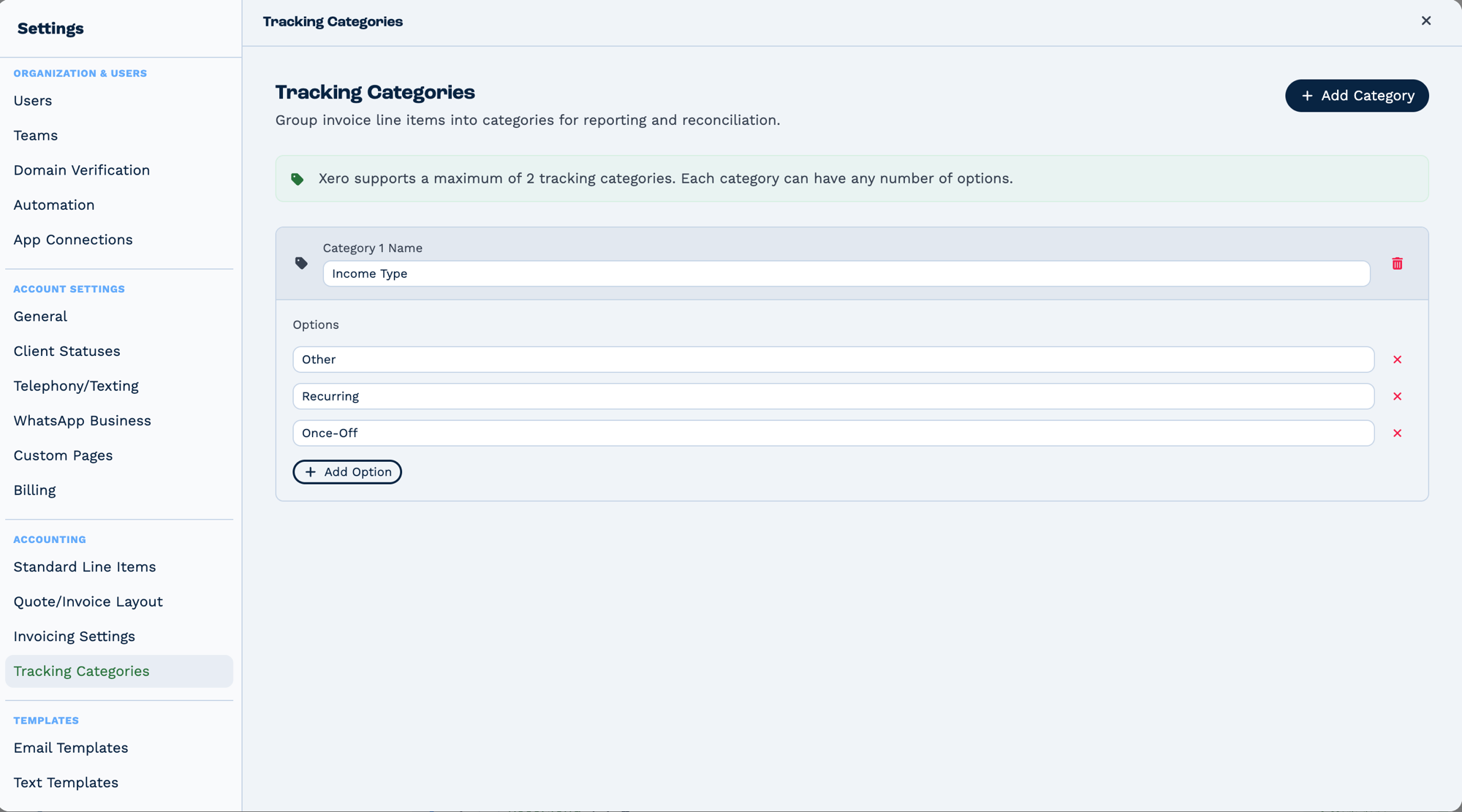
Two categories maximum, because that is Xero's limit — but each can hold any number of options. Categories group invoice line items for reporting and reconciliation, so the names here are what a task writes into when it sets a tracking value.
Outputs
Reference fields as {{task_<ID>_<field>}}.
| Field | Type | Notes |
|---|---|---|
xero |
string | Xero's response — contact or invoice data, depending on the action. Present only on some actions. |
Always emitted
| Field | Type | Notes |
|---|---|---|
run |
boolean | Whether the task succeeded. |
run_text |
string | What happened, including the reason on failure. |
Fields marked as action-dependent may be absent
This task does several different things depending on its action setting, and only the fields relevant to that action are emitted. Check a real run in the OUTPUT panel before referencing one downstream.
Configuration
Builder fields
The Field column is the label as it appears in the task builder; Key is the name the value is stored under and referenced by.
| Field | Key | Type | Default | Notes |
|---|---|---|---|---|
| Xero Account | app_connection_id |
app-connection | – | |
| Organisation (Tenant) | tenant_id |
select | – | |
| Action | xero_action |
select | – | Options: Create Contact · Update Contact · Get Contact · Get Contacts · Create Invoice · Update Invoice · Get Invoice · Get Invoices |
| Contact ID | Contact ID |
text | – | Only shown when xero_action is update_contact, get_contact |
| Contact Name | Contact Name |
text | – | Only shown when xero_action is create_contact, update_contact, get_contact, create_invoice |
| Account Number | Account Number |
text | – | Only shown when xero_action is create_contact, update_contact, get_contact |
| First Name | First Name |
text | – | Only shown when xero_action is create_contact, update_contact |
| Last Name | Last Name |
text | – | Only shown when xero_action is create_contact, update_contact |
| Email Address | Email Address |
text | – | Only shown when xero_action is create_contact, update_contact |
| Tax Number | Tax Number |
text | – | Only shown when xero_action is create_contact, update_contact |
| Bank Account Details | Bank Account Details |
text | – | Only shown when xero_action is create_contact, update_contact |
| Where Filter | Where Filter |
text | – | Only shown when xero_action is get_contacts |
| Where Filter | Where Filter |
text | – | Only shown when xero_action is get_invoices |
| Order By | Order By |
select | – | Options: Default order · Name (A to Z) · Name (Z to A) · Recently updated first · Oldest updated first · Email address · Account number. Only shown when xero_action is get_contacts |
| Order By | Order By |
select | – | Options: Default order · Newest invoice date first · Oldest invoice date first · Due soonest first · Due latest first · Invoice number · Highest total first · Highest amount due first · Recently updated first. Only shown when xero_action is get_invoices |
| Include Archived | Include Archived |
select | false |
Options: No · Yes. Only shown when xero_action is get_contacts |
| Invoice ID | Invoice ID |
text | – | Only shown when xero_action is update_invoice, get_invoice |
| Invoice Number | Invoice Number |
text | – | Only shown when xero_action is create_invoice, get_invoice |
| Invoice Date | Date |
text | – | Only shown when xero_action is create_invoice, update_invoice |
| Due Date | Due Date |
text | – | Only shown when xero_action is create_invoice, update_invoice |
| Reference | Reference |
text | – | Only shown when xero_action is create_invoice, update_invoice |
| Status | Status |
select | – | Options: Draft · Submitted · Authorised · Voided. Only shown when xero_action is create_invoice, update_invoice |
| Statuses Filter | Statuses |
select | – | Options: Draft · Submitted · Authorised · Paid · Voided · Deleted. Only shown when xero_action is get_invoices |
| Contact IDs Filter | Contact IDs |
text | – | Only shown when xero_action is get_invoices |
| Tax Type | line_items_tax_type |
select | – | Options: Exclusive · Inclusive · No Tax. Only shown when xero_action is create_invoice, update_invoice |
| Item Code(s) | Item Code |
text | – | Only shown when xero_action is create_invoice, update_invoice |
| Description(s) | Description |
text | – | Only shown when xero_action is create_invoice, update_invoice |
| Quantity(ies) | Quantity |
text | – | Only shown when xero_action is create_invoice, update_invoice |
| Unit Price(s) | Unit Price |
text | – | Only shown when xero_action is create_invoice, update_invoice |
| Discount %(s) | Discount % |
text | – | Only shown when xero_action is create_invoice, update_invoice |
| Account Code(s) | Account Code |
text | – | Only shown when xero_action is create_invoice, update_invoice |
| Tracking Category 1 | Tracking Category 1 Value |
text | – | Only shown when xero_action is create_invoice, update_invoice |
| Tracking Category 2 | Tracking Category 2 Value |
text | – | Only shown when xero_action is create_invoice, update_invoice |
Action 1: create_contact
Create new contact in Xero (never updates existing).
| Field | Required | Description | Example |
|---|---|---|---|
| xero_action | Yes | Must be "create_contact" | create_contact |
| app_connection_id | Yes | BaseCloud Xero connection ID | 45 |
| xero_tenant_id | Yes | Xero organization ID | {{client_xero_tenant_id}} |
| Contact Name | Yes | Contact/company name | {{client_company_name}} |
| Contact Number | No | Display number (# in Xero) | C{{client_id}} |
| Account Number | No | Account/customer number | {{client_account_number}} |
| First Name | No | Contact first name | {{client_first_name}} |
| Last Name | No | Contact last name | {{client_last_name}} |
| Email Address | No | Contact email | {{client_email}} |
| Bank Account Details | No | Bank account info | {{client_bank_details}} |
Output Variables:
task_31001_xero_contact_id; // Xero contact UUID
task_31001_xero_contact_name; // Contact name
task_31001_xero_account_number; // Account number
task_31001_xero_first_name; // First name
task_31001_xero_last_name; // Last name
task_31001_xero_email_address; // Email
task_31001_xero_message; // "Contact created successfully"
task_31001_xero_existing; // true if duplicate found, false if new
Duplicate Handling:
- If contact name exists: Returns existing contact with
existing=true - If account number exists: Returns existing contact
- No update performed - use
update_contactfor changes
Action 2: update_contact
Update existing Xero contact.
| Field | Required | Description | Example |
|---|---|---|---|
| xero_action | Yes | Must be "update_contact" | update_contact |
| app_connection_id | Yes | BaseCloud connection ID | 45 |
| xero_tenant_id | Yes | Xero organization ID | {{xero_tenant}} |
| Contact ID | Yes | Xero contact UUID | {{xero_contact_id}} |
| Contact Name | No | Updated name | {{new_company_name}} |
| Contact Number | No | Updated display number | C-NEW-{{client_id}} |
| Account Number | No | Updated account number | {{new_account_number}} |
| First Name | No | Updated first name | {{new_first_name}} |
| Last Name | No | Updated last name | {{new_last_name}} |
| Email Address | No | Updated email | {{new_email}} |
Output: Same structure as create_contact
Notes:
- Only provided fields are updated
- Empty fields are ignored (not cleared)
- Requires valid Contact ID UUID
Action 3: get_contact
Retrieve single contact by ID, number, or name.
| Field | Required | Description | Example |
|---|---|---|---|
| xero_action | Yes | Must be "get_contact" | get_contact |
| app_connection_id | Yes | BaseCloud connection ID | 45 |
| xero_tenant_id | Yes | Xero organization ID | {{xero_tenant}} |
| Contact ID | Conditional | Xero UUID (direct fetch) | {{contact_uuid}} |
| Contact Number | Conditional | Display number search | C123 |
| Account Number | Conditional | Account number search | ACC-001 |
| Contact Name | Conditional | Exact name match | Acme Corporation |
At least one search field required
Output:
task_31001_xero_contact = {
  contactID: 'uuid',
  name: 'Acme Corporation',
  accountNumber: 'ACC-001',
  emailAddress: 'billing@acme.com',
  firstName: 'John',
  lastName: 'Doe',
  // ... full Xero contact object
};
Action 4: get_contacts
Retrieve every matching contact. All pages are read automatically (1,000 per request); use the Where Filter to narrow large lists.
| Field | Required | Description | Example |
|---|---|---|---|
| xero_action | Yes | Must be "get_contacts" | get_contacts |
| app_connection_id | Yes | BaseCloud connection ID | 45 |
| xero_tenant_id | Yes | Xero organization ID | {{xero_tenant}} |
| Where Filter | No | OData where clause | Name.Contains("Acme") |
| Order By | No | Sort expression | Name ASC |
| Include Archived | No | "true" or "false" | false |
Output:
task_31001_xero_contacts = [...]  // Array of contact objects
task_31001_xero_pagination = {
  pages: 1,
  totalCount: 45,
  truncated: false  // true when the list was too large to keep in full
}
Where Filter Examples:
Name.Contains("Corp")- Name contains "Corp"EmailAddress=="billing@acme.com"- Exact email matchAccountNumber.StartsWith("C")- Account starts with CUpdatedDateUTC>=DateTime(2024,1,1)- Updated since date
Action 5: create_invoice
Create invoice with line items and tracking.
| Field | Required | Description | Example |
|---|---|---|---|
| xero_action | Yes | Must be "create_invoice" | create_invoice |
| app_connection_id | Yes | BaseCloud connection ID | 45 |
| xero_tenant_id | Yes | Xero organization ID | {{xero_tenant}} |
| Contact Name | Yes | Contact (auto-creates if not found) | {{client_company_name}} |
| Date | Yes | Invoice date (DD/MM/YYYY HH:mm) | 15/01/2024 10:00 |
| Due Date | Yes | Payment due date | 30/01/2024 17:00 |
| Status | Yes | DRAFT / SUBMITTED / AUTHORISED | AUTHORISED |
| line_items_tax_type | Yes | Exclusive / Inclusive / NoTax | Exclusive |
| Reference | No | Invoice reference | CRM-{{client_id}} |
| Invoice Number | No | Custom number (checks duplicates) | INV-{{timestamp}} |
| Item Code | Yes | Pipe-delimited item codes | CONSULT\|DESIGN |
| Item Description | Yes | Pipe-delimited descriptions | Consulting\|Design Work |
| Item Quantity | Yes | Pipe-delimited quantities | 10\|5 |
| Unit Price | Yes | Pipe-delimited prices | 150.00\|200.00 |
| Discount % | No | Pipe-delimited discounts | 0\|10 |
| Account Code | No | Pipe-delimited GL codes (default "200") | 200\|200 |
| Tracking Category 1 Value | No | Pipe-delimited TC1 values | Sales\|Marketing |
| Tracking Category 2 Value | No | Pipe-delimited TC2 values | Project A\|Project A |
Output:
task_31001_xero_invoice_id; // Invoice UUID
task_31001_xero_invoice_number; // Invoice number
task_31001_xero_invoice_status; // DRAFT / AUTHORISED / PAID
task_31001_xero_invoice_total; // Total amount
task_31001_xero_invoice_sub_total; // Subtotal
task_31001_xero_invoice_total_tax; // Tax amount
task_31001_xero_contact_id; // Contact UUID
Line Amount Types:
- Exclusive: Prices exclude tax (tax added on top)
- Inclusive: Prices include tax (tax within price)
- NoTax: No tax applied
Invoice Statuses:
- DRAFT: Editable draft
- SUBMITTED: Submitted for approval
- AUTHORISED: Approved and locked
- PAID: Fully paid (set automatically by Xero)
Action 6: get_invoice
Retrieve single invoice by ID or number.
| Field | Required | Description | Example |
|---|---|---|---|
| xero_action | Yes | Must be "get_invoice" | get_invoice |
| app_connection_id | Yes | BaseCloud connection ID | 45 |
| xero_tenant_id | Yes | Xero organization ID | {{xero_tenant}} |
| Invoice ID | Conditional | Invoice UUID (direct) | {{invoice_uuid}} |
| Invoice Number | Conditional | Invoice number search | INV-001 |
At least one field required
Output:
task_31001_xero_invoice = {
  invoiceID: "uuid",
  invoiceNumber: "INV-001",
  total: 1150.00,
  amountDue: 1150.00,
  amountPaid: 0,
  status: "AUTHORISED",
  lineItems: [...],
  contact: {...},
  // ... full invoice object
}
Action 7: get_invoices
Retrieve multiple invoices with filtering.
| Field | Required | Description | Example |
|---|---|---|---|
| xero_action | Yes | Must be "get_invoices" | get_invoices |
| app_connection_id | Yes | BaseCloud connection ID | 45 |
| xero_tenant_id | Yes | Xero organization ID | {{xero_tenant}} |
| Where Filter | No | OData where clause | Status=="AUTHORISED" |
| Order By | No | Sort expression | Date DESC |
| Statuses | No | Comma-separated statuses | AUTHORISED,PAID |
| Contact IDs | No | Comma-separated contact UUIDs | {{uuid1}},{{uuid2}} |
Output:
task_31001_xero_invoices = [...]  // Array of invoices
task_31001_xero_pagination = {
  pages: 1,
  totalCount: 23,
  truncated: false  // true when the list was too large to keep in full
}
Action 8: update_invoice
Update existing invoice.
| Field | Required | Description | Example |
|---|---|---|---|
| xero_action | Yes | Must be "update_invoice" | update_invoice |
| app_connection_id | Yes | BaseCloud connection ID | 45 |
| xero_tenant_id | Yes | Xero organization ID | {{xero_tenant}} |
| Invoice ID | Yes | Invoice UUID | {{invoice_uuid}} |
| Reference | No | Updated reference | PAID-{{date}} |
| Status | No | Updated status | AUTHORISED |
| Date | No | Updated date | 20/01/2024 10:00 |
| Due Date | No | Updated due date | 05/02/2024 17:00 |
| Line Items | No | Update all line items (same format as create) | See create_invoice |
Notes:
- Only provided fields updated
- Line items replace all existing (not additive)
- Status changes have restrictions (DRAFTAUTHORISED, cannot unpay PAID)
Real-World Examples
Create a Xero invoice from a won deal
CRM Trigger  (status changed to "Won")
  └─ Match to Client   look the client up
      └─ Xero          create the invoice
Keep a Xero contact in step with the CRM
Store the Xero contact ID on the client record so the update targets the right contact rather than creating a duplicate.
Confirm to the customer once the invoice exists
Troubleshooting
OAuth Token Expired
Cause: Access token invalid or expired
Solution: Automatic - task auto-refreshes tokens. If persistent:
- Reconnect Xero in BaseCloud Settings
- Check refresh token hasn't expired (90 days)
- Verify app scopes unchanged
Contact Duplicate Detection
Cause: create_contact finds existing contact
Solution: This is normal behavior:
- Check
{{task_31001_xero_existing}} - If
true, use returned contact ID - Use update_contact for changes
Tracking Category Not Found
Cause: Tracking value doesn't match Xero exactly
Solutions:
- Check exact spelling in Xero Settings
- Case-sensitive match required
- Use "null" to skip tracking (not empty string)
- Pre-fetch tracking categories to validate
Invoice Number Already Exists
Cause: Xero prevents duplicate invoice numbers per contact
Solutions:
- Use unique numbering:
INV-{{timestamp}}-{{client_id}} - Check existing invoices first with get_invoices
- Leave Invoice Number empty for Xero auto-numbering
Line Items Calculation Wrong
Cause: Tax type mismatch with line_items_tax_type
Solutions:
- Exclusive: Unit prices don't include tax tax added on top
- Inclusive: Unit prices include tax tax extracted from price
- Verify which format your prices use
Not All Records Returned
Cause: Get Contacts and Get Invoices read every page, but stop at about 12 MB of results so the output can still be saved. {{task_31001_xero_pagination.truncated}} is true when that happens.
Solution: Narrow the list with a Where Filter, Statuses or Contact IDs.
Multi-Tenant Confusion
Cause: Wrong tenant ID used for operation
Solutions:
- Store tenant ID per client:
{{client_xero_tenant_id}} - List available tenants: Use xeroService getTenants
- Validate tenant access before operations
- Use separate app connections per tenant if needed
Best Practices
OAuth Management
- Token Storage: BaseCloud handles token storage/refresh automatically
- App Scopes: Request only required scopes
- Reconnection: Prompt users to reconnect before 90-day refresh expiration
- Error Handling: Check for 401/403 errors indicating auth issues
Contact Management
- Auto-Create in Invoices: create_invoice auto-creates missing contacts
- Unique Account Numbers: Use CRM client IDs:
C{{client_id}} - Sync Strategy: Decide on sync direction (CRMXero, XeroCRM, bi-directional)
- Duplicate Prevention: Use get_contact before create_contact
Invoice Creation
- Status Workflow:
- DRAFT: For review/approval workflows
- AUTHORISED: For immediate dispatch
-
Never set to PAID manually (Xero manages)
-
Tracking Categories:
- Always use both levels for detailed reporting
- Standardize category values across CRM
-
Validate values exist before invoice creation
-
Line Items:
- Use meaningful item codes
- Consistent account codes (200=Sales, 400=Sales Discounts)
- Calculate totals in CRM for validation
Performance
- Pagination: Automatic for get_contacts and get_invoices — every page is read
- Filters: Use where clauses to reduce data transfer
- Caching: Cache tenant IDs and tracking categories
- Rate Limits: Xero has rate limits - add delays in bulk operations
Error Handling
- Validation Errors: Parse
{{task_31001_xero_error}}for details - Retry Logic: Implement retry for transient failures
- Logging: Always log Xero operations with IDs/numbers
- Alerts: Notify on critical failures (invoice creation, sync)
FAQ
Q: Can I use Xero with multiple organizations simultaneously?
A: Yes, specify different xero_tenant_id per operation. Store tenant IDs in client records or use tenant selector.
Q: How do I get my tenant ID?
A: Use xeroService getTenants() or check app connection details in BaseCloud after OAuth authorization.
Q: Can I update invoice line items after creation?
A: Yes, with update_invoice. Note: Replaces all existing line items (not additive).
Q: What happens if I create invoice with existing invoice number?
A: Xero returns error. Use get_invoice to check first or leave Invoice Number blank for auto-numbering.
Q: How do I handle refunds or credit notes?
A: Create separate credit note in Xero (not currently supported via task). Use Xero UI or request feature addition.
Q: Can I attach files to invoices?
A: Not via task action. Use Xero API directly or Xero UI for attachments.
Q: How long do access tokens last?
A: Access tokens: 30 minutes, Refresh tokens: 90 days. Auto-refresh handled by task.
Q: Can I get invoice PDFs?
A: Not directly. Xero generates PDFs separately. Use Xero API or UI to download.
Q: What's the rate limit?
A: Xero: 60 requests per minute per tenant. Add delays in bulk operations.
Q: How do I query tracking category reports?
A: Use get_invoices with where filter or query Xero Reports API separately.
Q: Can I create quotes instead of invoices?
A: Xero separates quotes from invoices. This task handles invoices only.
Q: How do I handle multiple currencies?
A: Xero supports 160+ currencies per contact. Specify currency when creating invoices.
Q: Can I mark invoices as paid from CRM?
A: No - Xero manages payment status based on payment entry. Use Xero UI or payment API.
Q: What if contact auto-create fails?
A: Task returns error. Create contact manually first with create_contact action.
Related Tasks
- BaseCloud Accounting - Internal alternative
- Sage - Alternative accounting integration
- Email - Send invoice notifications
- Loop - Process multiple contacts/invoices
- If Statement - Handle sync logic
- Timer Trigger - Schedule sync/monitoring
Technical Details
- Type ID: 31
- Function:
taskXero()in automationService.js (lines 7803-8400) - Service: xeroService.js (1367 lines)
- Library: xero-node (XeroClient)
- Authentication: OAuth 2.0 with auto token refresh
- Output Prefix:
task_31001_*ortask_31001_xero_* - Pagination: Automatic, 1,000 results per request
- Rate Limit: 60 requests/minute/tenant