Facebook Marketing
Overview
The Facebook Marketing task integrates BaseCloud CRM with Facebook Marketing API v18.0, enabling automated campaign management, performance reporting, and ad optimization across Facebook and Instagram.
Key Features:
- 6 Actions: Campaign/ad set/ad performance, campaign list, status updates
- OAuth 2.0 Authentication: Secure Facebook integration with long-lived tokens
- Multi-Level Reporting: Campaign, ad set, and individual ad metrics
- Status Management: Pause, activate, or archive campaigns and ads
- Flexible Date Ranges: 15+ preset ranges plus custom date selection
- Instagram Support: Unified reporting for Facebook and Instagram ads
Use Cases:
- Automated daily performance reporting
- Campaign budget monitoring
- Ad performance optimization
- Multi-account agency management
- A/B testing analysis
- ROI tracking and alerts
Prerequisites
1. Facebook Business Manager
Setup Business Manager:
- Go to https://business.facebook.com
- Create or access Business Manager account
- Add Ad Accounts under Business Settings
- Verify business (required for production API access)
- Ensure you have Admin or Advertiser role
2. Facebook App
Create Facebook App:
- Go to https://developers.facebook.com
- Click My Apps → Create App
- Select Business app type
- Enter app details and create
- Add Marketing API product
- Configure OAuth redirect URI:
https://yourapp.basecloudglobal.com/oauth/callback- Note App ID and App Secret
3. Ad Account Access
Get Ad Account ID:
- Open Facebook Ads Manager
- Click account dropdown (top left)
- Copy Ad Account ID (format:
act_123456789) - Or from URL:
https://business.facebook.com/adsmanager/manage/accounts?act=123456789
Account ID Format:
- Displayed:
123456789 - API format:
act_123456789(auto-prefixed by BaseCloud)
4. OAuth Configuration in BaseCloud
Create App Connection:
- Navigate to BaseCloud CRM → Settings → App Connections
- Click + New App Connection
- Select Facebook Marketing from dropdown
- Enter credentials:
- App ID: From Facebook App Dashboard
- App Secret: From Facebook App Dashboard
- Click Authorize with Facebook
- Authorize permissions:
pages_show_list- List pagespages_read_engagement- Read page dataads_read- Read ad dataads_management- Manage ads (for status updates)read_insights- Access performance metrics- Select ad accounts to access
- Save connection
OAuth Scopes Required:
Long-Lived Tokens:
Facebook access tokens expire after 60 days. BaseCloud uses long-lived tokens but doesn't auto-refresh. Re-authorize periodically.
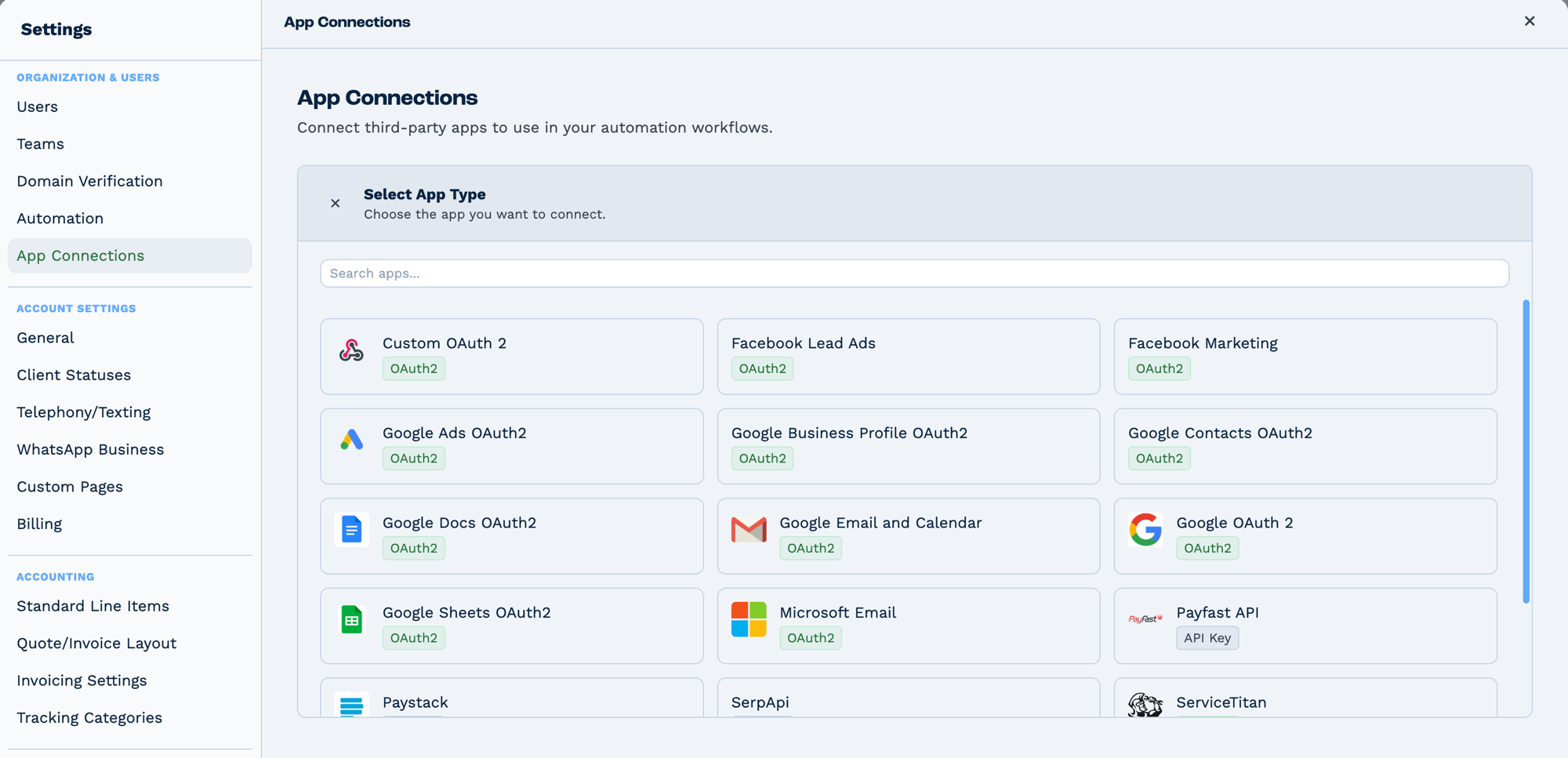
Connections live in Settings → App Connections, not on the task. Connect the app once and every task that needs it can use it. The badge on each tile says how it authenticates — OAuth2 sends you to the provider to sign in, API Key expects a key you paste in.
Outputs
Which fields appear depends on the action.
Reference fields as {{task_<ID>_<field>}}.
| Field | Type | Notes |
|---|---|---|
action |
string | |
data |
string | |
campaigns |
string | Present only on some actions. |
count |
string | Present only on some actions. |
adsets |
string | Present only on some actions. |
ads |
string | Present only on some actions. |
success |
string | Present only on some actions. |
error |
string |
Always emitted
| Field | Type | Notes |
|---|---|---|
run |
boolean | Whether the task succeeded. |
run_text |
string | What happened, including the reason on failure. |
Fields marked as action-dependent may be absent
This task does several different things depending on its action setting, and only the fields relevant to that action are emitted. Check a real run in the OUTPUT panel before referencing one downstream.
Configuration
Builder fields
The Field column is the label as it appears in the task builder; Key is the name the value is stored under and referenced by.
| Field | Key | Type | Default | Notes |
|---|---|---|---|---|
| Facebook Account | app_connection_id |
app-connection | – | |
| Action | action |
select | get_campaign_performance |
Options: Get Campaign Performance · Get Ad Set Performance · Get Ad Performance · Get Campaign List · Update Campaign Status · Update Ad Status · Send Conversion (lead or sale) |
| Ad Account ID | ad_account_id |
text | – | |
| Campaign ID | campaign_id |
text | – | Only shown when action is get_campaign_performance, get_adset_performance, get_ad_performance, get_campaign_list, update_campaign_status |
| Ad Set ID | adset_id |
text | – | Only shown when action is get_adset_performance, get_ad_performance |
| Ad ID | ad_id |
text | – | Only shown when action is get_ad_performance, update_ad_status |
| Status | status |
select | – | Options: Active · Paused. Only shown when action is update_campaign_status, update_ad_status |
| Metrics | metrics |
text | impressions,clicks,spend |
Only shown when action is get_campaign_performance, get_adset_performance, get_ad_performance |
| Date Range | date_range |
select | last_7_days |
Options: Last 7 Days · Last 14 Days · Last 28 Days · Last 30 Days · Last 90 Days · Custom. Only shown when action is get_campaign_performance, get_adset_performance, get_ad_performance |
| Date From | date_from |
text | – | |
| Date To | date_to |
text | – | |
| Status Filter | status_filter |
text | – | |
| Limit | limit |
number | – | |
| Dataset | dataset_id |
select | – | Only shown when action is send_conversion |
| Event | event_name |
select | Lead |
Options: Lead · Qualified lead (custom) · Schedule (appointment booked) · Submit application · Complete registration · Contact · Purchase (deal won) · Custom event name…. Only shown when action is send_conversion |
| Custom Event Name | custom_event_name |
text | – | |
| Where It Happened | action_source |
select | system_generated |
Options: In the CRM · In store · Phone call · Chat · Email · Other. Only shown when action is send_conversion |
| Customer Identifiers | identifiers |
dyn-rows | – | Options: Meta Lead ID (most accurate) · Facebook ad click ID · Facebook browser ID · Email address · Phone (with country code) · First name · Last name · City · State · Zip code · Country · Your contact ID. Only shown when action is send_conversion |
| Event Time | event_time |
text | – | Only shown when action is send_conversion |
| Value | value |
text | – | Only shown when action is send_conversion |
| Currency | currency |
select | USD |
Only shown when action is send_conversion |
| Order / Deal ID | order_id |
text | – | Only shown when action is send_conversion |
| Event ID | event_id |
text | – | Only shown when action is send_conversion |
| Limit Data Use (US Privacy) | ldu |
select | off |
Options: Off · On. Only shown when action is send_conversion |
| Test Event Code | test_event_code |
text | – | Only shown when action is send_conversion |
Action 1: get_campaign_performance
Retrieve campaign-level advertising performance metrics.
| Field | Required | Description | Example |
|---|---|---|---|
| action | Yes | Must be "get_campaign_performance" | get_campaign_performance |
| app_connection_id | Yes | OAuth connection ID | Select from dropdown |
| ad_account_id | Yes | Facebook Ad Account ID | 123456789 or act_123456789 |
| campaign_id | No | Specific campaign (omit for all) | 23850123456789 |
| date_range | No | Date range preset (default: last_7_days) | last_30_days |
| start_date | Conditional | Start date if custom range | 2024-01-01 |
| end_date | Conditional | End date if custom range | 2024-01-31 |
| metrics | No | Metrics to fetch (default: impressions,clicks,spend,reach,ctr,cpc,cpm) | impressions,clicks,spend,conversions |
| status | No | Filter by status | ACTIVE, PAUSED, DELETED, ARCHIVED |
| limit | No | Max campaigns to return (default: 25) | 50 |
Date Range Presets:
| Preset | Description |
|---|---|
today |
Today only |
yesterday |
Yesterday only |
last_7_days, last_7d |
Last 7 days |
last_14_days, last_14d |
Last 14 days |
last_30_days, last_30d |
Last 30 days |
last_90_days, last_90d |
Last 90 days |
this_month |
Current month to date |
last_month |
Previous calendar month |
this_quarter |
Current quarter |
last_quarter |
Previous quarter |
this_year |
Current year to date |
last_year |
Previous calendar year |
maximum |
All available data |
Available Metrics:
Basic Performance:
impressions- Ad impressionsclicks- Link clicksreach- Unique people reachedfrequency- Average impressions per person
Cost Metrics:
spend- Amount spentcpc- Cost per clickcpm- Cost per 1000 impressionscpp- Cost per person reachedctr- Click-through rateunique_clicks- Unique link clicksunique_ctr- Unique CTR
Conversions:
- All standard Facebook conversion events
- Custom conversion events
- Purchase events
- Lead events
Engagement:
- Post engagement metrics
- Video views
- Page likes
- Event responses
Output Variables:
task_57001_run; // true/false
task_57001_run_text; // "get_campaign_performance completed successfully."
task_57001_action; // "get_campaign_performance"
task_57001_campaigns; // Array of campaign objects
task_57001_count; // Number of campaigns
task_57001_date_range; // Date range used
task_57001_metrics; // Array of metrics requested
task_57001_data; // Raw API response
Campaign Object Structure:
{
  campaign_id: "23850123456789",
  campaign_name: "Summer Sale 2024",
  impressions: "125000",
  clicks: "4500",
  spend: "1250.50",
  reach: "85000",
  ctr: "3.6",
  cpc: "0.28",
  cpm: "10.00"
}
How It Works:
- Validates OAuth connection and ad account access
- Auto-formats account ID with
act_prefix if missing - Converts date_range to Facebook API format (
last_7_days→last_7d) - Parses metrics (accepts JSON array or CSV string)
- Calls:
GET https://graph.facebook.com/v18.0/{campaign_id}/insights(specific campaign) ORGET https://graph.facebook.com/v18.0/{ad_account_id}/insights?level=campaign(all campaigns) - Returns campaigns array with requested metrics
Action 2: get_adset_performance
Retrieve ad set level performance metrics.
| Field | Required | Description | Example |
|---|---|---|---|
| action | Yes | Must be "get_adset_performance" | get_adset_performance |
| app_connection_id | Yes | OAuth connection ID | Select from dropdown |
| ad_account_id | Yes | Facebook Ad Account ID | 123456789 |
| adset_id | No | Specific ad set (omit for all) | 23850234567890 |
| campaign_id | No | Filter by campaign | 23850123456789 |
| date_range | No | Date range preset | last_30_days |
| start_date | Conditional | Start date if custom | 2024-01-01 |
| end_date | Conditional | End date if custom | 2024-01-31 |
| metrics | No | Metrics to fetch | Same as campaigns |
| status | No | Filter by status | ACTIVE, PAUSED, etc. |
| limit | No | Max ad sets (default: 25) | 50 |
Output Variables:
task_57001_run; // true/false
task_57001_run_text; // "get_adset_performance completed successfully."
task_57001_action; // "get_adset_performance"
task_57001_adsets; // Array of ad set objects
task_57001_count; // Number of ad sets
Ad Set Object Structure:
{
  adset_id: "23850234567890",
  adset_name: "Summer Sale - Mobile 25-34",
  campaign_id: "23850123456789",
  impressions: "45000",
  clicks: "1500",
  spend: "420.30",
  ctr: "3.33"
}
How It Works:
Similar to campaign performance but queries at ad set level:
- API:
GET /v18.0/{adset_id}/insightsor/v18.0/{ad_account_id}/insights?level=adset - Can filter by campaign_id to get ad sets for specific campaign
- Returns adsets array with metrics
Action 3: get_ad_performance
Retrieve individual ad performance metrics.
| Field | Required | Description | Example |
|---|---|---|---|
| action | Yes | Must be "get_ad_performance" | get_ad_performance |
| app_connection_id | Yes | OAuth connection ID | Select from dropdown |
| ad_account_id | Yes | Facebook Ad Account ID | 123456789 |
| ad_id | No | Specific ad (omit for all) | 23850345678901 |
| adset_id | No | Filter by ad set | 23850234567890 |
| campaign_id | No | Filter by campaign | 23850123456789 |
| date_range | No | Date range preset | last_7_days |
| start_date | Conditional | Start date if custom | 2024-01-01 |
| end_date | Conditional | End date if custom | 2024-01-31 |
| metrics | No | Metrics to fetch | Same as campaigns |
| status | No | Filter by status | ACTIVE, PAUSED, etc. |
| limit | No | Max ads (default: 25) | 100 |
Output Variables:
task_57001_run; // true/false
task_57001_run_text; // "get_ad_performance completed successfully."
task_57001_action; // "get_ad_performance"
task_57001_ads; // Array of ad objects
task_57001_count; // Number of ads
Ad Object Structure:
{
  ad_id: "23850345678901",
  ad_name: "Summer Sale - Image 1",
  adset_id: "23850234567890",
  campaign_id: "23850123456789",
  impressions: "15000",
  clicks: "540",
  spend: "150.10",
  ctr: "3.6"
}
How It Works:
Similar to campaign/ad set but at individual ad level:
- API:
GET /v18.0/{ad_id}/insightsor/v18.0/{ad_account_id}/insights?level=ad - Can filter by adset_id or campaign_id
- Returns ads array with creative performance
Action 4: get_campaign_list
Retrieve list of campaigns without performance metrics (faster).
| Field | Required | Description | Example |
|---|---|---|---|
| action | Yes | Must be "get_campaign_list" | get_campaign_list |
| app_connection_id | Yes | OAuth connection ID | Select from dropdown |
| ad_account_id | Yes | Facebook Ad Account ID | 123456789 |
| status | No | Filter by effective_status | ACTIVE, PAUSED, etc. |
| limit | No | Max campaigns (default: 100) | 50 |
Output Variables:
task_57001_run; // true/false
task_57001_run_text; // "get_campaign_list completed successfully."
task_57001_action; // "get_campaign_list"
task_57001_campaigns; // Array of campaign objects
task_57001_count; // Number of campaigns
Campaign Object Structure (List):
{
  id: "23850123456789",
  name: "Summer Sale 2024",
  status: "ACTIVE",
  effective_status: "ACTIVE",
  objective: "CONVERSIONS",
  daily_budget: "10000",  // In cents
  lifetime_budget: null,
  created_time: "2024-01-15T10:30:00+0000",
  updated_time: "2024-02-01T14:20:00+0000"
}
API Endpoint:
GET https://graph.facebook.com/v18.0/{ad_account_id}/campaigns?fields=id,name,status,effective_status,objective,daily_budget,lifetime_budget,created_time,updated_time
How It Works:
- Queries campaigns endpoint (not insights)
- Returns campaign metadata without metrics
- Much faster than get_campaign_performance
- Use for dropdown population or status checks
Action 5: update_campaign_status
Change campaign status (pause, activate, archive, delete).
| Field | Required | Description | Example |
|---|---|---|---|
| action | Yes | Must be "update_campaign_status" | update_campaign_status |
| app_connection_id | Yes | OAuth connection ID | Select from dropdown |
| ad_account_id | Yes | Facebook Ad Account ID | 123456789 |
| campaign_id | Yes | Campaign to update | 23850123456789 |
| status | Yes | New status | ACTIVE, PAUSED, DELETED, ARCHIVED |
Status Values:
ACTIVE- Campaign runningPAUSED- Campaign paused (can reactivate)DELETED- Soft delete (can restore via UI)ARCHIVED- Archived (for historical data)
Output Variables:
task_57001_run; // true/false
task_57001_run_text; // "update_campaign_status completed successfully."
task_57001_action; // "update_campaign_status"
task_57001_success; // true/false
task_57001_campaign_id; // Campaign ID updated
task_57001_status; // New status
task_57001_data; // API response
API Endpoint:
How It Works:
- Validates status value
- Sends POST request with new status
- Returns success confirmation
- Campaign changes take effect immediately
Action 6: update_ad_status
Change individual ad status.
| Field | Required | Description | Example |
|---|---|---|---|
| action | Yes | Must be "update_ad_status" | update_ad_status |
| app_connection_id | Yes | OAuth connection ID | Select from dropdown |
| ad_account_id | Yes | Facebook Ad Account ID | 123456789 |
| ad_id | Yes | Ad to update | 23850345678901 |
| status | Yes | New status | ACTIVE, PAUSED, DELETED, ARCHIVED |
Output Variables:
task_57001_run; // true/false
task_57001_run_text; // "update_ad_status completed successfully."
task_57001_action; // "update_ad_status"
task_57001_success; // true/false
task_57001_ad_id; // Ad ID updated
task_57001_status; // New status
API Endpoint:
Real-World Examples
Report campaign performance weekly
Keep a running record in a sheet
Using a sheet keeps the history somewhere a non-technical reader can open.
Act on a lead the moment it arrives
Facebook Lead Ads Trigger
  └─ Match to Client   contact_email: {{task_56001_fields_email}}
      └─ Email         send the follow-up
Troubleshooting
Error: "No app connection selected"
Cause: OAuth connection not configured
Solutions:
- Go to Settings → App Connections
- Create Facebook Marketing connection
- Enter App ID and App Secret
- Complete OAuth authorization
- Grant all required permissions
Error: "Invalid OAuth 2.0 Access Token"
Cause: Access token expired (60-day lifetime)
Solutions:
- Re-authorize app connection:
- Settings → App Connections → Edit
- Click Re-authorize with Facebook
- Grant permissions again
- Long-lived tokens last 60 days (no auto-refresh)
- Set reminder to re-authorize quarterly
Error: "Ad account not found" or Permission Denied
Cause: No access to specified ad account
Solutions:
- Verify ad account ID format:
123456789oract_123456789 - Check Facebook Business Manager:
- Business Settings → Accounts → Ad Accounts
- Verify you have Admin or Advertiser role
- Ensure ad account linked to Business Manager
- Re-authorize OAuth with correct account selection
Metrics List Empty or Invalid
Cause: Metrics field format incorrect
Solutions:
- Accepts JSON array:
["impressions","clicks","spend"] - Or CSV string:
impressions,clicks,spend - Remove spaces around commas
- Use valid metric names (see Available Metrics)
- Default used if omitted:
impressions,clicks,spend,reach,ctr,cpc,cpm
Date Range Returns No Data
Cause: No data for specified range or invalid format
Solutions:
- Check campaigns ran during date range
- Use valid preset:
last_7_days,yesterday, etc. - For custom range, provide both start_date and end_date
- Date format:
YYYY-MM-DD - Recent data may take 24-48 hours to appear
Campaign/Ad Status Update Failed
Cause: Invalid status value or permission issue
Solutions:
- Use valid status:
ACTIVE,PAUSED,DELETED,ARCHIVED - Ensure
ads_managementscope authorized - Verify you have edit permissions on ad account
- Cannot change status of deleted campaigns
- Check campaign isn't in Facebook review
Rate Limiting / API Throttling
Cause: Exceeded Facebook API rate limits
Solutions:
- Rate Limits:
- 200 calls/hour per user
-
200 calls/hour per app-user pair
-
Immediate Actions:
- Add delays in multi-account loops (2-5 seconds)
- Reduce frequency of metric fetches
-
Cache results when possible
-
Long-term:
- Spread large queries over time
- Use get_campaign_list instead of performance for lists
- Implement exponential backoff
- Apply for higher rate limits (requires verification)
Empty Campaigns/Ads Array
Cause: No data matches filters
Solutions:
- Remove status filter (may be filtering all)
- Check date range has data
- Verify correct ad account ID
- Increase limit parameter
- Confirm campaigns exist in Facebook Ads Manager
Best Practices
Authentication Management
- Long-Lived Tokens:
- Facebook tokens expire after 60 days
- Set calendar reminders to re-authorize
- Monitor connection status in BaseCloud
-
Re-authorize before expiration
-
Permissions:
- Grant all required scopes during authorization
ads_managementneeded for status updatesread_insightsrequired for performance data-
Review requested permissions before accepting
-
Multi-Account:
- Create separate connections per ad account
- Or use one connection with multiple account access
- Store connection IDs in client records for dynamic selection
Metrics Strategy
- Metric Selection:
- Request only needed metrics to reduce API calls
- Use default metrics for general reporting
- Add conversion metrics for ROI tracking
-
Include engagement for brand campaigns
-
Date Ranges:
- Use presets when possible (standardized)
yesterdayfor daily reports (data complete)last_7_daysfor weekly trendslast_30_daysfor monthly reviews-
Be aware 24-48 hour data lag for some metrics
-
Performance Tiers:
- Campaign-level for executive summaries
- Ad set-level for audience analysis
- Ad-level for creative optimization
- Use get_campaign_list for faster metadata only
Reporting Strategy
- Automated Reports:
- Daily: Yesterday's performance summary
- Weekly: 7-day trends and insights
- Monthly: Full campaign analysis
-
Real-time: Budget alerts and thresholds
-
Data Storage:
- Append metrics to a sheet with Google Sheets for historical trends
- Create time-series for visualization
- Archive raw responses for auditing
-
Maintain client-level reporting tables
-
Stakeholder Communication:
- Executives: High-level KPIs (ROAS, conversions)
- Marketing: Detailed campaign breakdowns
- Finance: Spend tracking and budget adherence
- Clients: Campaign-specific results and insights
Campaign Management
- Status Updates:
- Always validate before pausing campaigns
- Include reason in workflow notes
- Log status changes to database
-
Alert relevant teams
-
Optimization:
- Set minimum data thresholds (1000+ impressions)
- Use multiple metrics for decisions (CTR + CPC)
- Implement gradual changes (test before scaling)
-
Monitor after automation runs
-
Error Handling:
- Wrap critical updates in If Conditions
- Log failures for troubleshooting
- Provide manual override workflows
- Alert admins on persistent issues
Performance Optimization
- Caching:
- Cache campaign lists (reload hourly)
- Store account structure (reload daily)
- Cache metric results for dashboards
-
Reduce redundant API calls
-
Rate Limiting:
- Add 2-3 second delays in loops
- Batch operations where possible
- Schedule large queries off-peak
-
Implement exponential backoff
-
Efficiency:
- Use get_campaign_list for dropdowns (faster)
- Filter by status to reduce dataset
- Set appropriate limits (don't fetch all)
- Query specific campaigns when possible
FAQ
Q: What's the difference between Facebook Marketing and Facebook Lead Ads?
A:
- Facebook Marketing: Campaign management and performance reporting
- Facebook Lead Ads: Lead capture from Lead Ads campaigns
- Different use cases: Marketing for optimization, Lead Ads for lead generation
Q: Can I create new campaigns via API?
A: This task focuses on reporting and status management. Campaign creation requires additional actions not currently implemented. Use Facebook Ads Manager for creation.
Q: How accurate is the performance data?
A: Data matches Facebook Ads Manager but may have 24-48 hour lag for some metrics. Use yesterday for fully complete data.
Q: Can I manage Instagram ads?
A: Yes, Instagram ads managed through Facebook Ads Manager appear in same API. No separate configuration needed.
Q: What happens when token expires?
A: API calls fail with "Invalid OAuth token" error. Re-authorize connection in BaseCloud. Set 60-day reminder.
Q: Can I get data older than 90 days?
A: Yes, use custom date range or maximum preset. Historical data available based on account age.
Q: How do I track specific conversion events?
A: Include conversion event names in metrics field. Example: purchase,lead,add_to_cart. Must be configured in Facebook Events Manager.
Q: Can I manage multiple ad accounts?
A: Yes, create separate app connections per account or grant one connection access to multiple accounts. Use account selector in task.
Q: What's the difference between status and effective_status?
A:
- status: Status you set (ACTIVE, PAUSED)
- effective_status: Actual status including Facebook's decision (may be CAMPAIGN_PAUSED due to budget)
Q: Can I pause ads based on performance automatically?
A: Yes, use Example 3 workflow. Set appropriate thresholds (minimum impressions, CTR, spend) to avoid premature decisions.
Q: How do I calculate ROAS?
A: ROAS = Conversion Value / Spend. Get conversion value with purchase_roas metric or calculate: (conversions × average_order_value) / spend
Q: Can I export data to Google Sheets?
A: Yes, use Google Sheets task after getting metrics. Store in variables and write to sheets.
Related Tasks
- Google Ads - Google advertising analytics
- Google Sheets - Export metrics to spreadsheets
- Loop - Process multiple accounts/campaigns
- If Statement - Performance-based logic
- Email - Send performance reports
- Variable - Calculate custom metrics
Technical Details
- Type ID: 57
- Function:
taskFacebookMarketing()in automationService.js (lines 10049-10097) - Service:
facebookService.js(1086 lines) - API Version: Facebook Marketing API v18.0
- Authentication: OAuth 2.0 (60-day tokens, no auto-refresh)
- Scopes:
pages_show_list,pages_read_engagement,ads_read,ads_management,read_insights - Output Prefix:
task_57001_* - Rate Limits: 200 calls/hour per user/app-user pair
- Base URL:
https://graph.facebook.com/v18.0/ - Documentation: https://developers.facebook.com/docs/marketing-api