Email nurture campaign
New leads go quiet if nobody follows up, and the follow-up is the part that never happens. This workflow enrols every client who reaches a status, walks them through a sequence of emails spread over weeks, and — the moment they convert — stops that sequence and starts a different one.

The workflow
| Order | Task | Purpose |
|---|---|---|
| 1 | Campaign Trigger | Enrols clients who match the entry criteria, and watches for the goal |
| 2 | Email × 4 (main port) | The nurture sequence, each with its own delay |
| 3 | Email × 4 (goal port) | The sequence that runs instead, once the client converts |
The two rows of emails are not alternatives you choose between when building. They are two branches the trigger picks between at run time, and every client goes down one or the other.
1. Campaign Trigger
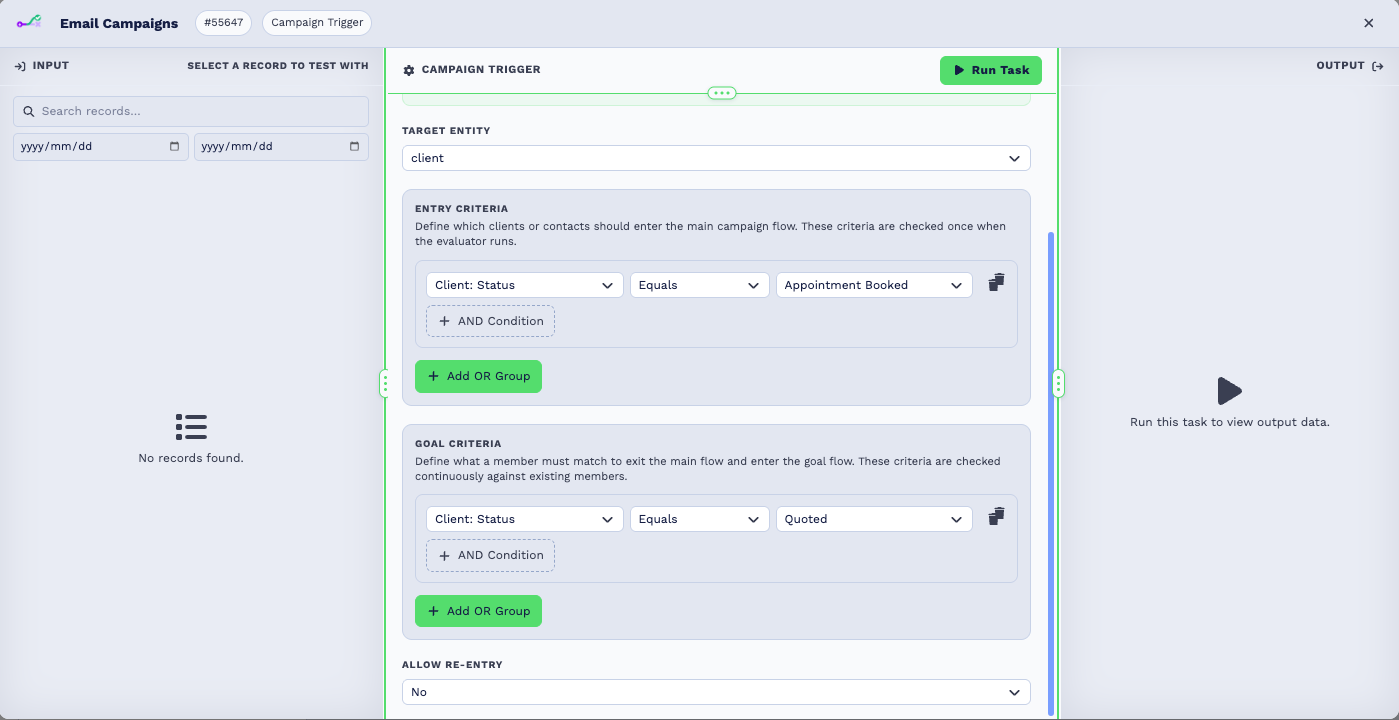
| Field | Set it to |
|---|---|
| Target Entity | client |
| Entry Criteria | The condition that enrols someone — in the screenshot, Client Status equals Appointment Booked |
| Goal Criteria | What counts as converted — here, Client Status equals Quoted |
| Allow Re-Entry | No for a one-off journey |
Empty entry criteria matches nobody
A new Campaign Trigger starts with no conditions, and no conditions means no members. The campaign will sit there doing nothing until you add at least one.
Entry criteria are checked once — when someone first matches, they are enrolled. Goal criteria are checked continuously against everyone already in the campaign, which is what lets the trigger interrupt a sequence part-way through.
2. The main port — the nurture sequence
The main port is the top one. Everything wired to it runs for a client who has just been enrolled.
Each email in the chain carries its own delay — the badges on the canvas read 3d, 6d, 11d and 20d. You do not put Delay tasks between them: open the Email task, use Add delay at the top of the panel, and the delay applies before that task runs.
| Delay | Purpose | |
|---|---|---|
| Nurture Email 1 | 3 days | Introduce yourself while the enquiry is fresh |
| Nurture Email 2 | 6 days | A case study or a testimonial |
| Nurture Email 3 | 11 days | Answer the objection you hear most |
| Nurture Email 4 | 20 days | A clear ask, with a way to book |
The delays are counted from when the previous task finishes, so they space the sequence out rather than all firing from enrolment.
3. The goal port — what happens when they convert
The goal port is the bottom one. When a client meets the goal criteria, two things happen in order: their pending main-flow tasks are abandoned, and then the goal branch runs.
That is the whole point of the campaign trigger. A client who books on day four does not receive Nurture Email 3 eleven days later asking them to book.
| Delay | Purpose | |
|---|---|---|
| Welcome to … | — | Confirm the conversion straight away |
| Did you know | 7 days | Help them get value early |
| Review Request | 20 days | Ask while the experience is fresh |
| Refer a Friend | 30 days | Ask for the referral last |
Test it
- Set Entry Criteria to something only one test client matches — a status you invented for the purpose is safest.
- Give the first nurture email a delay of a few minutes rather than days.
- Enable the campaign and move your test client into the entry status.
- Confirm the first email arrives and the client shows as a member.
- Move the client to the goal status and confirm the remaining nurture emails stop and the goal sequence starts.
- Put the real delays back, then widen the entry criteria.
Widen the entry criteria last
Enabling a campaign whose entry criteria match your whole database enrols all of them on the next evaluation. Test narrow, then widen.
What can go wrong
| Symptom | Cause |
|---|---|
| Nobody is enrolled | Entry criteria are empty, or the task or workflow is disabled. |
| Enrolment lags behind a status change | Membership is worked out by a scheduled evaluator, not the instant a field changes. |
| Emails keep arriving after the client converted | The later emails were wired to the main port instead of goal, or the goal criteria never match. |
| A client goes through twice | Allow Re-Entry is on. |
| The whole sequence arrives at once | The delays are missing. Delay lives on each Email task, not between them. |
Related tasks
- Campaign Trigger
- CRM Trigger — react to a single change instead of running a journey
- Client Date Trigger