PDF tools
Who can do this
Anyone with Files Access who can see the client.
Put a password on a PDF
- On the client's Files tab, click the ⋮ on the PDF and choose Add Password.
- Type the password, type it again, and click Add Password.
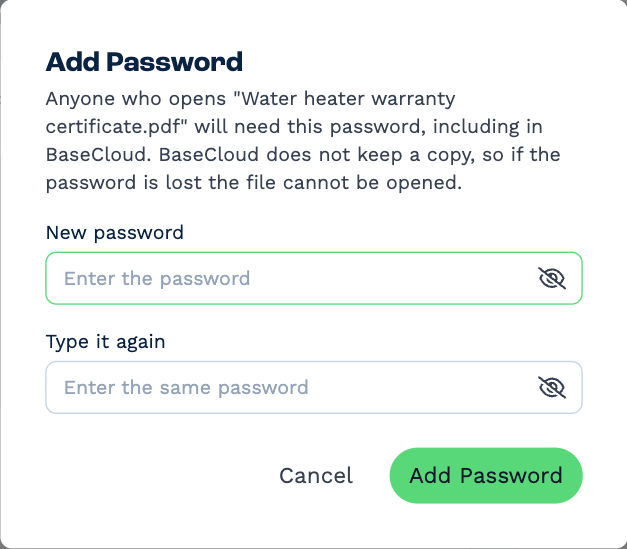
From then on, anyone who opens the file — in BaseCloud, from a link, or as an email attachment — is asked for the password.
BaseCloud doesn't keep the password
If the password is lost, the file can't be opened by you, by us, or by anyone. Keep it somewhere safe, and give it to the client separately from the file.
Take a password off
Click the ⋮ on the PDF and choose Remove Password, then type the file's password. You need to know it to remove it.
Combine PDFs into one
- Pick two or more PDFs: Ctrl-click each (⌘-click on a Mac).
- Right-click the selection and choose Combine 2 PDFs into One (the number is how many you picked).
- Give the new PDF a name, and use the arrows to put the files in the order their pages should come.
- Click Combine.
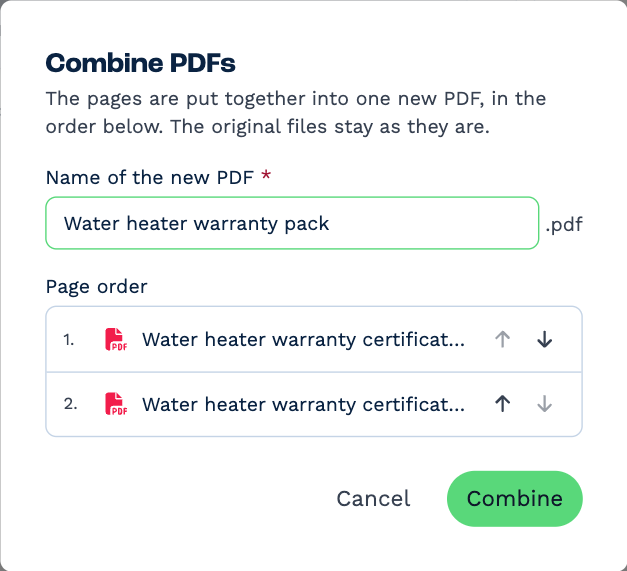
The new PDF appears in the same folder. The files you combined stay as they are.