Appointment reminders
A missed appointment is an empty chair that cannot be resold. A reminder the day before, with an easy way to reschedule, fills most of those gaps.

Before you start
- Appointments booked in the BaseCloud calendar and linked to the patient
The workflow
| Step | Task | Type | What it does |
|---|---|---|---|
| 1 | Day before | Calendar Trigger | Starts one day before each appointment |
| 2 | Text a reminder | SMS | Texts the reminder |
| 3 | What to bring | Emails what to bring | |
| 4 | Reception log | Workflow Note | Records on the patient that both were sent |
About the variables
Values such as {{task_36366_…}} carry the number of the task they come from, so yours will
differ. Do not type them: click into a field and pick the value from an earlier task.
1. Day before
Task: Calendar Trigger. Starts one day before each appointment.
| Field | Set it to |
|---|---|
| Start this workflow when | A meeting is coming up |
| How long before / after | 1 |
| Unit | Days |
| Only meetings linked to a client | Ticked |
2. Text a reminder
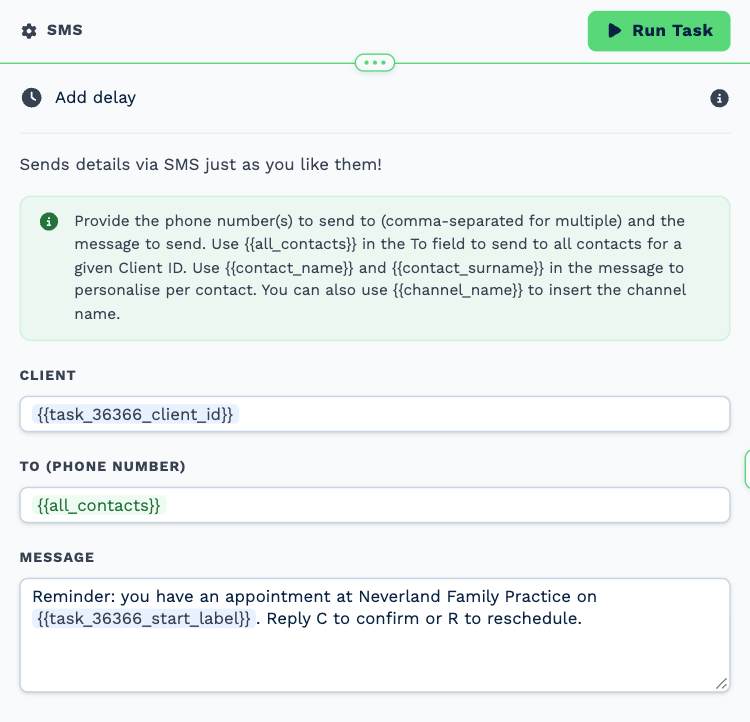
Task: SMS. Texts the reminder.
| Field | Set it to |
|---|---|
| Client | {{task_36366_client_id}} |
| To (phone number) | {{all_contacts}} |
Message
Reminder: you have an appointment at Neverland Family Practice on {{task_36366_start_label}}. Reply C to confirm or R to reschedule.
3. What to bring
Task: Email. Emails what to bring.
| Field | Set it to |
|---|---|
| Outgoing Email User | Wendy Darling |
| Client | {{task_36366_client_id}} |
| To | {{all_contacts}} |
| Subject | Your appointment on {{task_36366_start_label}} |
Body
Hi,
We look forward to seeing you on {{task_36366_start_label}}.
Please bring:
- Your insurance or membership card
- A list of any medication you take
- Referral letters, if you have them
Please arrive ten minutes early. If you cannot make it, reply to this email and we will find another time.
Neverland Family Practice
4. Reception log
Task: Workflow Note. Records on the patient that both were sent.
| Field | Set it to |
|---|---|
| Action | Create Note |
| Client ID | {{task_36366_client_id}} |
| Note Type | Note |
| Priority | Low |
| Due Date | Now |
| Tag Users | Tiger Lily |
| Mark above users as | Done |
| Message | Reminder text and preparation email sent for the appointment on {{task_36366_start_label}}. |
Make it yours
- Add a second workflow with the Text Message Received trigger to act on the C and R replies.
- Limit the trigger to certain calendars under Whose calendars.