Quote follow-up
Quotes go quiet. A follow-up three days later, with the link to accept, is the cheapest sales activity there is.

Before you start
- Quotes created in BaseCloud
The workflow
| Step | Task | Type | What it does |
|---|---|---|---|
| 1 | Quote created | CRM Trigger | Starts whenever a quote or invoice is created |
| 2 | Wait 3 days | Delay | Waits three working days |
| 3 | Fetch the quote | Accounting | Looks the document up again |
| 4 | Still a quote? | If Statement | Continues only if it is still a quote, not yet an invoice |
| 5 | Follow-up email | Emails the client the link to view and accept | |
| 6 | Call reminder | Workflow Note | Reminds the salesperson to call if there is no answer |
About the variables
Values such as {{task_36391_…}} carry the number of the task they come from, so yours will
differ. Do not type them: click into a field and pick the value from an earlier task.
1. Quote created
Task: CRM Trigger. Starts whenever a quote or invoice is created.
| Field | Set it to |
|---|---|
| Trigger Type | Quote / Invoice Change |
| Target Field | Quote/Invoice Created |
2. Wait 3 days
Task: Delay. Waits three working days.
| Field | Set it to |
|---|---|
| Delay Type | Specified Time |
| Days | 3 |
3. Fetch the quote
Task: Accounting. Looks the document up again.
| Field | Set it to |
|---|---|
| Action | Fetch Quote / Invoice |
| Quote / Invoice ID | {{task_36391_inv_id}} |
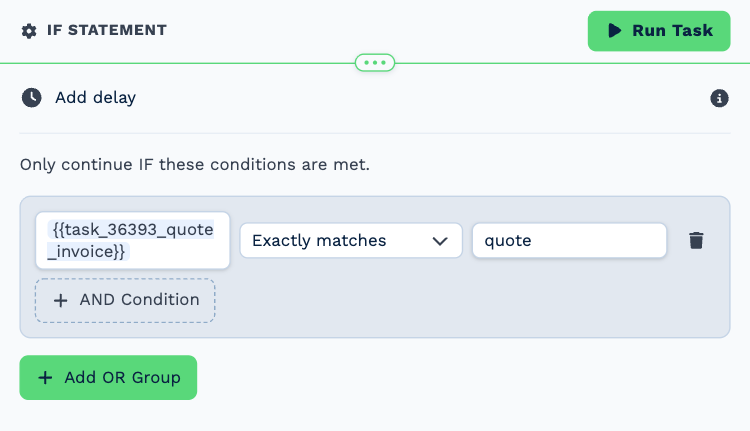
4. Still a quote?
Task: If Statement. Continues only if it is still a quote, not yet an invoice.
| Field | Set it to |
|---|---|
| Condition | {{task_36393_quote_invoice}} exactly matches quote |
5. Follow-up email
Task: Email. Emails the client the link to view and accept.
| Field | Set it to |
|---|---|
| Outgoing Email User | Wendy Darling |
| Client | {{task_36391_client_id}} |
| To | {{all_contacts}} |
| Subject | Any questions about your quote? |
Body
Hi,
We sent you quote {{task_36393_quote_invoice_o_id_full}} a few days ago and wanted to check you have everything you need.
You can view and accept it here: {{task_36393_document_url}}
If the scope or the timing needs adjusting, reply to this email and we will revise it.
Kind regards,
The Neverland team
6. Call reminder
Task: Workflow Note. Reminds the salesperson to call if there is no answer.
| Field | Set it to |
|---|---|
| Action | Create Note |
| Client ID | {{task_36391_client_id}} |
| Note Type | Note |
| Priority | Medium |
| Due Date | In Two Days (8AM) |
| Tag Users | Peter Pan |
Message
Follow-up email sent for quote {{task_36393_quote_invoice_o_id_full}} (${{task_36393_quote_invoice_total}}). Call if there is no answer.
Make it yours
- Add a second follow-up a week later with a different message.
- Tag the client’s responsible manager instead of a fixed person.