Grain meeting follow-up
Grain records the meeting and writes notes, but the notes stay in Grain. This workflow puts them where the rest of the team looks: a short summary, the next steps and the link to the recording, filed on the client the meeting was with, a few minutes after the call ends.
flowchart LR
    A[Meeting recorded] --> B[Wait for Grain's notes]
    B --> C[Read the recording]
    C --> D{Client found?}
    D -->|Yes| E[Summarise]
    E --> F[File on client]
Before you start
- A Grain connection. A workspace token covers the whole team's meetings; a personal token covers only the meetings of the person who created it.
- Your clients' contacts have their email addresses filled in. That is how BaseCloud finds the client a meeting was with.
- Credit for the AI Prompt task.
The workflow
| Step | Task | Type | What it does |
|---|---|---|---|
| 1 | Meeting recorded | Grain Trigger | Starts when Grain adds a recording of a meeting with someone from outside the company |
| 2 | Wait for Grain's notes | Delay | Gives Grain time to finish its summary and action items |
| 3 | Read the recording | Grain | Reads the recording again, with Grain's latest notes and the transcript |
| 4 | Client found? | If Statement | Continues only when the meeting was with one of your clients |
| 5 | Summarise | AI Prompt | Summarises the call and lists the next steps |
| 6 | File on client | Workflow Note | Files the summary and the recording link on the client |
About the variables
Values such as {{task_36601_…}} carry the number of the task they come from, so yours will
differ. Do not type them: click into a field and pick the value from an earlier task.
1. Meeting recorded
Task: Grain Trigger. Starts when Grain adds a recording of a meeting with someone from outside the company.
| Field | Set it to |
|---|---|
| Start this workflow when | A new recording is added |
| Grain account | Your Grain connection, for example Sales team Grain |
| Only meetings with someone from outside your company | Ticked |
| Only meetings that lasted at least (minutes, optional) | 5 |
Leave the other settings empty. To try the rest of the workflow, open the trigger's Input panel and select Load my recordings.
2. Wait for Grain's notes
Task: Delay. Gives Grain time to finish its summary and action items.
| Field | Set it to |
|---|---|
| Delay Type | Specified Time |
| Minutes | 15 |
3. Read the recording
Task: Grain. Reads the recording again, with Grain's latest notes and the transcript.
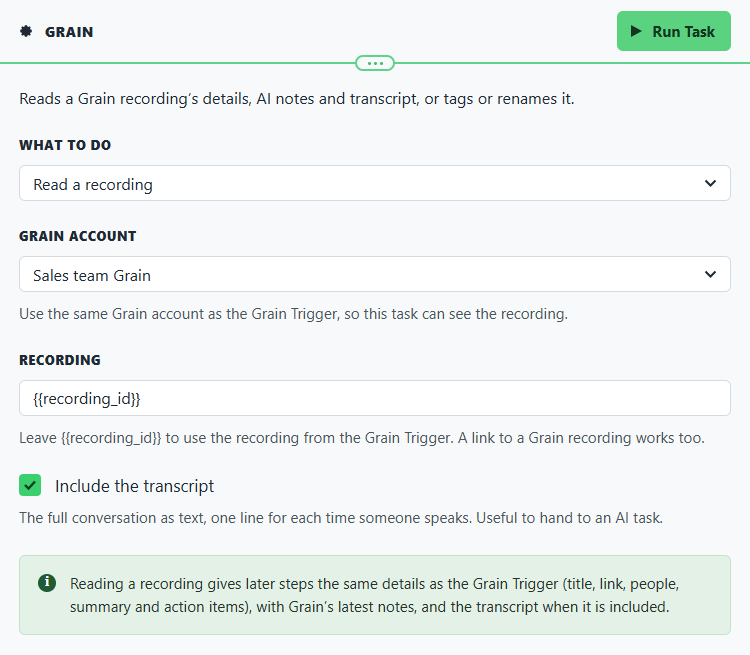
| Field | Set it to |
|---|---|
| What to do | Read a recording |
| Grain account | The same Grain connection as step 1 |
| Recording | Leave it as {{recording_id}}, the recording from step 1 |
| Include the transcript | Ticked |
4. Client found?
Task: If Statement. Continues only when the meeting was with one of your clients.
| Field | Set it to |
|---|---|
| Condition | {{task_36603_client_matched}} equals true |
The client is found when exactly one client has a contact with the email address of someone from outside your company in the meeting. A meeting with nobody you know, or with people from two of your clients, stops here.
5. Summarise
Task: AI Prompt. Summarises the call and lists the next steps.
| Field | Set it to |
|---|---|
| Input | {{task_36603_transcript}} |
| AI model | OpenAI · GPT-5 Mini (Balanced) |
| What type of analysis do you want to do? | Custom Prompt |
| Output Format | Text (default) |
Prompt
This is the transcript of a meeting with a client. Summarise it for the client record in three short bullet points, then list the agreed next steps under a heading "Next steps", with who will do each one. Keep names, amounts and dates exactly as spoken.
6. File on client
Task: Workflow Note. Files the summary and the recording link on the client.
| Field | Set it to |
|---|---|
| Action | Create Note |
| Client ID | {{task_36603_client_id}} |
| Note Type | Note |
| Priority | Medium |
| Due Date | Tomorrow (8AM) |
| Tag Users | The salesperson, or whoever follows up on meetings |
| Mark Tagged Users Done | Not Done (users must tick to complete) |
Message
{{task_36603_title}}
Recorded by {{task_36603_recorder_name}}, {{task_36603_duration_minutes}} minutes{{task_36605_output}}
Recording: {{task_36603_url}}
Make it yours
- To file only certain meetings, fill in Only when the title contains on the trigger, for example
Discovery. - Use Grain's own notes instead of your own summary: put
{{task_36603_summary}}and{{task_36603_action_items_text}}in the note, and leave out step 5. - Draft the follow-up email too: a second AI Prompt writes it to
{{task_36603_first_external_name}}, and an Email sends the draft to{{task_36603_recorder_email}}to check and send. - Tag the recording in Grain with a second Grain task set to Add a tag, for
example
filed-in-crm, so the team can see which meetings are on a client. - On the false side of Client found?, email
{{task_36603_recorder_email}}the recording link, so a meeting with someone new is added to BaseCloud by hand.