New Client Task
Overview
The New Client Task creates a new client (company) record in your CRM with an optional primary contact. Use it to automatically add leads, customers, and prospects to your system from forms, webhooks, or other automation triggers.
When to use this task:
- Create clients from form submissions
- Add leads from external sources
- Import customers from integrations
- Automatically create client records
- Link contact to new client
- Set responsible manager
- Assign client status
- Trigger CRM workflows
Key Features:
- Create client with company name
- Optional primary contact creation
- Auto-validates emails and phone numbers
- Auto-formats phone numbers
- Links contact to client automatically
- Sets responsible manager
- Assigns client status
- Triggers global CRM events
- Prevents duplicate clients
Important: This task creates NEW clients only. To find existing clients or prevent duplicates, use Match to Client first.
Quick Start
- Add New Client task
- Enter company name (required)
- Set client status (required)
- Assign responsible manager (required)
- Optionally add contact details
- Save
Simple Example:
Company Name: {{task_55001_company}}
Status: Lead
Responsible Manager: {{task_55001_assigned_to}}
Contact First Name: {{task_55001_first_name}}
Contact Email: {{task_55001_email}}
Configuration
Builder fields
The Field column is the label as it appears in the task builder; Key is the name the value is stored under and referenced by.
| Field | Key | Type | Default | Notes |
|---|---|---|---|---|
| Match Before Creating | match_groups |
match-group-builder | 0 |
|
| Client Name | client_name |
text | – | |
| Client Status | client_status |
select | – | |
| Responsible Manager | responsible_manager |
select | – | |
| Contact First Name | contact_name |
text | – | |
| Contact Last Name | contact_surname |
text | – | |
| Contact Email | contact_email |
text | – | |
| Contact Cell Number | contact_cell_number |
text | – | |
| Contact Landline | contact_landline_number |
text | – | |
| Custom Fields | custom_fields |
new-client-custom-fields | – |
Required Fields
Company Name:
Maximum 255 characters. This becomes the client record name.
Client Status:
Options: Lead, Prospect, Customer, Inactive, etc. (depends on your CRM setup)
Responsible Manager:
Must be a valid user email from your CRM system.
Optional Contact Fields
Add a primary contact to the client:
Contact First Name:
Maximum 255 characters.
Contact Surname:
Maximum 255 characters.
Contact Email:
Automatically validated. Invalid emails will prevent contact creation.
Contact Cell:
Auto-formatted and validated. Invalid numbers are rejected.
Contact Landline:
Auto-formatted and validated.
Contact Position:
Job title or position within company.
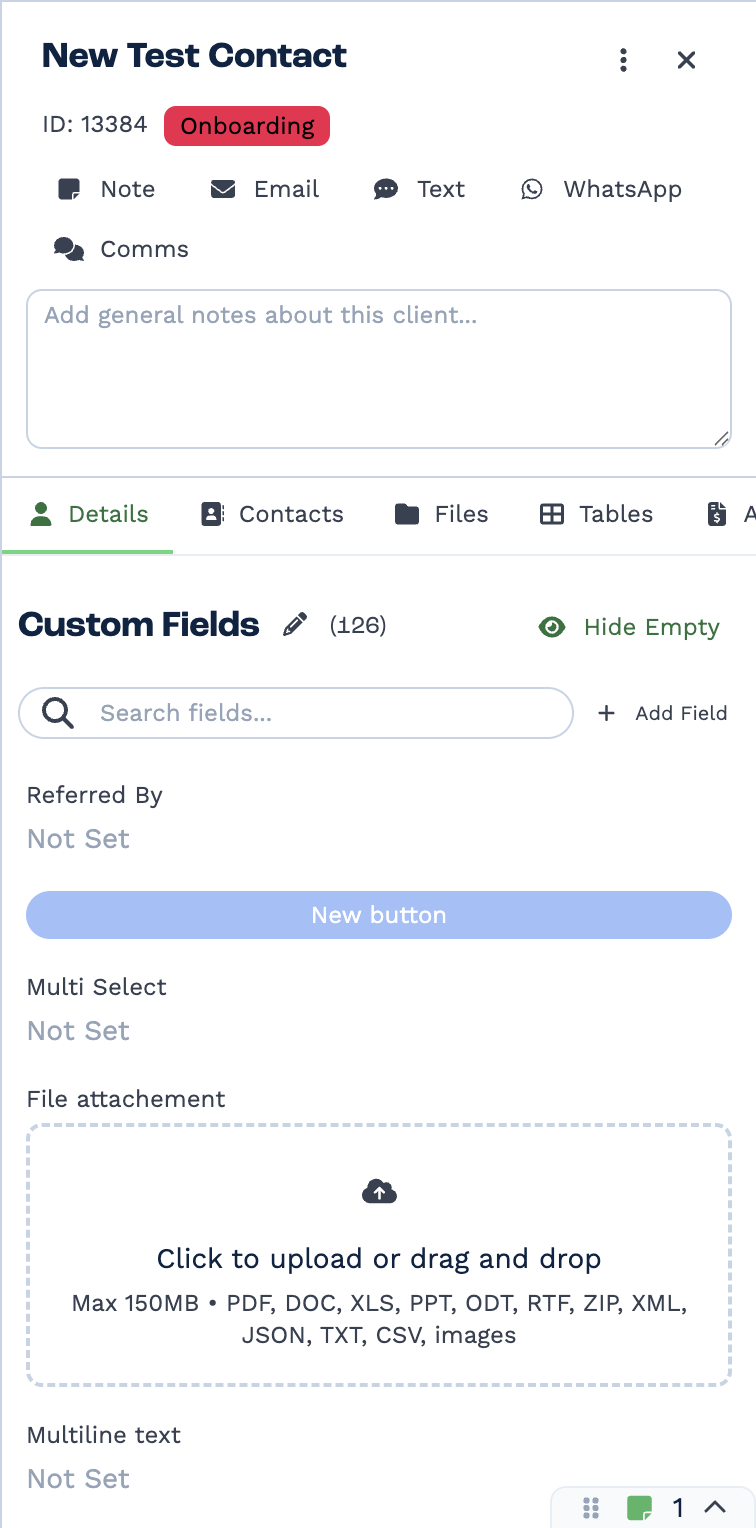
Custom fields are defined per tenant on the client record itself — the pencil edits the set, Add Field creates one. The name you give a field here is the name you reference from a task.
Outputs
Which fields appear depends on whether the task matched an existing client or created a new one.
Always
| Field | Type | Notes |
|---|---|---|
run |
boolean | Whether the task succeeded. |
run_text |
string | What happened, including the reason on failure. |
was_created |
boolean | true when a new client was created, false when an existing one was matched. The field to branch on. |
The client
| Field | Type | Example | Notes |
|---|---|---|---|
client_id |
number | 10482 |
The client's ID, whether created or matched. |
client_name |
string | Acme Trading |
Company name. |
client_status |
number | 3 |
Status ID. |
responsible_manager_id |
number | 57 |
The responsible user's ID. |
The primary contact
| Field | Type | Notes |
|---|---|---|
contact_id |
number | The primary contact's ID. |
contact_name, contact_surname |
string | Their name. |
contact_email |
string | Their email. |
contact_cell_number, contact_landline_number |
string | Their numbers. |
custom_fields |
array | Custom field values set on creation. |
When an existing client was matched
| Field | Type | Notes |
|---|---|---|
matched_field |
string | Which field matched — e.g. contact_email. |
match_criteria |
string | A readable description, e.g. Matched on contact email. |
matched_group_index |
number | Which match-rule group hit. |
total_matched |
number | How many clients matched. Above 1 means the rule was not unique. |
Use was_created to avoid double-sending
A workflow that welcomes new customers should branch on was_created, otherwise an existing
client re-entering the workflow receives the welcome again.
Real-World Examples
Create a client from a website enquiry
was_created tells you whether a record was made or an existing one matched, which is what to
branch on before sending a welcome message.
Create only when nobody matches
Webhook In
  └─ Match to Client     contact_email from the payload
      └─ If Statement    run is false
          └─ New Client  create the record
Capture a lead from an ad
Facebook Lead Ads Trigger
  └─ New Client   from {{task_56001_fields_email}} and the other form answers
      └─ Email    send the follow-up
Best Practices
Company Names
- Consistent formatting - Use title case or uppercase
- Remove extra spaces - Trim leading/trailing spaces
- Validate not empty - Check company name exists
- Handle individuals - Use person's name if no company
- Unique names - Check for duplicates first with Match to Client
Responsible Manager
- Valid users only - Must be actual CRM user email
- Territory routing - Assign based on location or criteria
- Round-robin - Distribute leads evenly
- Fallback owner - Have default if assignment fails
Contact Information
- Email validation - Verify format before submission
- Phone formatting - Use consistent formats
- Required fields - Decide which contact fields are essential
- Data quality - Clean data before creating client
Preventing Duplicates
Always use Match to Client first:
Match to Client → Check if exists
If Task → {{task_15001_found}} = false
  True: Create new client with New Client task
  False: Use existing {{task_15001_client_id}}
Troubleshooting
Client Not Created
Check:
- Company name not empty?
- Company name under 255 characters?
- Valid client status?
- Valid responsible manager email?
- Manager exists in CRM?
Debug: Check error messages in workflow logs
Contact Not Created
Possible causes:
- Invalid email format
- Invalid phone number format
- Missing required contact fields
- Client creation failed
Note: Client is created even if contact fails. Check if task_13001_contact_id exists.
Duplicate Clients Created
Issue: Multiple client records for same company
Cause: Not checking for existing clients first
Solution: Always use Match to Client before New Client
Match to Client → Try to find existing
If Task → {{task_15001_found}} = false
  True: Create with New Client
  False: Update with Edit Client
Phone Number Rejected
Issue: Contact not created due to invalid phone
Cause: Phone number format invalid
Solution: Use Phone Formatter first
Manager Not Assigned
Issue: Responsible manager field empty in created client
Cause: Invalid manager email provided
Solution: Use Coalesce for fallback manager
Coalesce → Value 1: {{task_55001_assigned_to}}
           Value 2: default-manager@company.com
New Client → Responsible Manager: {{task_19001_value}}
Frequently Asked Questions
Can I create multiple clients at once?
Use Loop task to iterate and create multiple clients sequentially.
Can I add custom fields during creation?
No. Create client first, then use Edit Client to add custom fields.
What if company name is missing?
Provide fallback using Coalesce or create from contact name.
Can I add multiple contacts?
Create primary contact with New Client, then use Contact task to add more.
How do I prevent duplicates?
Always use Match to Client first to check if client exists.
Can I update existing clients?
No. This task creates NEW clients only. Use Edit Client for updates.
What happens if email is invalid?
Contact creation fails, but client is still created. Email validation is strict.
Can I specify client ID?
No. Client ID is auto-generated by the system.
Related Tasks
- Match to Client - Find existing clients, prevent duplicates
- Edit Client - Update client details and custom fields
- Contact - Add additional contacts to client
- Phone Formatter - Format phone numbers before creation
- Coalesce - Provide fallback values for required fields
- If Task - Conditional client creation
- Loop - Bulk client creation
- Workflow Note - Create follow-up tasks for new clients