Call Logged
Overview
The Call Logged trigger starts a workflow when a call ends. It covers the calls your team makes and receives on your BaseCloud numbers, whoever made or took them. Each call starts the workflow once.
Alongside the details of the call, it tells the workflow two things that are hard to get any other way:
- whether this was the first call your team ever made to that client, and
- how many minutes after the client was added the call started.
Together they measure how quickly a new lead gets its first call.
When to use this trigger:
- Record how long each new lead waited for its first call.
- Move a client to the next status once someone has spoken to them.
- Tell a manager when a first call took longer than you allow.
- Send a "sorry we missed you" text after a call nobody answered.
- Leave a note on the client after every long call.
flowchart TD
    A[A call ends] --> B[Trigger starts the workflow]
    B --> C{First call to this client?}
    C -->|Yes| D[Save the minutes it took on the client]
    C -->|No| E[Carry on as usual]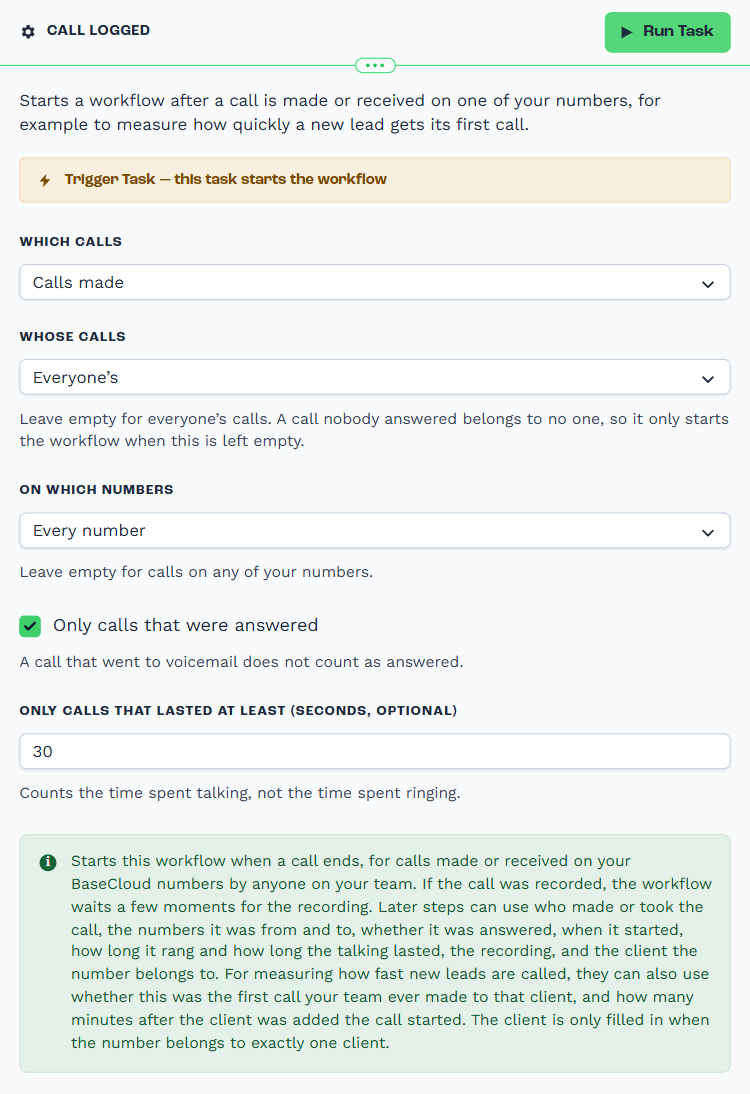
Configuration
Builder fields
The Field column is the label as it appears in the task builder; Key is the name the value is stored under and referenced by.
| Field | Key | Type | Default | Notes |
|---|---|---|---|---|
| Which calls | direction |
select | both |
Options: Calls made and calls received · Calls made · Calls received |
| Whose calls | user_ids |
select | – | |
| On which numbers | line_numbers |
select | – | |
| Only calls that were answered | answered_only |
checkbox | 0 |
|
| Only calls that lasted at least (seconds, optional) | min_talk_seconds |
number | – |
How it behaves
- It starts when the call ends. The times in the output are the times of the call itself, so the speed-to-lead figure is exact even though the workflow runs afterwards.
- A recorded call waits for its recording. The workflow starts as soon as the recording is saved, usually within a few seconds. If no recording arrives within 90 seconds, it starts without one.
- The client is filled in only when the number belongs to exactly one client. A number nobody has, or one shared by several clients, leaves the client fields empty.
- A call nobody answered belongs to no one. It starts the workflow only when Whose calls is left empty.
- Each call starts the workflow once, even when it rang several people.
Which calls are left out
- Calls to a tracking number that are passed on to another phone. Use the Call Tracking Trigger for those.
- Call Connect calls.
- Calls between two people on your own team.
- Conference calls, and the private call an agent makes to a colleague before handing a caller over.
Output Fields
The call
| Field | Description |
|---|---|
call_id |
The call's identifier. |
direction |
outbound for a call your team made, inbound for one it received. |
user_id |
The person who made the call, or who answered it. Empty when nobody answered. |
user_name |
That person's name. |
from_number |
The number the call came from. For a call your team made, this is your own number. |
to_number |
The number that was called. For a call your team received, this is your own number. |
line_number |
Your own number the call was on, whichever way it went. |
The client
| Field | Description |
|---|---|
client_id |
The client the other number belongs to, or empty. |
client_status_id |
That client's status when the call ended. |
client_registered |
When the client was added. |
auto_matched |
true when the number was matched to a client, false when it was not. |
The result
| Field | Description |
|---|---|
answered |
true when a person picked up. false for a missed call and for a voicemail. |
outcome |
answered, missed, voicemail, abandoned or busy. |
start_stamp |
When the call started. |
answer_stamp |
When it was answered. Empty when it was not. |
ring_duration |
Seconds spent ringing. |
talk_duration |
Seconds spent talking. |
recording_url |
The recording, when the call was recorded. |
Speed to lead
| Field | Description |
|---|---|
is_first_call_to_client |
true on the first call your team ever made to this client. Always false for calls received and for calls with no client. |
minutes_since_client_registered |
Whole minutes between the client being added and this call starting. Empty when there is no client. |
{{task_ID_run_text}} |
Call Logged trigger executed successfully. |
Times are in UTC.
Real-World Examples
Record how long each new lead waited for its first call
Call Logged                    calls made
  └─ If Statement              is_first_call_to_client equals true
      └─ Edit Client           save minutes_since_client_registered in a "Minutes to first call" field
Add a number field to your clients for the result. You can then report on it, or sort your clients by it.
Tell a manager when a first call was slow
Call Logged                    calls made, only answered
  └─ If Statement              is_first_call_to_client equals true
                               and minutes_since_client_registered is greater than 15
      └─ Workflow Note         tag the manager with the client and the minutes
Follow up on a call nobody answered
Call Logged                    calls received
  └─ If Statement              answered equals false and client_id is not empty
      └─ SMS                   "Sorry we missed you. We will call you back shortly."
Move a lead on once someone has spoken to them
Call Logged                    calls made, only answered, at least 30 seconds
  └─ If Statement              client_status_id equals your "New lead" status
      └─ Edit Client           set the status to "Contacted"
Best Practices
- Check for a client first. Branch on
client_idbeing empty before using the client fields. - Decide whether an attempt counts. Leave Only calls that were answered off to measure how fast your team tried to call. Turn it on to measure how fast they reached the lead.
- Save the number on the client.
minutes_since_client_registeredis most useful once it is in a client field you can report on. - Keep phone numbers on your contacts tidy. The call is matched to a client by the number, so a lead with no number saved cannot be matched.
Troubleshooting
| What you see | What to do |
|---|---|
| Nothing starts the workflow | Check Which calls, Whose calls, On which numbers and the two optional filters. Also check the workflow is switched on. |
| The client fields are empty | The number is not saved on any contact, or it is saved on contacts of more than one client. |
is_first_call_to_client is true twice for one client |
The first attempt was hung up before anyone answered. An attempt like that is not kept on the client's call history, so the next call is still the first. Turn on Only calls that were answered to avoid this. |
recording_url is empty |
The call was not recorded, or the recording took longer than 90 seconds to save. |
| Missed calls do not start the workflow | Whose calls has people picked. A call nobody answered belongs to no one. Leave it empty. |
Related Tasks
- Call Tracking Trigger - Calls to a tracking number
- Call Connect Trigger - Call Connect calls
- Edit Client - Save the result on the client
- Workflow Note - Tell someone about the call