Inbound text triage
Texts to a business number arrive from customers and strangers alike. This workflow makes sure a customer’s text reaches the person who knows them, and that an unknown number is asked who they are instead of being ignored.

Before you start
- A BaseCloud number that receives texts
The workflow
| Step | Task | Type | What it does |
|---|---|---|---|
| 1 | Text received | Text Message Received | Starts when a text arrives on any of your numbers |
| 2 | Find the sender | Match to Client(s) | Looks for a contact with the sender’s number |
| 3 | Known sender? | If Statement | Takes one path for a known customer and the other for an unknown number |
| 4 | To manager | Workflow Note | Sends the text to the customer’s responsible manager |
| 5 | Unknown: reply | SMS | Asks an unknown sender for their name and address |
| 6 | To front desk | Workflow Note | Tells the front desk about the unknown number |
About the variables
Values such as {{task_36397_…}} carry the number of the task they come from, so yours will
differ. Do not type them: click into a field and pick the value from an earlier task.
1. Text received
Task: Text Message Received. Starts when a text arrives on any of your numbers.
| Field | Set it to |
|---|---|
| Receiving number (optional) | Leave blank |
2. Find the sender
Task: Match to Client(s). Looks for a contact with the sender’s number.
| Field | Set it to |
|---|---|
| Action | Match to Client |
| Find the client by | Contact cell number = {{task_36397_from_number}} |
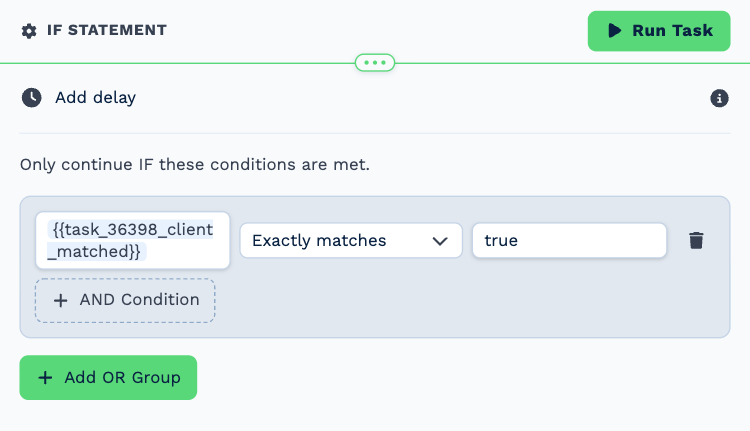
3. Known sender?
Task: If Statement. Takes one path for a known customer and the other for an unknown number.
| Field | Set it to |
|---|---|
| Condition | {{task_36398_client_matched}} exactly matches true |
4. To manager
Task: Workflow Note. Sends the text to the customer’s responsible manager.
| Field | Set it to |
|---|---|
| Action | Create Note |
| Client ID | {{task_36398_match_client_id}} |
| Note Type | Note |
| Priority | High |
| Due Date | Now |
| Tag Users | {{task_36398_match_client_responsible_manager}} |
Message
Text from {{task_36398_match_contact_name}}:
{{task_36397_message}}
5. Unknown: reply
Task: SMS. Asks an unknown sender for their name and address.
| Field | Set it to |
|---|---|
| Client | Leave blank |
| To (phone number) | {{task_36397_from_number}} |
Message
Thanks for your message. We could not find your number on our system. Please reply with your name and address and we will get right back to you.
6. To front desk
Task: Workflow Note. Tells the front desk about the unknown number.
| Field | Set it to |
|---|---|
| Action | Create Note |
| Client ID | 555 |
| Note Type | Note |
| Priority | Medium |
| Due Date | Now |
| Tag Users | Tiger Lily |
Message
Text from an unknown number ({{task_36397_from_number}}):
{{task_36397_message}}
They were asked for their name and address.
Make it yours
- Limit the trigger to one number under Receiving number.
- Add an AI Prompt task to draft a suggested reply into the note.