WhatsApp Business Cloud API
Overview
The WhatsApp Business task integrates BaseCloud CRM with Meta's official WhatsApp Business Cloud API, enabling enterprise-grade WhatsApp messaging with OAuth 2.0 authentication, multi-organization support, and advanced template management.
Key Features:
- 7 Actions: Send templates/text/media, create/manage templates, track message status, mark as read
- OAuth 2.0 Authentication: Secure Facebook integration with automatic token refresh
- Multi-WABA Support: Manage multiple WhatsApp Business Accounts (owned + client accounts)
- Template Management: Create, retrieve, and send WhatsApp-approved templates
- Message Status Tracking: Monitor delivery, read status, and failures
- Quality Ratings: Phone number quality monitoring (GREEN/YELLOW/RED)
- Official Meta API: Direct integration with Facebook Graph API v18.0
Use Cases:
- Multi-organization WhatsApp management
- Template-based marketing campaigns
- Order confirmations with media/QR codes
- Customer support with status tracking
- E-commerce order updates
- Appointment reminders
Prerequisites
1. Facebook Developer Account
Create App:
- Go to https://developers.facebook.com
- My Apps → Create App
- Select Business type
- Fill in app details and create
2. WhatsApp Business Account (WABA)
Setup WABA:
- In Facebook App Dashboard, add WhatsApp product
- Complete Business Verification (required for production)
- Select or create WhatsApp Business Account
- Add phone number to WABA
- Complete phone number verification
Account Types:
- Owned WABA: Your organization's account
- Client WABA: Customer accounts (via System User access)
3. OAuth Configuration in BaseCloud
Create App Connection:
- Navigate to BaseCloud CRM → Settings → App Connections
- Click + New App Connection
- Select WhatsApp Business from dropdown
- Click Authorize with Facebook
- Authorize permissions:
whatsapp_business_management- Manage WABA settingswhatsapp_business_messaging- Send messages- Select Business Account
- Save connection
OAuth Scopes Required:
4. Phone Number Configuration
Get Phone Number ID:
- In automation task, select app connection
- Reload Business Accounts dropdown (🔄 button)
- Select your WhatsApp Business Account
- Reload Phone Numbers dropdown (🔄 button)
- Select phone number (shows quality rating)
- Phone Number ID automatically populated
Quality Ratings:
- 🟢 GREEN: High quality, highest message limits
- 🟡 YELLOW: Medium quality, reduced limits
- 🔴 RED: Low quality, severe restrictions
Maintain quality by:
- Avoiding spam reports
- Maintaining high engagement rates
- Following WhatsApp policies
5. Message Templates
Create Templates:
Use WhatsApp Manager or create_template action:
- Define template name (lowercase, underscores)
- Select category (MARKETING, UTILITY, AUTHENTICATION)
- Design template components:
- HEADER: Text or media (optional)
- BODY: Main message with {{1}} placeholders (required)
- FOOTER: Small text (optional)
- BUTTONS: Quick replies, URLs, phone numbers (optional)
- Submit for approval (24-48 hours)
Template Example:
Name: order_confirmation
Category: UTILITY

HEADER: Your order is confirmed! 🎉

BODY: Hi {{1}}, your order #{{2}} has been confirmed.
Total: {{3}}
Estimated delivery: {{4}}

FOOTER: Thank you for your business

BUTTONS:
- Track Order (URL: https://example.com/track/{{1}})
Outputs
Session fields describe the 24-hour customer-service window: outside it, only template messages can be sent.
Reference fields as {{task_<ID>_<field>}}.
| Field | Type | Notes |
|---|---|---|
session_open |
string | Whether the 24-hour messaging window is currently open for this contact. |
session_expires_at |
string | When that window closes. |
success |
boolean | |
message_id |
string | |
recipient |
string | |
thread_id |
string | The chat thread this message belongs to. |
error |
string |
Always emitted
| Field | Type | Notes |
|---|---|---|
run |
boolean | Whether the task succeeded. |
run_text |
string | What happened, including the reason on failure. |
Fields marked as action-dependent may be absent
This task does several different things depending on its action setting, and only the fields relevant to that action are emitted. Check a real run in the OUTPUT panel before referencing one downstream.
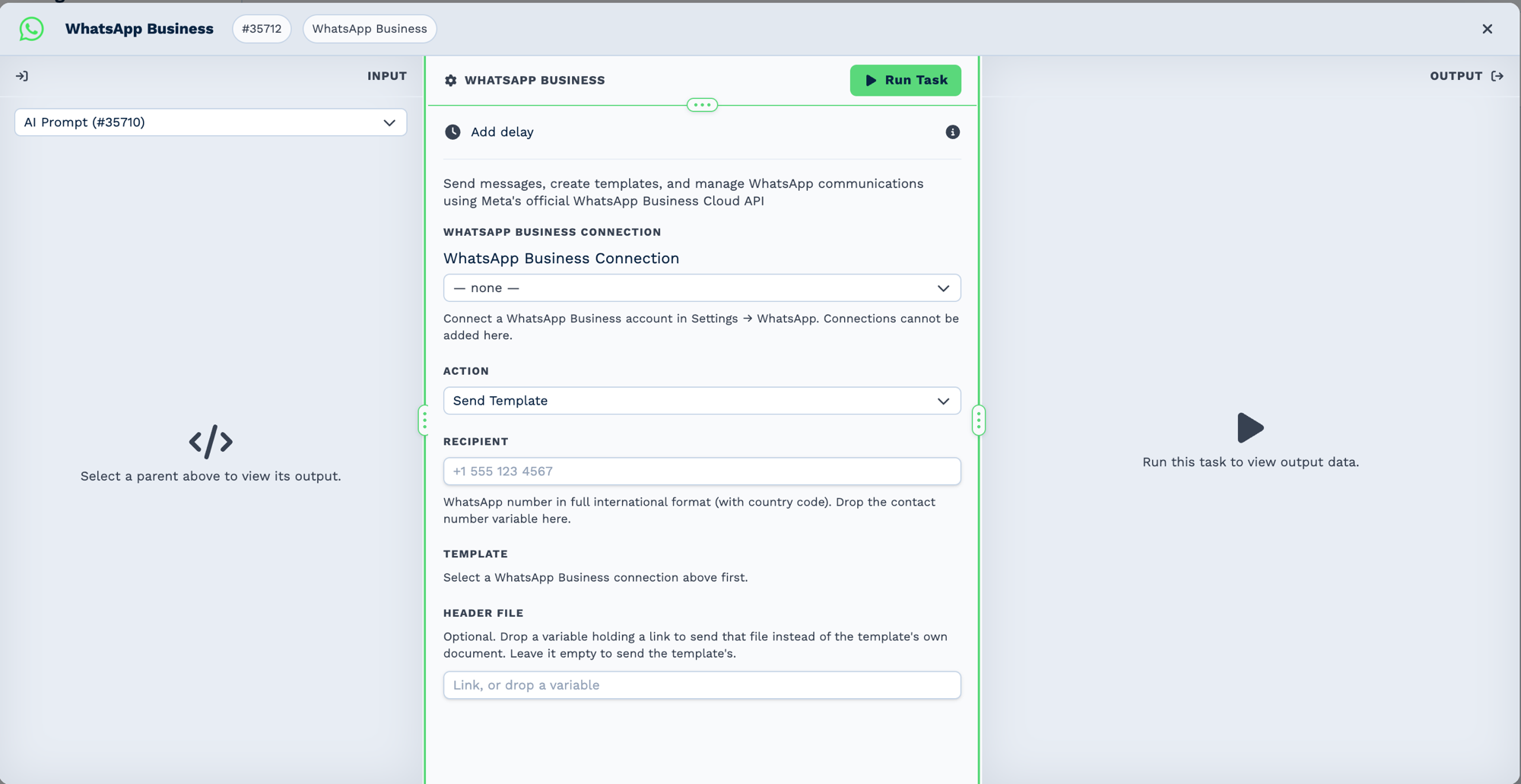
Connections are made in Settings → WhatsApp Business, not on the task — the selector here only picks from what is already connected, and the template list stays empty until one is chosen.
Configuration
Builder fields
The Field column is the label as it appears in the task builder; Key is the name the value is stored under and referenced by.
| Field | Key | Type | Default | Notes |
|---|---|---|---|---|
| WhatsApp Business Connection | app_connection_id |
app-connection | – | |
| Action | action |
select | send_template |
Options: Send Template · Send Text (session only) · Send Media (session only) |
| Recipient | recipient |
text | – | |
| Template | template_name |
whatsapp-template-select | – | Only shown when action is send_template |
| Template Variables | tpl_params |
whatsapp-template-params | – | Only shown when action is send_template |
| Message Text | message_text |
textarea | – | Only shown when action is send_text |
| Media Type | media_type |
select | image |
Options: Image · Video · Document · Audio. Only shown when action is send_media |
| Media URL | media_url |
text | – | Only shown when action is send_media |
| Caption | caption |
text | – | Only shown when action is send_media |
| Filename | filename |
text | – |
Action 1: send_template
Send pre-approved WhatsApp template (works anytime, no 24-hour window).
| Field | Required | Description | Example |
|---|---|---|---|
| action | Yes | Must be "send_template" | send_template |
| app_connection_id | Yes | OAuth connection ID | Select from dropdown |
| business_account_id | Yes | WABA ID | Auto-populated from selection |
| phone_number_id | Yes | Sender phone number ID | Auto-populated from selection |
| recipient | Yes | Recipient WhatsApp number (no +) | 27821234567 |
| template_name | Yes | Approved template name | order_confirmation |
| template_language | No | Template language code (default: en_US) | en_US |
| template_parameters | No | JSON array of parameter values | ["John", "12345", "R500", "Dec 25"] |
Output Variables:
task_58001_run; // true/false
task_58001_run_text; // "Template sent successfully."
task_58001_action; // "send_template"
task_58001_message_id; // WhatsApp message ID (wamid.xxx)
task_58001_recipient; // Recipient number
task_58001_template_name; // Template used
How It Works:
- Validates OAuth connection and permissions
- Builds template payload with parameters
- Sends via:
POST https://graph.facebook.com/v18.0/{phone_number_id}/messages - Request body:
{ "messaging_product": "whatsapp", "to": "27821234567", "type": "template", "template": { "name": "order_confirmation", "language": { "code": "en_US" }, "components": [ { "type": "body", "parameters": [ { "type": "text", "text": "John" }, { "type": "text", "text": "12345" }, { "type": "text", "text": "R500" }, { "type": "text", "text": "Dec 25" } ] } ] } } - Returns
wamidmessage ID for tracking
Template Parameters:
Parameters replace placeholders in order:
{{1}}= first parameter value{{2}}= second parameter value- etc.
Provide as JSON array: ["value1", "value2", "value3"]
Or build dynamically:
Action 2: create_template
Create new WhatsApp message template (requires Meta approval 24-48 hours).
| Field | Required | Description | Example |
|---|---|---|---|
| action | Yes | Must be "create_template" | create_template |
| app_connection_id | Yes | OAuth connection ID | Select from dropdown |
| business_account_id | Yes | WABA ID | Auto-populated |
| template_name | Yes | Unique template name (lowercase, underscores) | new_customer_welcome |
| template_category | Yes | Template category | MARKETING, UTILITY, or AUTHENTICATION |
| template_language | No | Language code (default: en_US) | en_US |
| template_components | Yes | JSON structure defining template | See below |
Template Components JSON:
[
  {
    "type": "HEADER",
    "format": "TEXT",
    "text": "Welcome to Our Service!"
  },
  {
    "type": "BODY",
    "text": "Hi {{1}}, thank you for signing up! Your account ID is {{2}}. Start exploring today.",
    "example": {
      "body_text": [["John", "ACC12345"]]
    }
  },
  {
    "type": "FOOTER",
    "text": "Reply STOP to unsubscribe"
  },
  {
    "type": "BUTTONS",
    "buttons": [
      {
        "type": "QUICK_REPLY",
        "text": "Get Started"
      },
      {
        "type": "URL",
        "text": "Visit Website",
        "url": "https://example.com/{{1}}"
      }
    ]
  }
]
Output Variables:
task_58001_run; // true/false
task_58001_run_text; // "Template created successfully."
task_58001_action; // "create_template"
task_58001_template_id; // Meta template ID
task_58001_template_name; // Template name
task_58001_status; // "PENDING" (awaiting approval)
How It Works:
- Validates template name format (lowercase, underscores only)
- Builds template structure with components
- Submits via:
POST https://graph.facebook.com/v18.0/{waba_id}/message_templates - Request body:
- Meta reviews template (24-48 hours)
- Returns template ID with PENDING status
- Check status with
get_templatesaction
Template Categories:
- MARKETING: Promotional, offers, announcements (subject to 24-hour window limits)
- UTILITY: Account updates, order confirmations, support (better delivery rates)
- AUTHENTICATION: One-time passwords, verification codes (special handling)
Component Types:
- HEADER: Optional, supports TEXT or MEDIA (IMAGE, VIDEO, DOCUMENT)
- BODY: Required, main message text with {{1}}, {{2}} placeholders
- FOOTER: Optional, small disclaimer text (no placeholders)
- BUTTONS: Optional, up to 3 buttons (QUICK_REPLY, URL, PHONE_NUMBER)
Action 3: get_templates
Retrieve all message templates for a WABA.
| Field | Required | Description | Example |
|---|---|---|---|
| action | Yes | Must be "get_templates" | get_templates |
| app_connection_id | Yes | OAuth connection ID | Select from dropdown |
| business_account_id | Yes | WABA ID | Auto-populated |
| status_filter | No | Filter by status | APPROVED, PENDING, REJECTED, DISABLED |
| limit | No | Max templates to return (default: 100) | 50 |
Output Variables:
task_58001_run; // true/false
task_58001_run_text; // "Successfully retrieved templates."
task_58001_action; // "get_templates"
task_58001_templates; // Array of template objects
task_58001_count; // Number of templates returned
Template Object Structure:
{
  "name": "order_confirmation",
  "status": "APPROVED",
  "category": "UTILITY",
  "language": "en_US",
  "id": "1234567890",
  "components": [/* components array */]
}
How It Works:
- Calls:
GET https://graph.facebook.com/v18.0/{waba_id}/message_templates - Query params:
?fields=name,status,category,language,components&limit=100 - Optionally filters by status
- Returns array of templates
- Use in If Conditions to check template availability
Status Values:
- APPROVED: Ready to use in
send_template - PENDING: Awaiting Meta review (24-48 hours)
- REJECTED: Not approved (check rejection reason)
- DISABLED: Previously approved but now disabled
Action 4: send_text
Send plain text message within 24-hour conversational window.
| Field | Required | Description | Example |
|---|---|---|---|
| action | Yes | Must be "send_text" | send_text |
| app_connection_id | Yes | OAuth connection ID | Select from dropdown |
| phone_number_id | Yes | Sender phone number ID | Auto-populated |
| recipient | Yes | Recipient WhatsApp number | 27821234567 |
| message_text | Yes | Message content | Thank you for contacting us! |
| preview_url | No | Enable link preview (default: false) | true |
Output Variables:
task_58001_run; // true/false
task_58001_run_text; // "Text message sent successfully."
task_58001_action; // "send_text"
task_58001_message_id; // wamid.xxx
task_58001_recipient; // Recipient number
How It Works:
- Validates 24-hour conversation window exists
- Sends via:
POST https://graph.facebook.com/v18.0/{phone_number_id}/messages - Request body:
- Returns message ID
24-Hour Window:
- Session starts when customer messages your business
- Window lasts 24 hours from last customer message
- Outside window, use
send_templateinstead - Meta returns error if window expired
Link Preview:
Set preview_url: true to show preview for URLs in message:
Shows rich preview with image, title, description.
Action 5: send_media
Send media file (image, video, document, audio).
| Field | Required | Description | Example |
|---|---|---|---|
| action | Yes | Must be "send_media" | send_media |
| app_connection_id | Yes | OAuth connection ID | Select from dropdown |
| phone_number_id | Yes | Sender phone number ID | Auto-populated |
| recipient | Yes | Recipient WhatsApp number | 27821234567 |
| media_type | Yes | Media type | image, video, document, audio |
| media_url | Conditional | Public URL to media (or use media_id) | https://example.com/invoice.pdf |
| media_id | Conditional | Pre-uploaded media ID (or use media_url) | 1234567890 |
| caption | No | Media caption (image/video/document only) | Your invoice for December |
| filename | No | Display filename (documents only) | invoice_dec2024.pdf |
Either media_url OR media_id required
Output Variables:
task_58001_run; // true/false
task_58001_run_text; // "Media sent successfully."
task_58001_action; // "send_media"
task_58001_message_id; // wamid.xxx
task_58001_recipient; // Recipient number
task_58001_media_type; // Media type sent
How It Works:
- Validates media type and required fields
- If
media_urlprovided: - Meta downloads from URL
- URL must be publicly accessible
- HTTPS preferred
- If
media_idprovided: - Uses pre-uploaded media
- Upload via WhatsApp Media API first
- Sends via:
POST https://graph.facebook.com/v18.0/{phone_number_id}/messages - Request body (URL example):
Media Types:
| Type | Formats | Max Size | Caption | Filename |
|---|---|---|---|---|
| image | JPG, PNG, WEBP | 5 MB | ✅ Yes | ❌ No |
| video | MP4, 3GP | 16 MB | ✅ Yes | ❌ No |
| document | PDF, DOC, DOCX, XLS, XLSX, PPT, PPTX | 100 MB | ✅ Yes | ✅ Yes |
| audio | MP3, OGG, AMR | 16 MB | ❌ No | ❌ No |
Media URL Requirements:
- Public URL (no authentication required)
- HTTPS strongly recommended
- Valid content-type header
- File size within limits
- Hosted on reliable server
Action 6: get_message_status
Check delivery/read status of sent message.
| Field | Required | Description | Example |
|---|---|---|---|
| action | Yes | Must be "get_message_status" | get_message_status |
| app_connection_id | Yes | OAuth connection ID | Select from dropdown |
| message_id | Yes | WhatsApp message ID (wamid) | wamid.HBgNMjc4MjEyMzQ1Njc4... |
Output Variables:
task_58001_run; // true/false
task_58001_run_text; // "Message status retrieved."
task_58001_action; // "get_message_status"
task_58001_data; // Full status object
task_58001_data.status; // "sent", "delivered", "read", "failed"
task_58001_data.timestamp; // Unix timestamp
task_58001_data.errors; // Error details if failed
How It Works:
- Queries:
GET https://graph.facebook.com/v18.0/{message_id} - Returns status and timestamp
- Use to verify delivery or troubleshoot failures
Status Values:
- sent: Message sent from Meta server
- delivered: Message delivered to recipient device
- read: Recipient opened message (if read receipts enabled)
- failed: Delivery failed (check errors)
Use Case:
// Send message
Task 1: WhatsApp Business - Send Template
  Output: {{task_58001_message_id}}

// Wait for delivery
Task 2: Delay 5 seconds

// Check status
Task 3: WhatsApp Business - Get Message Status
  message_id: {{task_58001_message_id}}

// Conditional action
Task 4: If Condition
  Condition: {{task_58001_data.status}} equals "delivered"
  Then: Mark order as notified
  Else: Retry send or alert admin
Action 7: mark_as_read
Mark incoming message as read (sends read receipt).
| Field | Required | Description | Example |
|---|---|---|---|
| action | Yes | Must be "mark_as_read" | mark_as_read |
| app_connection_id | Yes | OAuth connection ID | Select from dropdown |
| phone_number_id | Yes | Your phone number ID | Auto-populated |
| message_id | Yes | Incoming message ID (wamid) | From webhook {{task_46001_message_id}} |
Output Variables:
task_58001_run; // true/false
task_58001_run_text; // "Message marked as read."
task_58001_action; // "mark_as_read"
task_58001_success; // true/false
How It Works:
- Sends read receipt via:
POST https://graph.facebook.com/v18.0/{phone_number_id}/messages - Request body:
- Customer sees double blue checkmarks
- Indicates message received and processed
Use Case:
// Incoming message webhook
Trigger: Webhook In
  Receives: {{task_46001_message_id}}, {{task_46001_sender}}, {{task_46001_message_text}}

// Process message
Task 1: Workflow Note - log the message against the client
  Insert message into database

// Send read receipt
Task 2: WhatsApp Business - Mark As Read
  message_id: {{task_46001_message_id}}

// Auto-reply
Task 3: WhatsApp Business - Send Text
  recipient: {{task_46001_sender}}
  message_text: Thank you! We received your message.
Real-World Examples
Reply automatically to an inbound message
WhatsApp Message Received
  └─ Chat Thread          read the conversation so far
      └─ AI Prompt        draft a reply, memory key {{task_61001_session_id}}
          └─ WhatsApp Business   send it
Send a template outside the messaging window
session_open tells you whether the 24-hour window is still open. Outside it, only templates
can be sent.
Confirm an order over WhatsApp
Troubleshooting
Error: "No app connection selected"
Cause: OAuth connection not configured
Solutions:
- Go to Settings → App Connections
- Create WhatsApp Business connection
- Complete OAuth authorization
- Select connection in task dropdown
Error: "Invalid or expired access token"
Cause: OAuth token expired (30-minute lifetime)
Solutions:
- BaseCloud automatically refreshes tokens
- If error persists, re-authorize connection:
- Settings → App Connections
- Edit WhatsApp connection
- Click Re-authorize
- Check OAuth scopes are correct:
whatsapp_business_managementwhatsapp_business_messaging
Error: "Phone number ID not found" (404)
Cause: Phone number doesn't exist or no access permission
Solutions:
- Verify phone number is registered in your WABA
- Check Facebook Business Manager permissions
- Use correct phone number ID (not phone number itself)
- Reload phone numbers in task dropdown (🔄 button)
- Verify OAuth connection has access to correct WABA
Detailed Troubleshooting:
If phone registered but error persists:
- Token may not have
whatsapp_business_managementscope - Phone may be in different WABA than selected
- Business verification may be incomplete
- Check WhatsApp Manager: https://business.facebook.com/wa/manage/
Error: "Insufficient permissions" (403)
Cause: Missing OAuth scopes or Business Manager role
Solutions:
- Verify OAuth scopes:
whatsapp_business_management- Requiredwhatsapp_business_messaging- Required- Check Business Manager role (Admin or Editor)
- Re-authorize app connection with all scopes
- Verify business account verification status
Template Not Found
Cause: Template name doesn't exist or not approved
Solutions:
- Use
get_templatesaction to list available templates - Check template status is "APPROVED"
- Verify exact template name (case-sensitive, lowercase, underscores)
- Wait 24-48 hours if recently submitted
Template Parameter Mismatch
Cause: Wrong number of parameters or incorrect order
Solutions:
- Check template definition in WhatsApp Manager
- Count placeholders:
{{1}},{{2}},{{3}} - Provide parameters in JSON array matching order:
- Verify parameter types match template (all strings)
Session Message Failed (24-Hour Window)
Cause: No active conversation window for text/media send
Solutions:
- Use
send_templateaction instead (works anytime) - Customer must message your business first to open window
- Window lasts 24 hours from last customer message
- Check message timestamp to confirm window active
Media Upload Failed
Cause: Media URL inaccessible, wrong format, or too large
Solutions:
- Verify URL is publicly accessible (test in browser)
- Use HTTPS URLs (HTTP may fail)
- Check file size within limits:
- Images: 5 MB
- Videos: 16 MB
- Documents: 100 MB
- Audio: 16 MB
- Verify correct MIME type/file extension
- Alternative: Upload to WhatsApp first, use
media_id
Message Status Returns "failed"
Cause: Various delivery issues
Solutions:
- Use
get_message_statusto get error details - Common failures:
- Invalid recipient number
- Recipient blocked your number
- Recipient phone offline extended period
- Message content policy violation
- Check
{{task_58001_data.errors}}for specific error code - Retry with template if text/media failed
Quality Rating is YELLOW or RED
Cause: High spam reports, low engagement, policy violations
Solutions:
- Immediate Actions:
- Reduce sending volume
- Only message engaged customers
- Verify opt-in compliance
-
Remove inactive recipients
-
Long-term Improvements:
- Use utility templates instead of marketing
- Increase engagement (ask questions, provide value)
- Honor opt-outs immediately
-
Follow WhatsApp Commerce Policy
-
Prevention:
- Monitor quality rating daily (see Example 5)
- Maintain high response rates
- Avoid spam trigger words
- Segment audiences carefully
Business Account Discovery Failed
Cause: No Business Manager access or permissions issue
Solutions:
- Verify Facebook Business Manager account exists
- Check you're Admin or Editor on Business Account
- Complete business verification (required for production)
- Re-authorize app connection
- Check Business Manager at: https://business.facebook.com/settings/whatsapp-business-accounts
Rate Limiting / 429 Errors
Cause: Exceeded messaging rate limits
Solutions:
- Tier Limits (vary by quality rating and verification):
- Tier 1: 1,000 messages/24 hours
- Tier 2: 10,000 messages/24 hours
- Tier 3: 100,000 messages/24 hours
-
Tier 4 (Unlimited): Request from Meta
-
Immediate Actions:
- Add delays in bulk send loops (3-5 seconds)
- Spread campaigns over multiple days
-
Implement exponential backoff on errors
-
Long-term:
- Request tier upgrade: https://business.facebook.com/wa/manage/
- Maintain GREEN quality rating for highest limits
- Use multiple phone numbers for high volume
Best Practices
OAuth Management
- Connection Setup:
- Create separate app connections for dev/staging/production
- Use descriptive connection names: "WhatsApp - Main Account", "WhatsApp - Client ABC"
-
Document which connection uses which WABA
-
Token Refresh:
- BaseCloud handles automatic refresh (30-min access, 90-day refresh)
- Monitor for refresh failures (check connection status)
-
Re-authorize connection if issues persist
-
Multi-WABA:
- Use one app connection per WABA
- Store connection ID in client records for dynamic selection
- Test each connection after setup
Template Strategy
- Design Templates:
- Use UTILITY category for transactional messages (better delivery)
- Use MARKETING for promotional content (subject to limits)
- Keep body text concise (< 1024 characters)
-
Add footer with opt-out instructions
-
Approval Process:
- Submit templates in batches
- Allow 48 hours for approval
- Keep rejection reasons for learning
-
Create template library for reuse
-
Parameter Management:
- Use meaningful parameter names in docs
- Validate parameter values before sending
- Provide example values in template submission
- Test templates with edge cases (long names, special chars)
Message Delivery
- Session vs Template:
- Use templates for initial outreach (no 24-hour window needed)
- Use text/media for ongoing conversations (cheaper)
- Track conversation status to choose appropriately
-
Template fallback if session expired
-
Status Tracking:
- Use
get_message_statusfor critical messages - Log message IDs for troubleshooting
- Implement retry logic for failed sends
-
Alert admins on persistent failures
-
Quality Maintenance:
- Monitor quality rating weekly (Example 5)
- Only message engaged customers
- Verify opt-in status before sends
- Quick response to customer messages
Performance Optimization
- Rate Limiting:
- Add 3-5 second delays in bulk send loops
- Batch campaigns (100 messages, delay, next 100)
- Spread large campaigns over hours/days
-
Monitor tier limits
-
Caching:
- Cache template list (reload hourly, not per automation)
- Cache business account/phone number lists
-
Store frequently-used values in variables
-
Error Handling:
- Wrap critical sends in If Conditions (validate data)
- Implement exponential backoff for retries
- Log failures for analysis
- Provide fallback channels (email, SMS)
Compliance
- Opt-In Management:
- Maintain
whatsapp_opt_infield in CRM - Verify opt-in before every send
- Provide clear opt-out mechanism
-
Honor opt-outs within 24 hours
-
Content Policies:
- Follow WhatsApp Commerce Policy
- Avoid: Adult content, gambling, misleading claims
- Required for financial: Clear pricing, terms
-
Healthcare: Follow additional regulations
-
Data Privacy:
- Don't share customer data between WABAs
- Encrypt sensitive data in parameters
- Follow GDPR/POPIA requirements
- Provide data access/deletion mechanisms
FAQ
Q: What's the difference between WhatsApp Business and WATI?
A:
- WhatsApp Business: Official Meta API, OAuth 2.0, multi-WABA support, template management, status tracking
- WATI: Third-party platform, simple Bearer token, media retrieval, contact sync
- Choose WhatsApp Business for: Enterprise, multi-tenant, official Meta integration
- Choose WATI for: Simpler setup, media handling, existing WATI subscription
Q: Can I use both simultaneously on the same phone number?
A: No, a WhatsApp number can only connect to one platform at a time. Choose one platform per number.
Q: How long does OAuth token last?
A: Access token: 30 minutes (auto-refreshed). Refresh token: 90 days. BaseCloud handles refresh automatically.
Q: What happens if business verification fails?
A: Limited to 250 messages/24 hours. Complete verification for higher limits and production use.
Q: Can I send messages outside 24-hour window?
A: Yes, using approved templates (send_template action). Templates work anytime.
Q: How do I increase messaging limits?
A:
- Maintain GREEN quality rating
- Complete business verification
- Request tier upgrade in WhatsApp Manager
- Meta reviews and approves based on usage patterns
Q: Can I manage multiple client WABAs?
A: Yes! Create one app connection per WABA. Use connection selector in tasks.
Q: How do I track message delivery?
A: Use get_message_status action with message ID (wamid) from send response.
Q: What's the cost per message?
A: Meta charges per conversation (24-hour window):
- User-initiated: Free (first 1,000/month per number)
- Business-initiated (templates): Varies by country (~$0.03-$0.05 USD)
- Check current rates: https://developers.facebook.com/docs/whatsapp/pricing
Q: Can I send bulk messages?
A: Yes, use Loop task with delays. Respect rate limits based on your tier and quality rating.
Q: How do I create templates programmatically?
A: Use create_template action with JSON components structure (see Action 2).
Q: What if template is rejected?
A: Check rejection reason in WhatsApp Manager. Common issues:
- Policy violations (spam, misleading content)
- Formatting errors
- Missing required elements
- Revise and resubmit
Q: Can I send interactive buttons?
A: Yes, in templates. Use BUTTONS component with QUICK_REPLY, URL, or PHONE_NUMBER types.
Q: How do I handle incoming messages?
A: Configure webhook in Meta App Dashboard. Use Webhook In trigger to receive messages. Use mark_as_read and send_text to respond.
Related Tasks
- WATI - Alternative WhatsApp platform integration
- Email - Fallback communication channel
- SMS - Alternative text messaging
- If Statement - Message routing logic
- Loop - Bulk message sending
- Delay - Rate limiting in campaigns
- Webhook In - Receive WhatsApp webhooks
- Match to Client - Match phone numbers to clients
Technical Details
- Type ID: 58
- Function:
taskWhatsAppBusiness()in automationService.js (lines 10128-10208) - Service:
whatsappService.js(552 lines, 10+ functions) - API Version: Meta Graph API v18.0
- Authentication: OAuth 2.0 (Facebook)
- Scopes:
whatsapp_business_management,whatsapp_business_messaging - Output Prefix:
task_58001_* - Token Lifetime: 30 minutes (access), 90 days (refresh)
- Rate Limits: Tier-based (1K-100K+ messages/24hr)
- Quality Ratings: GREEN, YELLOW, RED (affects limits)
- Message ID Format:
wamid.xxx(WhatsApp Message ID)