Email templates
Who can do this
Anyone with CRM Access.
A template is a subject and message you use again and again — a quote cover note, a booking confirmation, a payment thank-you. Fields such as the client's name are filled in for each email.
Templates are shared by everyone in the account. You'll use them when you send an email and in automations' Email task.
Edit a template
Open Settings → Email Templates and click a template.
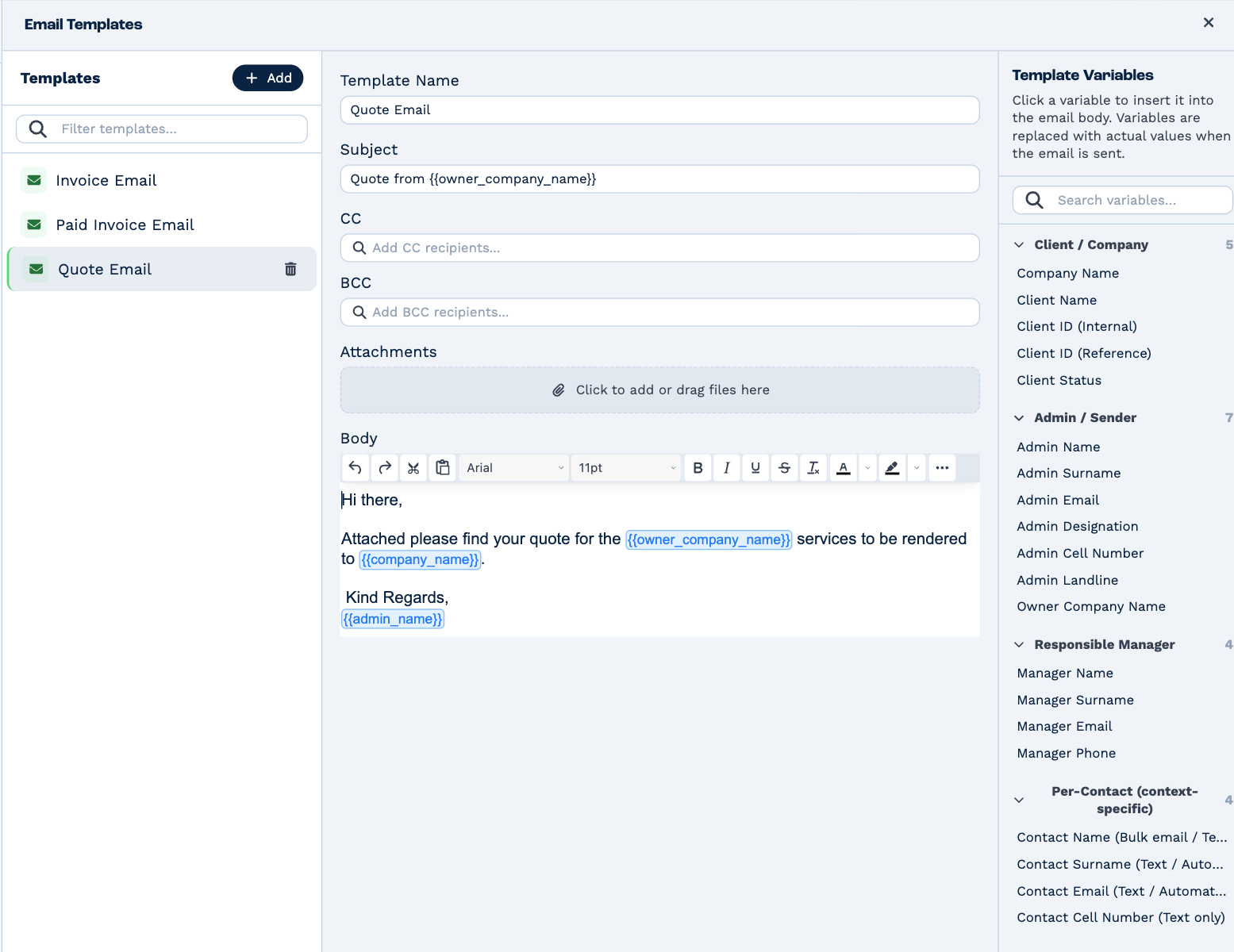
- Template Name — what you pick it by. Recipients don't see it.
- Subject and Body — what the email says.
- CC and BCC — added when an automation sends the template.
- Attachments — files sent with every email that uses the template. Click, or drag files onto the box.
Changes save as you make them.
Fill in client details
Template Variables, on the right, are fields BaseCloud fills in when the email is sent. Click one to put it
where your cursor is in the body. They appear in double braces — {{company_name}} becomes the client's company
name, {{admin_name}} the name of whoever sends it.
They're grouped by where the value comes from: the client, the person sending, the client's responsible manager, and the contact the email is going to. Search for one at the top of the list.
Add or delete a template
Click Add, give the template a name, and fill it in. To delete one, click the bin beside it in the list.
Every account starts with three: Quote Email, Invoice Email and Paid Invoice Email, for sending quotes and invoices.