Change or cancel a meeting
Who can do this
The person who organized the meeting — or, on their calendar, anyone with See and edit other people's calendars. Guests can answer the invitation but not change the meeting.
Click a meeting to see it: when and where, who organized it, who's invited and whether they've answered, and the notes. A meeting with a video link shows Join Meeting, and a button to copy the link.
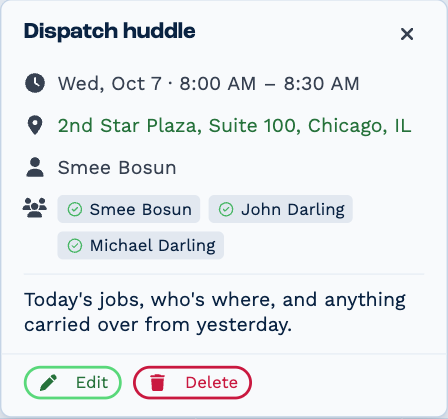
Click the location to open it in maps.
Change it
Click Edit, change what you need — the time, the guests, the location, the notes — and click Save This Event (or Save Entire Series, for a repeating meeting). You can also double-click the meeting to edit it.
Guests are told about the change, by Outlook or Google if your calendar is connected, or by BaseCloud if it isn't.
Move it to another time
Drag the meeting to a new time, or drag its bottom edge to make it longer or shorter. If the move doesn't save, the meeting goes back where it was and BaseCloud tells you. Dragging works with a mouse, not on a phone or tablet.
Cancel it
Click Delete, then confirm. The meeting is removed from your calendar and the guests are told it's canceled. Deleting can't be undone.
Repeating meetings
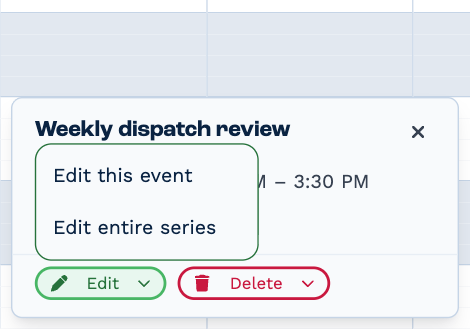
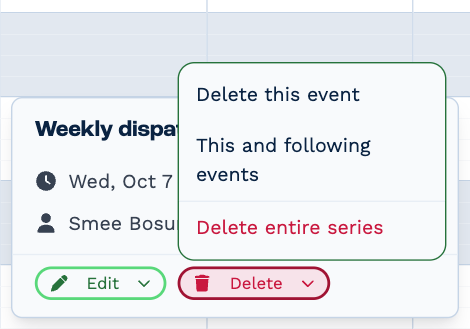
When you edit or delete one meeting in a series, BaseCloud asks which you mean:
| Choice | What it changes |
|---|---|
| Edit this event | Just this one. The rest of the series stays as it is. |
| Edit entire series | Every meeting in the series. |
| Delete this event | Just this one. |
| This and following events | This one and every one after it — the series ends here. |
| Delete entire series | Every meeting in the series. |
While you're editing, a banner says which you chose. Switch to entire series or Switch to this event only changes your mind, but loses what you've changed so far. Dragging one meeting in a series moves only that one.
A one-off meeting can be made to repeat: open it, click Edit, and click Recurring. See Make it repeat.
Unsaved changes
Closing the panel with changes you haven't saved asks first: Discard throws them away, Keep Editing goes back.