Loop Task
Overview
The Loop task runs the tasks beneath it once for every item in a list. Use it to email each contact in a query result, sync a batch of records, or process every line item on an order.
A loop dispatches one iteration per pass. It does not fan the whole list out at once — see How a loop runs, which is the part that most affects how long a loop takes and what it does to anything it calls.
flowchart TD
    A[Loop over the list] -->|one iteration per pass| B[Body tasks for the current item]
    B --> C{More items?}
    C -->|yes| A
    C -->|no| D[Wait for all body work to finish]
    D --> E[done branch runs once]
When to use this task:
- Send a personalised message to each contact in a list
- Push each row of a query result to another system
- Process every item on an order
- Repeat a fixed number of times
What a loop gives you:
- One iteration per item, in forward or reverse order
- The current item in
loop_value, and its position inloop_index - A separate
donebranch that runs once after everything finishes - Counts of what happened, on that
donebranch - Nesting, with each loop tracking its own position
What this task cannot do
| You may want to… | This task | Do this instead |
|---|---|---|
| Stop the loop early | No break input exists. Every item is dispatched. | Put an If Statement at the top of the body so unwanted items do nothing. |
| Cap the number of iterations | No max-iterations input exists. | Shorten the list before it reaches the loop. |
| Skip empty or invalid items | Every item is dispatched, including empty strings. | First task in the body is an If Statement that tests loop_value. |
| Process the whole list at once | Iterations are dispatched one per pass, deliberately. | Nothing to change — this is a rate limiter, not a fault. See How a loop runs. |
Read the current item on the done branch |
The loop is over; there is no current item. | Use the totals (total_items, iterations_completed, …). |
| Change the list while it is running | The list is fixed when the loop first runs. | Build the final list before the loop. |
An item that should not be processed still costs an iteration. Filtering inside the body is how you skip work, not how you skip the pass.
Quick Start
- Add Loop task to workflow
- Specify array to loop through
- Add tasks after Loop task
- Configure tasks to use loop item data
- Test with small dataset
- Save
Simple Example:
Configuring the Loop
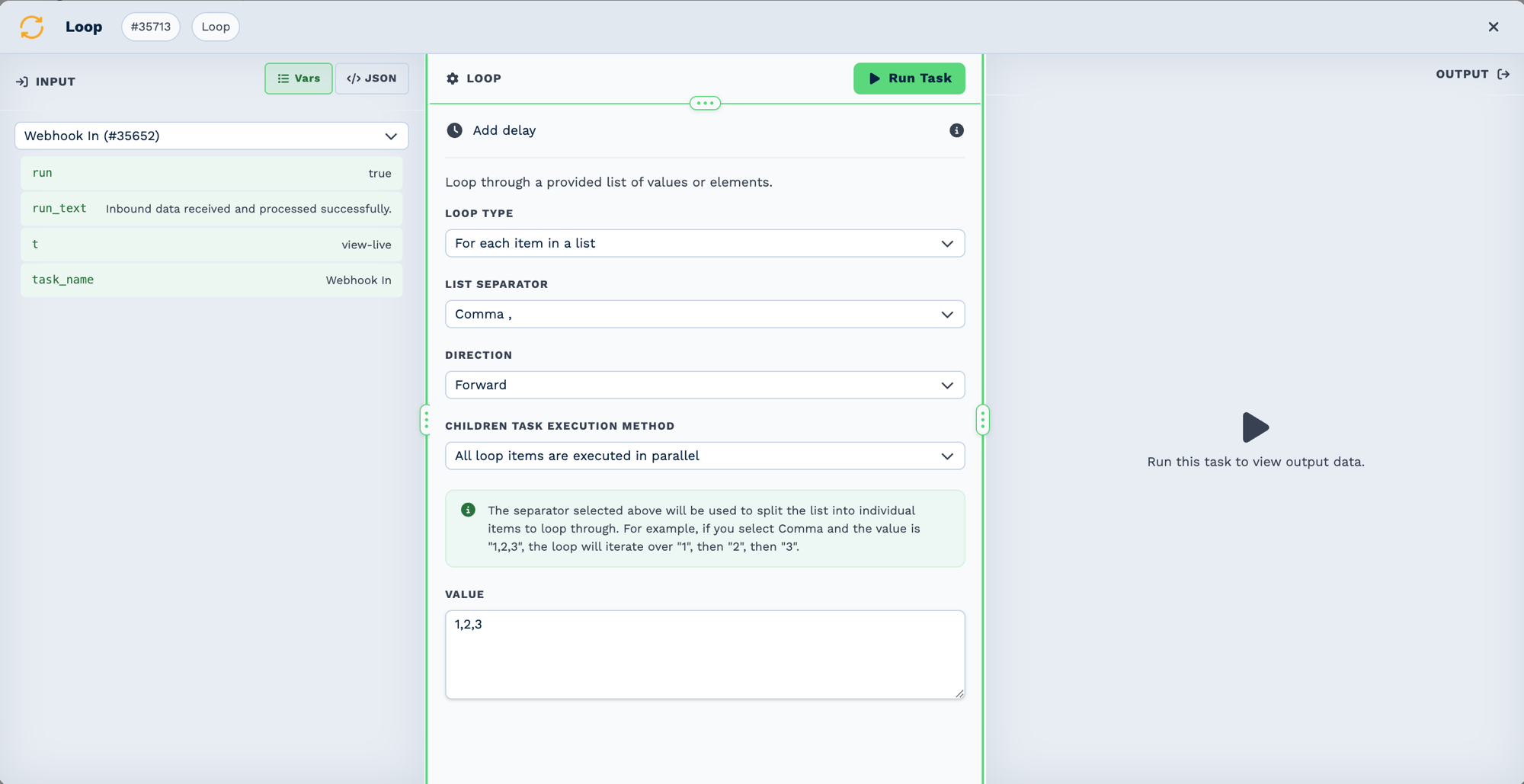
The field labels in the builder do not use the key names. Loop Type is action, List Separator is delimiter, Value is loop_array, and Children Task Execution Method is execution_type.
Array Source
What you point Loop Array at depends on where the list comes from.
A delimited string — the default, and the simplest:
An array from the trigger:
Rows from a sheet:
Rows from a MySQL Query — the one case with no native equivalent, because no other task returns an arbitrary filtered list of CRM records:
A fixed number of repeats:
Use .JSON for arrays, not the flattened form
{{task_46001.JSON.customers}} passes the array itself. The flattened form
({{task_46001_customers_0_name}}) reaches one item and is not what a loop wants.
Inputs
Builder fields
The Field column is the label as it appears in the task builder; Key is the name the value is stored under and referenced by.
| Field | Key | Type | Default | Notes |
|---|---|---|---|---|
| Loop Type | action |
select | items |
Options: For each item in a list · For each item in a JSON array · Repeat a specific number of times |
| List Separator | delimiter |
select | , |
Options: Comma , · Semi Colon ; · Pipe Character |. Only shown when action is items |
| Direction | direction |
select | forward |
Options: Forward · Reverse. Only shown when action is items, array |
| Children Task Execution Method | execution_type |
select | asynchronous |
Options: All loop items are executed in parallel · Next loop item only executes after all children have completed |
| Value | loop_array |
textarea | – |
| Key | Type | Required | Default | What it does |
|---|---|---|---|---|
loop_array |
string | yes | – | The list to iterate. How it is read depends on action. An empty value is not an error: the loop completes with 0 iterations and goes straight to done. |
action |
string | no | items |
How loop_array is interpreted. One of items, array, value — see below. Anything else fails the task with No valid action provided. |
delimiter |
string | no | , |
Separator used when action is items. An empty value falls back to a comma. |
direction |
string | no | forward |
forward starts at the first item; any other value walks the list from the end. |
execution_type |
string | no | asynchronous | synchronous makes each iteration wait for the previous one to finish. Any other value — including a missing or corrupt one — is treated as asynchronous. |
action — how the list is read
| Value | loop_array holds |
Result |
|---|---|---|
items |
Delimited text: alice@x.com,bob@y.com |
Split on delimiter. The default, and what most workflows use. |
array |
A JSON array: [{"id":1},{"id":2}] |
Parsed as JSON. Not an array, or not valid JSON, fails the task. |
value |
A number: 5 |
Counts 1..5. Must be a number greater than 0. |
Outputs
Field names are exactly as the task emits them. Reference them as {{task_<ID>_<field>}}.
On every pass, available to the body tasks
| Field | Type | Example | Notes |
|---|---|---|---|
run |
boolean | true |
false when the configuration is invalid. |
run_text |
string | Loop value: alice@x.com |
Carries the current value. |
loop_value |
string or object | alice@x.com |
The current item. An object when action is array. This is the field body tasks use. |
loop_index |
number | 0 |
Position of the current item, zero-based. |
loop_index_end |
number | 2 |
Index of the last item — length - 1. |
new_loop_index |
number or END |
1 |
The position the loop will use on its next pass. Becomes the string END on the final pass. Internal bookkeeping; you rarely read it. |
loop_array |
array | ["a","b","c"] |
The parsed list. |
action |
string | items |
The action that was used. |
delimiter |
string | , |
The delimiter that was used. |
direction |
string | forward |
The direction that was used. |
loop_index is not the same thing inside a nested loop
On an ordinary task, loop_index answers "which iteration of the loop above me am I part of".
An inner Loop task keeps the outer loop's loop_index intact — that is what makes
{{loop_value}} from the outer loop resolve correctly inside the inner loop's configuration.
An inner loop's own position lives in its own output, not in that column.
On the done branch only
See Reading what the loop did below for how these are used.
| Field | Type | Notes |
|---|---|---|
total_items |
number | How many items the loop was given. 0 for an empty list. |
iterations_completed |
number | Iterations that ran and did not fail. Deliberately not total_items minus errors — a loop that stopped early would otherwise report items it never dispatched as successful. |
iterations_errored |
number | Iterations in which a task failed. |
tasks_run |
number | Total tasks run across every iteration. |
Rare
| Field | Type | Notes |
|---|---|---|
already_finished |
boolean | true only when a loop that had already finished its list is run again — a retry after the final pass. It re-reports END and does not run the body a second time. |
Running Tasks After the Loop
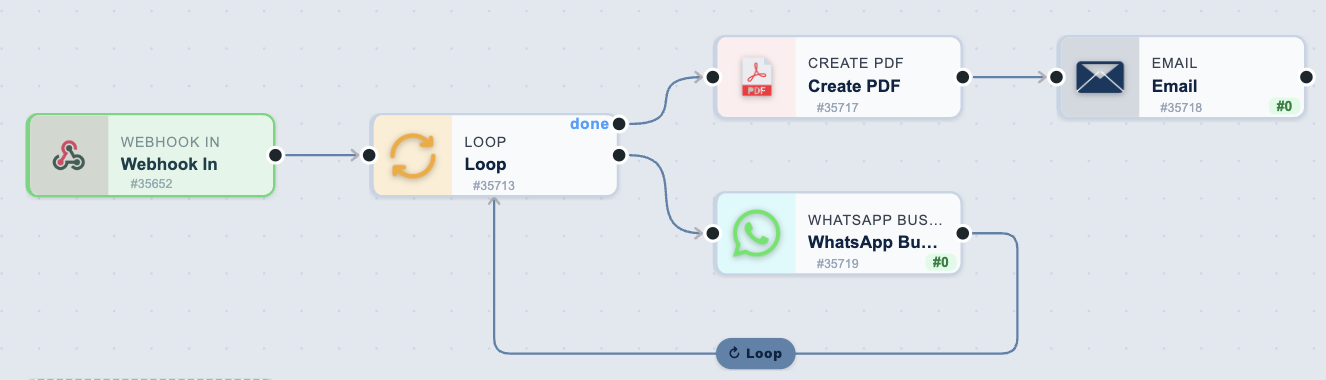
Two ports, and the difference matters. The lower port is the body — it runs once per item and feeds back into the loop, which is the return edge along the bottom. The upper done port runs once, after every item has been dispatched and the whole body has drained. Tasks that should run per item go on the body; tasks that should run once at the end go on done.
The Loop task has two outputs.
| Output | Runs |
|---|---|
| the main output (unlabelled) | once per item, for every item |
done |
once, after the whole loop has finished |
Drag from the done handle — the lower one on the right of the node — to attach tasks that should
run after every item has been processed. Use it for the things you only want to happen once: a
summary email, a status write-back, a single notification.
done waits for all the work, not just the last item. If your loop runs asynchronously, several
items are in flight at the same time; the done branch still waits for every one of them to finish
before it runs.
Reading what the loop did
Tasks on the done branch can use these:
| Field | Description |
|---|---|
task_[ID]_total_items |
How many items the loop was given |
task_[ID]_iterations_completed |
How many finished without error |
task_[ID]_iterations_errored |
How many had a task fail |
task_[ID]_tasks_run |
Total tasks run across every iteration |
Example — a summary after a bulk send:
1. Loop         - over a list of addresses
2.   Email      - Send to {{task_29001_loop_value}}   <- main output, runs per item
4. done → Email - "Sent {{task_29001_iterations_completed}} of
                   {{task_29001_total_items}}, {{task_29001_iterations_errored}} failed"
Only send the summary if nothing failed:
done → If Task - {{task_29001_iterations_errored}} equals 0
       True:  Email the success summary
       False: Create a Workflow Note to investigate
Things to know
- Per-item fields such as
{{task_29001_loop_value}}are not available on thedonebranch. The loop is over, so there is no current item. Use the totals above instead. - An empty list runs the
donebranch withtotal_itemsof0, and does not run the main output at all. "Nothing to do" still reaches your notification step. - If the Loop task itself fails — for example the input is not valid JSON — neither output runs.
- A Delay inside the loop body holds the
donebranch until that delay fires. A loop with a 30-day delay in it will not reachdonefor 30 days. That is expected, not a fault. - Nested loops each get their own
done. An inner loop'sdoneruns once per outer iteration; the outer loop'sdonewaits for all of them.
Tasks Inside Loop
The current item is {{task_<ID>_loop_value}}. When the items are objects, reach their fields
with the flattened form — {{task_29001_loop_value_email}} for {"email": "..."}.
Message each person in a list
Update a record per item
Webhook In
  └─ Loop                  over {{task_46001.JSON.records}}, action: array
      └─ Match to Client   contact_email: {{task_29001_loop_value_email}}
          └─ Edit Client   update the matched client
Skip items that do not qualify
Loop                    over the list
  └─ If Statement       {{task_29001_loop_value_status}} equals "active"
      └─ Webhook Out    only runs for active items
Filtering happens inside the body — every item still costs an iteration. See What this task cannot do.
Space out calls to a rate-limited API
A loop already dispatches one iteration per pass, so this is only needed when the body itself must slow down further.
How a loop runs
This section describes timing, and it is the part that decides how long a loop takes and how hard it hits whatever the body calls.
One iteration per pass
A loop dispatches one iteration each time the automation runner picks it up — roughly every five seconds in production. It does not dispatch the whole list at once.
That is deliberate. A loop over 1,000 items ramps up over roughly an hour and a half rather than pushing 1,000 subtrees into the queue at once, which matters when the body sends email or calls a rate-limited API.
Parallel or one at a time
The Children Task Execution Method setting decides whether the loop waits between items.
| Builder option | Key value | What happens |
|---|---|---|
| All loop items are executed in parallel (default) | asynchronous |
The loop starts an item, then moves on to the next without waiting for the first to finish. Items overlap. |
| Next loop item only executes after all children have completed | synchronous |
The loop starts an item and waits until every task in it has finished before starting the next. Items run one at a time. |
What "parallel" actually means
Automations run in passes: BaseCloud checks for waiting work every 5 seconds at most.
- Inside an item, nothing waits for a pass. When an item starts, its tasks run straight through, one after another, in that same pass.
- Between items, the loop does wait for a pass. A loop starts one item per pass, whichever option you choose.
So in parallel mode the items do not all start at the same moment. They start at least 5 seconds apart, and each runs alongside the ones already going.
5 seconds is the best case
A pass does not start until the previous one has finished, so when the automation queue is busy the gap between items stretches to however long a pass takes. A pass is also skipped entirely while the database is working through a very slow query. The timings below assume a quiet queue.
Three items, each with a 60-second Delay in the body, on a quiet queue:
| Parallel | One at a time | |
|---|---|---|
| Item 1 | starts at 0s, finishes at ~60s | starts at 0s, finishes at ~60s |
| Item 2 | starts at ~5s, finishes at ~65s | starts at ~65s, finishes at ~125s |
| Item 3 | starts at ~10s, finishes at ~70s | starts at ~130s, finishes at ~190s |
done runs |
after about 70 seconds | after about 3 minutes 10 seconds |
Parallel saves time by letting the slow parts overlap, not by starting everything together.
Which to choose
- Parallel is the default and right for most loops — sending a message to each contact, updating each record. The whole loop takes roughly as long as its slowest item, plus at least 5 seconds for every item in the list.
- One at a time is for when an item depends on the one before it having finished, when the order things happen in matters, or when a service you call cannot handle several requests at once.
When a parallel loop runs one at a time anyway
A loop whose items change a variable created outside the loop runs one item at a time, even when it is set to parallel. Every Loop Task's node carries a "Sequential" or "Parallel" badge showing how it will really run; hover it to see why, and the loop's panel names the task responsible.
This is not a setting being ignored — it is the only way that loop can be correct. Changing a variable means reading its value, adding to it, and writing it back. With items overlapping, two of them read the same value and the second write erases the first, so a summary built this way quietly comes out missing most of its items.
To get the speed back, use the Variable task's Append action instead. Append adds to a variable in one step, so items can safely overlap and the loop keeps running in parallel. Your setting is never changed: remove or change the task and the loop goes back to parallel on its own.
Only changing an outside variable does this. A variable created inside the loop belongs to that item alone, and appending or reading never causes it.
Worth knowing
- A long list takes a while to get going, even in parallel. At one item per pass, 200 items take at least 1,000 seconds — around 17 minutes, longer on a busy queue — before the last one starts. A useful side effect: a big loop never hits an external service with all of its requests at the same instant.
- In parallel, do not rely on the order items finish in. An item with less work to do can finish before one that started earlier.
- Neither option hands you all the results at once. If a step needs every item to be finished,
connect it to the
doneport — it runs once, after everything beneath the loop is complete.
When a loop reports complete
A loop is finished only when everything beneath it is finished — not when the last item was dispatched.
| Situation | What the loop is doing |
|---|---|
| More items to dispatch | Waiting for its next pass |
| Every item dispatched, bodies still running | Waiting for its subtree to drain |
| Everything beneath it finished | Complete — the done branch runs |
This is why a single slow task deep inside the body holds the whole loop open, and why a
Delay in the body postpones done by that much. It is also why nesting works: an inner
loop stays unfinished while its own body runs, so the outer loop waits for it.
Real-World Examples
Send a personalised email to each address on a list
Schedule
  └─ Loop         over "alice@example.com,bob@example.com,carol@example.com"
      └─ Email    to {{task_29001_loop_value}}
Three iterations, one email each, dispatched one per pass.
Process every line item on an order
Webhook In
  └─ Loop               over {{task_46001.JSON.items}}, action: array
      └─ Math Formula   {{task_29001_loop_value_quantity}} * {{task_29001_loop_value_price}}
Work through rows from a sheet
Schedule
  └─ Google Sheets       get_rows
      └─ Loop            over {{task_44001.JSON.rows}}, action: array
          └─ SMS         send to {{task_29001_loop_value_phone}}
Report once, after everything has finished
Schedule
  └─ Loop              over the list
      ├─ body ─────── Email    to {{task_29001_loop_value}}
      └─ done ─────── Email    "Sent {{task_29001_iterations_completed}} of
                                {{task_29001_total_items}}, {{task_29001_iterations_errored}} failed"
The done branch runs once, after every iteration has finished — see
Running Tasks After the Loop.
Nested Loops
A loop inside a loop works, and each tracks its own position.
Webhook In
  └─ Loop  (outer)          over {{task_46001.JSON.orders}}, action: array
      └─ Loop  (inner)      over {{task_29001_loop_value_items}}, action: array
          └─ Webhook Out    send {{task_29002_loop_value}}
Two things to know:
- The inner loop's configuration can still reference the outer loop's current item. That is what makes "for each order, loop over that order's items" resolve to the right order.
- Each loop gets its own
donebranch. The inner one runs once per outer iteration; the outer one waits for all of them.
Nesting multiplies the passes
Ten orders with ten items each is a hundred iterations, dispatched one per pass. Keep the outer list short.
Best Practices
Performance
- Limit iterations - Process in batches (100-500 per run)
- Add delays - Rate limit API calls (0.5-1 second)
- Paginate large datasets - Multiple scheduled runs
- Filter before looping - Use SQL WHERE to reduce items
- Break early - Stop loop when condition met
Error Handling
- Try-catch in Code tasks - Handle errors per iteration
- Check success - Verify operations completed
- Log failures - Track which items failed
- Continue on error - Don't stop entire loop for one failure
- Retry logic - Re-process failed items later
Data Quality
- Validate before loop - Check array exists and isn't empty
- Handle missing fields - Provide defaults
- Check null values - Skip invalid items
- Deduplicate - Ensure unique items
- Sort order - Process in logical sequence
Maintainability
- Name loops clearly - "Loop through customers" not "Loop 1"
- Comment complex logic - Explain iteration purpose
- Keep simple - Max 5-10 tasks in loop
- Extract complex operations - Use Code task for calculations
- Test with small dataset - Verify logic before production
Troubleshooting
The done Branch Has Not Run
This is usually not a fault. done waits for every iteration's tasks to finish, so it will
not run while any of them is still going.
Check, in this order:
- Is there a Delay inside the loop body? A 30-day delay means
donewill not run for 30 days, per item. This is the most common cause by far, and it is working as designed. - Is a task in the body waiting on something external? A rate-limited API call backs off and retries; the loop waits for it.
- Does the loop node show as running on the canvas? Hover it. A loop that has dispatched everything and is waiting says so in its tooltip. Running means healthy.
- Only if the loop shows as failed is something actually wrong — check the loop's own output for a configuration or parsing error.
A loop can sit waiting for months and still be perfectly healthy. Nothing should ever be cleaned up, retried, or cancelled purely because it has been waiting a long time.
Loop Not Executing
Check:
- Array field exists?
{{task_x_results_JSON}} - Array empty? Check
{{task_x_rows}} > 0 - Valid JSON format?
- Loop task enabled?
Debug:
Can't Access Loop Item Data
Error: {{task_29001_email}} is empty
Check:
- Field name correct? Case-sensitive
- Loop task ID correct?
- Task is inside loop (after Loop task)?
- Array items have that field?
Debug: View execution history → Loop task → See item structure
Loop Running Too Long
Causes:
- Too many items (1000s)
- No delay between iterations
- Slow external API calls
- Complex tasks in loop
Solutions:
- Add
Max Iterations: 100 - Add Delay task in loop
- Process in batches
- Optimize tasks
Loop Stuck on One Item
Check:
- Infinite nested loop?
- Task failing but not stopping?
- Break condition never met?
Solution:
- Add
Max Iterationssafety limit - Check task execution in history
- Verify break conditions
Memory/Timeout Issues
Error: Workflow timeout or Memory limit
Causes:
- Processing thousands of items
- Large data in each iteration
- Complex calculations
Solutions:
- Reduce batch size
- Paginate: Process 100 per run, multiple runs
- Simplify tasks in loop
- Use database queries instead of loading all data
Frequently Asked Questions
What's the maximum loop iterations?
No hard limit, but practical limits:
- Recommended: 100-500 per workflow run
- Maximum: 1000s possible but slower
- Best practice: Batch process with multiple scheduled runs
Can I loop through a CSV?
Yes, first parse CSV to JSON array using Code task, then loop through result.
How do I count successful vs failed iterations?
Use Variable task to track:
let success = parseInt(input.task_41001_success_count) || 0;
if (input.task_x_success) success++;
return { success_count: success };
Can I loop through non-JSON data?
Loop requires JSON array format. Use Code task to convert other formats first.
How do I stop loop midway?
Set break condition:
Can I restart failed loop iterations?
Not automatically. Best practice:
- Log failed items to database
- Create separate workflow to retry failures
Do all tasks in loop run for each item?
Yes, unless you use If tasks for conditional execution.
Can I modify loop array while looping?
No, loop operates on snapshot of array at start.
Related Tasks
- MySQL Query - Provide arrays to loop through
- Code Task - Transform data before/in loop
- If Task - Conditional logic per iteration
- Delay Task - Rate limiting in loops
- Variable Task - Track loop progress