BaseCloud Documentation
BaseCloud is a CRM and automation platform. You build workflows by connecting tasks on a visual canvas — no code — so the work that used to sit in someone's inbox happens on its own.
How a workflow works
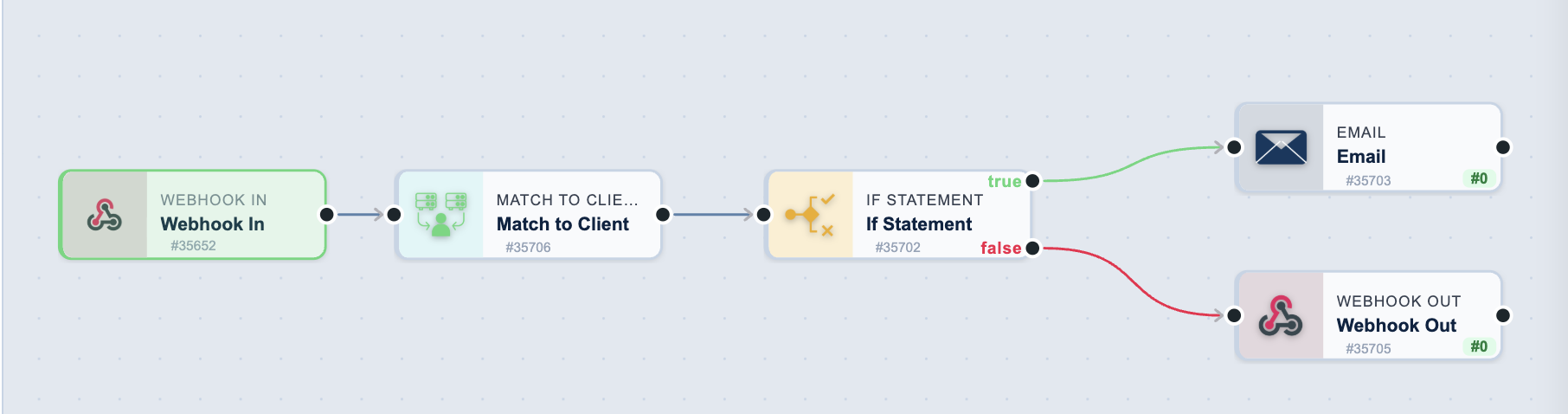
Every workflow starts with exactly one trigger and continues through as many actions as you need. The trigger listens; the actions do the work. Each task passes its output to the next.
flowchart LR
    A[Form submitted] --> B[Match to Client]
    B --> C{New customer?}
    C -->|Yes| D[Send welcome email]
    C -->|No| E[Log the enquiry]
That is the whole model. A form submission arrives, the workflow looks the client up in the CRM, checks whether they are new, and takes a different path for each answer.
Start here
-
Build your first workflow
A guided walkthrough, start to finish, in about ten minutes.
-
Browse every task
All triggers and actions, what they output, and how to configure them.
-
Learn from a worked example
Complete workflows built step by step, with the reasoning explained.
What you can build
-
Capture leads automatically
Take enquiries from your website, your ad campaigns or any external system, and turn them into CRM records without anyone retyping them.
-
Answer customers faster
React the moment a WhatsApp or SMS message arrives — reply automatically, or route the conversation to the right person.
WhatsApp Message Received · Text Message Received · Assign Chat Thread
-
Run campaigns that manage themselves
Enrol everyone who matches a set of criteria, nurture them on a schedule, and branch again when they convert.
-
Put AI to work
Classify incoming email, draft replies with the conversation as context, or turn a call recording into a searchable transcript.
-
Keep your systems in step
Sync a spreadsheet, raise an invoice in your accounting package, or push data to any service with an API.
-
Shape the data on the way through
Branch on a condition, loop over a list, combine values from several tasks, or reformat anything before it reaches its destination.
More worked examples
Each of these builds a complete workflow and explains why it is put together that way.
- Payment to invoice — take a Stripe payment, create the customer, generate a PDF invoice and email it
- AI email routing — classify support email with AI, route it, and escalate the urgent ones by SMS
- Support ticket creation — turn a form into a ticket, assign it fairly, and confirm to the customer
- Birthday automation — send birthday messages over WhatsApp from a date on the contact record
- Call tracking attribution — match inbound calls to leads and attribute them to a marketing source
Need help?
- Contact support — get help with your account or a workflow you are building
- API reference — for custom applications only. Almost everything is easier to build with the no-code tasks above, so start there unless you specifically need direct programmatic access.