Job complete: thank you and review request
The best time to ask for a review is a few days after a job well done, and nobody in a busy trade business remembers to. This workflow hangs off the status change your team already makes.

Before you start
- A client status for a finished job (the demo account calls it Job Complete)
The workflow
| Step | Task | Type | What it does |
|---|---|---|---|
| 1 | Status changes | CRM Trigger | Starts whenever a client’s status changes |
| 2 | Job complete? | If Statement | Continues only when the new status is Job Complete |
| 3 | Thank-you text | SMS | Thanks the customer and invites them to flag problems |
| 4 | Wait 3 days | Delay | Lets a few days pass |
| 5 | Ask for review | Asks for a review, with your review link | |
| 6 | Next service | Workflow Note | Reminds the office to set the next service date |
About the variables
Values such as {{task_36355_…}} carry the number of the task they come from, so yours will
differ. Do not type them: click into a field and pick the value from an earlier task.
1. Status changes
Task: CRM Trigger. Starts whenever a client’s status changes.
| Field | Set it to |
|---|---|
| Trigger Type | Client Field Change |
| Target Field | client_status |
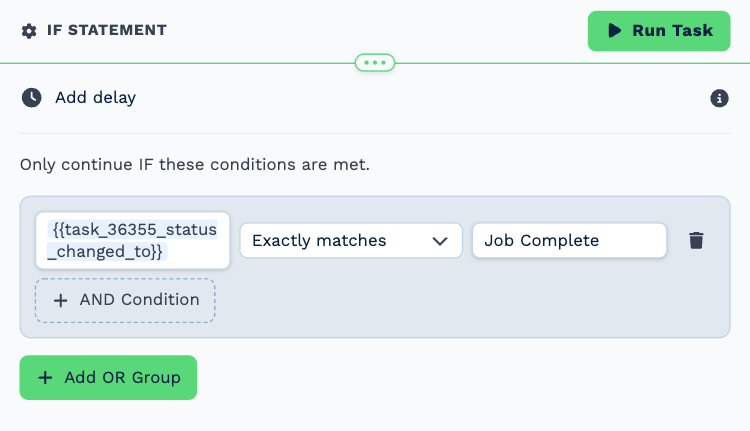
2. Job complete?
Task: If Statement. Continues only when the new status is Job Complete.
| Field | Set it to |
|---|---|
| Condition | {{task_36355_status_changed_to}} exactly matches Job Complete |
3. Thank-you text
Task: SMS. Thanks the customer and invites them to flag problems.
| Field | Set it to |
|---|---|
| Client | {{task_36355_client_id}} |
| To (phone number) | {{all_contacts}} |
Message
Thanks for choosing Neverland Home Services. Your technician has marked the job complete. Anything not right? Reply to this text and we will sort it out.
4. Wait 3 days
Task: Delay. Lets a few days pass.
| Field | Set it to |
|---|---|
| Delay Type | Specified Time |
| Days | 3 |
5. Ask for review
Task: Email. Asks for a review, with your review link.
| Field | Set it to |
|---|---|
| Outgoing Email User | Wendy Darling |
| Client | {{task_36355_client_id}} |
| To | {{all_contacts}} |
| Subject | How did we do? |
Body
Hi,
Thank you again for having us out. If you were happy with the work, a short review helps other homeowners find us:
https://example.com/review
If anything was not up to standard, reply to this email and it comes straight to the owner.
Kind regards,
Neverland Home Services
6. Next service
Task: Workflow Note. Reminds the office to set the next service date.
| Field | Set it to |
|---|---|
| Action | Create Note |
| Client ID | {{task_36355_client_id}} |
| Note Type | Note |
| Priority | Low |
| Due Date | In One Week (8AM) |
| Tag Users | Wendy Darling |
| Message | Job complete and review requested. Set **Next Service Due** on the client and offer the maintenance plan. |
Make it yours
- Replace the link in Ask for review with your own review page.
- Add an Edit a Client task that sets a next-service date field a year ahead.