Overdue invoice reminders
Most late invoices are forgotten, not disputed. A polite reminder on the day the terms run out collects a surprising share of them without anyone picking up the phone. This workflow waits out the payment terms, checks the invoice, and only chases the ones that are still open.

Before you start
- Quotes and invoices created in BaseCloud
- Online payments switched on, for the payment link
The workflow
| Step | Task | Type | What it does |
|---|---|---|---|
| 1 | New invoice | CRM Trigger | Starts whenever a quote or invoice is created |
| 2 | Wait 30 days | Delay | Waits out 30-day terms and lands on a weekday |
| 3 | Fetch invoice | Accounting | Looks the invoice up again, so the workflow sees today’s state |
| 4 | Still unpaid? | If Statement | Continues only when the invoice has no payment date |
| 5 | Send reminder | Emails the amount, the invoice number and a link to pay | |
| 6 | Accounts note | Workflow Note | Leaves accounts a note to call if it is still unpaid in a week |
About the variables
Values such as {{task_36339_…}} carry the number of the task they come from, so yours will
differ. Do not type them: click into a field and pick the value from an earlier task.
1. New invoice
Task: CRM Trigger. Starts whenever a quote or invoice is created.
| Field | Set it to |
|---|---|
| Trigger Type | Quote / Invoice Change |
| Target Field | Quote/Invoice Created |
2. Wait 30 days
Task: Delay. Waits out 30-day terms and lands on a weekday.
| Field | Set it to |
|---|---|
| Delay Type | Specified Time |
| Days | 30 |
3. Fetch invoice
Task: Accounting. Looks the invoice up again, so the workflow sees today’s state.
| Field | Set it to |
|---|---|
| Action | Fetch Quote / Invoice |
| Quote / Invoice ID | {{task_36339_inv_id}} |
4. Still unpaid?
Task: If Statement. Continues only when the invoice has no payment date.
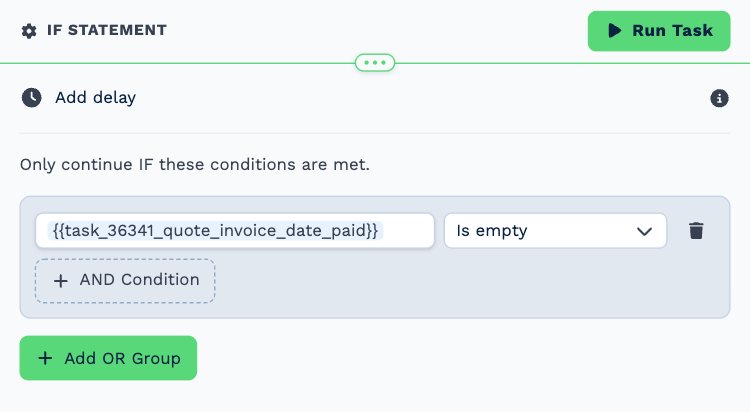
| Field | Set it to |
|---|---|
| Condition | {{task_36341_quote_invoice_date_paid}} is empty |
5. Send reminder
Task: Email. Emails the amount, the invoice number and a link to pay.
| Field | Set it to |
|---|---|
| Outgoing Email User | Wendy Darling |
| Client | {{task_36339_client_id}} |
| To | {{all_contacts}} |
| Subject | Invoice {{task_36341_quote_invoice_o_id_full}} is overdue |
Body
Hi,
Invoice {{task_36341_quote_invoice_o_id_full}} for ${{task_36341_quote_invoice_total}} is now overdue.
You can pay online here: {{task_36341_payment_link}}
If you have already paid, thank you, and please ignore this message.
Kind regards,
Accounts
6. Accounts note
Task: Workflow Note. Leaves accounts a note to call if it is still unpaid in a week.
| Field | Set it to |
|---|---|
| Action | Create Note |
| Client ID | {{task_36339_client_id}} |
| Note Type | Note |
| Priority | Medium |
| Due Date | In One Week (8AM) |
| Tag Users | Tiger Lily |
Message
Reminder sent for overdue invoice {{task_36341_quote_invoice_o_id_full}} (${{task_36341_quote_invoice_total}}). Call if it is still unpaid in a week.
Make it yours
- Match the Delay to your payment terms.
- Add a second round: another delay, another check, and a firmer email.
- The trigger also fires for quotes. Add an If Statement on
quote_invoiceafter the fetch to run for invoices only.