Payment to Invoice Workflow
Automatically generate and email invoices when customers make payments through Stripe
Overview
This intermediate workflow demonstrates how to capture Stripe payment webhooks, create customer records, generate PDF invoices, and email them automatically - creating a complete payment-to-invoice pipeline.
What You'll Build:
- Receive Stripe payment notifications
- Create/match customer in CRM
- Generate invoice in BaseCloud Accounting
- Create PDF of invoice
- Email invoice PDF to customer
- Log payment in CRM
Real-World Applications:
- E-commerce order invoicing
- Service payment receipts
- Subscription billing documentation
- Professional services invoicing
- Membership payment tracking
Workflow Diagram
graph LR
    A[Stripe Payment<br/>TRIGGER] --> B[Match to Client<br/>Find Existing]
    B --> C[BaseCloud Accounting<br/>Create Invoice]
    C --> D[PDF<br/>Generate Invoice PDF]
    D --> E[Email<br/>Send Invoice]
    E --> F[Workflow Note<br/>Log Payment]
    F --> G[End]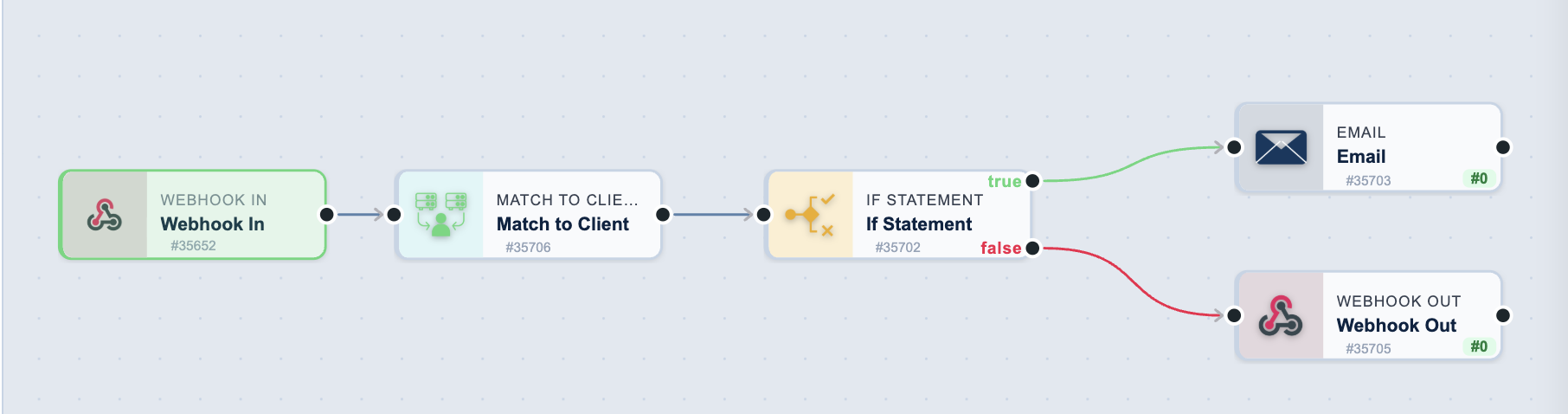
Tasks Used
| Order | Task Type | Purpose |
|---|---|---|
| 1 | Webhook In | Receive Stripe payment webhook |
| 2 | Match to Client | Find existing customer record |
| 3 | BaseCloud Accounting | Create invoice in accounting system |
| 4 | Generate invoice PDF | |
| 5 | Send invoice to customer | |
| 6 | Workflow Note | Log payment activity |
Total Setup Time: 30-40 minutes
Skill Level: Intermediate
Prerequisites: Stripe account with webhook access, BaseCloud Accounting configured
Step-by-Step Setup
Step 1: Create Workflow
- Go to Settings → Automation
- Click Add Workflow
- Enter:
- Name:
Payment to Invoice - Stripe - Description:
Auto-generate and email invoices for Stripe payments - Click Create Workflow
Step 2: Configure Stripe Webhook Trigger
2.1: Create Webhook in BaseCloud
- Click Add Task on canvas
- Select Webhook In trigger
- Configure:
- Task Name:
Stripe Payment Received - Click Save
- Copy webhook URL (e.g.,
https://yourapp.basecloudglobal.com/webhook/abc123)
2.2: Add Webhook to Stripe Dashboard
- Go to Stripe Dashboard → Developers → Webhooks
- Click Add Endpoint
- Endpoint URL: Paste BaseCloud webhook URL
- Events to send:
payment_intent.succeededcharge.succeeded- Click Add Endpoint
- Copy Signing Secret (starts with
whsec_)
2.3: Test Stripe Webhook
- In Stripe Dashboard, click Send test webhook
- Select
payment_intent.succeeded - Click Send test webhook
- Return to BaseCloud workflow
- Click on webhook trigger task
- Verify test data appears in LEFT panel
Stripe Payment Data Available:
{{task_1001_data.amount}}                    // Amount in cents (1500 = $15.00)
{{task_1001_data.currency}}                  // Currency code (usd, eur, zar)
{{task_1001_data.customer}}                  // Stripe customer ID
{{task_1001_data.payment_intent}}            // Payment intent ID
{{task_1001_data.receipt_email}}             // Customer email
{{task_1001_data.billing_details.name}}      // Customer name
{{task_1001_data.billing_details.phone}}     // Customer phone
{{task_1001_data.description}}               // Payment description
Step 3: Match/Create Customer
- Click Add Task below webhook
- Select Match to Client
- Configure:
- Parent Task:
Stripe Payment Received - Match by: Email
- Email:
{{task_1001_data.receipt_email}} - Name:
{{task_1001_data.billing_details.name}} - Phone:
{{task_1001_data.billing_details.phone}} - Create if not found: ✅ Yes
- Custom Fields:
stripe_customer_id={{task_1001_data.customer}}
- Task Name:
Find or Create Customer
What This Does:
- Searches for existing customer by email
- Creates new customer if not found
- Stores Stripe customer ID for future reference
- Prevents duplicate customer records
Output:
{{task_1002_client_id}}              // BaseCloud customer ID
{{task_1002_is_new_client}}          // true/false
{{task_1002_client_name}}            // Customer name
{{task_1002_client_email}}           // Customer email
Step 4: Create Invoice in Accounting
- Click Add Task after Match to Client
- Select BaseCloud Accounting
- Configure:
- Parent Task:
Find or Create Customer - Action: Create Invoice
- Client ID:
{{task_1002_client_id}} - Invoice Date:
{{current_date}} - Due Date:
{{current_date}}(already paid) - Status: Paid
- Line Items:
- Payment Method: Stripe
- Payment Reference:
{{task_1001_data.payment_intent}} - Notes:
Paid via Stripe on {{current_date}} - Task Name:
Create Invoice
Amount Calculation:
- Stripe returns amounts in cents (1500 = $15.00)
- Divide by 100:
{{task_1001_data.amount / 100}} - Use Variable task if complex calculation needed
Output:
{{task_1003_invoice_id}}             // Invoice ID
{{task_1003_invoice_number}}         // Invoice #INV-001234
{{task_1003_total_amount}}           // Total with tax
{{task_1003_invoice_url}}            // View invoice URL
Step 5: Generate Invoice PDF
- Click Add Task after Create Invoice
- Select PDF
- Configure:
- Parent Task:
Create Invoice - PDF Type: Invoice
- Invoice ID:
{{task_1003_invoice_id}} - Template: Default Invoice Template
- Include: Logo, Payment Details, Tax Breakdown
- Task Name:
Generate Invoice PDF
What This Does:
- Converts invoice to professional PDF
- Uses your company branding
- Includes all invoice line items
- Adds payment status stamp
- Generates secure download URL
Output:
{{task_1004_pdf_url}}                // Direct PDF download link
{{task_1004_pdf_filename}}           // invoice_INV-001234.pdf
{{task_1004_file_size}}              // File size in KB
Step 6: Email Invoice to Customer
- Click Add Task after Generate PDF
- Select Email
- Configure:
- Parent Task:
Generate Invoice PDF - To:
{{task_1002_client_email}} - From Name: Your Company
- From Email: billing@yourcompany.com
- Subject:
Invoice {{task_1003_invoice_number}} - Payment Received -
Body:
Hi {{task_1002_client_name}}, Thank you for your payment of ${{task_1001_data.amount / 100}}! Your invoice is attached for your records. Invoice Details: - Invoice Number: {{task_1003_invoice_number}} - Amount: ${{task_1003_total_amount}} - Payment Method: Stripe - Payment Date: {{current_date}} - Payment Reference: {{task_1001_data.payment_intent}} If you have any questions, please don't hesitate to contact us. Best regards, The [Your Company] Team --- This is an automated message. Please do not reply to this email. -
Attachments:
{{task_1004_pdf_url}} - Task Name:
Email Invoice
Personalization Tips:
- Include invoice number in subject for easy searching
- Attach PDF using
{{task_1004_pdf_url}} - Add payment reference for customer records
- Include support contact information
Step 7: Log Payment in CRM
- Click Add Task after Email Invoice
- Select Workflow Note
- Configure:
- Parent Task:
Email Invoice - Client ID:
{{task_1002_client_id}} - Note Type: Payment
- Note:
- Task Name:
Log Payment Activity
What This Does:
- Creates timeline entry in customer record
- Links payment to customer history
- Provides audit trail
- Visible in CRM contact view
Step 8: Test Workflow
Test with Stripe Test Mode
- In Stripe Dashboard, ensure Test Mode is enabled
- Use test card:
4242 4242 4242 4242 - Create test payment:
- Submit payment
- Webhook triggers BaseCloud workflow
- Monitor each task execution
Verify Results
- ✅ Customer created/matched in CRM
- ✅ Invoice created with correct amount
- ✅ PDF generated and accessible
- ✅ Email sent with PDF attachment
- ✅ Payment logged in timeline
Step 9: Handle Multiple Products
For orders with multiple items, use Variable task before Create Invoice:
Add Variable Task:
// Parse Stripe metadata for line items
const items = JSON.parse('{{task_1001_data.metadata.line_items}}');

// Build line items array
const lineItems = items.map(item => ({
  description: item.name,
  quantity: item.quantity,
  unit_price: item.price,
  tax_rate: 0,
}));

return { line_items: lineItems };
Then use {{task_1002_line_items}} in accounting task.
Expected Output
Successful Payment Processing:
- ✅ Stripe webhook received (< 1 second)
- ✅ Customer created/matched (< 1 second)
- ✅ Invoice created with payment status "Paid"
- ✅ PDF generated (< 3 seconds)
- ✅ Email sent with invoice attachment (< 5 seconds)
- ✅ Payment logged in CRM timeline
Total Processing Time: 5-10 seconds from payment to email delivery
Common Issues & Solutions
Issue: Webhook not triggering
Cause: Stripe webhook not configured correctly
Solution:
- Verify webhook URL is correct in Stripe Dashboard
- Check "Events to send" includes
payment_intent.succeeded - Test with "Send test webhook" button
- Check webhook signing secret matches
- Verify workflow is enabled
Issue: Invoice amount showing as 1500 instead of $15.00
Cause: Stripe returns amounts in cents
Solution:
- Divide by 100:
{{task_1001_data.amount / 100}} - Or use Variable task with calculation:
Issue: PDF attachment not in email
Cause: PDF task not completing before email sends
Solution:
- Verify Email task parent is PDF task (not Create Invoice)
- Check PDF generation completed successfully
- Ensure
{{task_1004_pdf_url}}is in Attachments field - Test PDF URL manually to confirm accessibility
Issue: Duplicate customers being created
Cause: Match to Client not finding existing customers
Solution:
- Verify "Match by Email" selected
- Ensure email variable correct:
{{task_1001_data.receipt_email}} - Check customer emails in CRM are properly formatted
- Test with known existing customer email
Issue: Invoice line items showing [object Object]
Cause: Line items not properly formatted as JSON
Solution:
- Ensure line items is valid JSON array:
- Don't use quotes around JSON structure
- Use Variable task for complex item parsing
Workflow Enhancements
Add SMS Receipt
After email, add SMS task:
To: {{task_1001_data.billing_details.phone}}
Message: Hi {{task_1002_client_name}}! Your payment of
${{task_1001_data.amount / 100}} was received.
Invoice {{task_1003_invoice_number}} sent to email.
Add Slack Notification
Notify finance team of payments:
Webhook URL: https://hooks.slack.com/your-webhook
Body:
{
  "text": "💳 Payment received: ${{task_1001_data.amount / 100}} from {{task_1002_client_name}}",
  "attachments": [{
    "fields": [
      {"title": "Invoice", "value": "{{task_1003_invoice_number}}"},
      {"title": "Customer", "value": "{{task_1002_client_name}}"}
    ]
  }]
}
Add to Google Sheets
Log all payments to spreadsheet:
Spreadsheet: Payment Log
Sheet: 2024 Payments
Action: Append Row
Values:
{{current_date}}, {{task_1002_client_name}},
{{task_1001_data.amount / 100}}, {{task_1003_invoice_number}}
Add Subscription Tracking
For recurring payments, add Edit Client:
Custom Field: subscription_status = active
Custom Field: last_payment_date = {{current_date}}
Custom Field: next_billing_date = {{current_date + 30 days}}
Related Workflows
- Lead Capture to CRM - Capture customers from forms
- Facebook Lead Nurture - Follow-up sequences
- Support Ticket Creation - Customer support automation
Related Tasks
- Webhook In - Webhook configuration
- Stripe - Stripe integration
- Match to Client - Customer management
- BaseCloud Accounting - Invoicing
- PDF - PDF generation
- Email - Email delivery
Next Steps
✅ You've built a complete payment pipeline!
Try these enhancements:
- Add refund handling webhook (
charge.refunded) - Create different invoice templates for product types
- Set up payment failure notifications
- Add subscription renewal reminders with Delay task
- Create monthly revenue reports with Google Sheets
Need help? Check Testing Workflows or Troubleshooting