Celebration cake reminders
Birthdays and anniversaries come round every year, and a customer who ordered a cake once will usually order again if they are reminded in time to do it.

Before you start
- A date custom field on the client holding the reminder date, a week before the celebration
The workflow
| Step | Task | Type | What it does |
|---|---|---|---|
| 1 | Reminder date | Date Trigger | Starts for each customer on the reminder date, every year |
| 2 | Email the offer | Emails the offer | |
| 3 | Wait 4 days | Delay | Waits four days |
| 4 | Last-call text | SMS | Texts a last call before the ordering cut-off |
| 5 | Tell the shop | Workflow Note | Leaves a note on the client so the shop honours the offer |
About the variables
Values such as {{task_36646_…}} carry the number of the task they come from, so yours will
differ. Do not type them: click into a field and pick the value from an earlier task.
1. Reminder date
Task: Date Trigger. Starts for each customer on the reminder date, every year.
| Field | Set it to |
|---|---|
| Date Field | Your date field |
| Interval | 1 |
| Unit | Years |
| Time of Day (UTC) | 14:00 UTC |
The Date Trigger runs on the date in the field, never before it, so the field holds the day you want the offer to go out.
2. Email the offer
Task: Email. Emails the offer.
| Field | Set it to |
|---|---|
| Outgoing Email User | Wendy Darling |
| Client | {{task_36646_client_id}} |
| To | {{all_contacts}} |
| Subject | Shall we bake for the big day? |
Body
Hi {{task_36646_first_name}},
A little bird told us there is something to celebrate next week.
Order a celebration cake this week and we will add six cupcakes on the house. Reply to this email with the flavour and how many people you are feeding.
The Neverland Bakery
3. Wait 4 days
Task: Delay. Waits four days.
| Field | Set it to |
|---|---|
| Delay Type | Specified Time |
| Days | 4 |
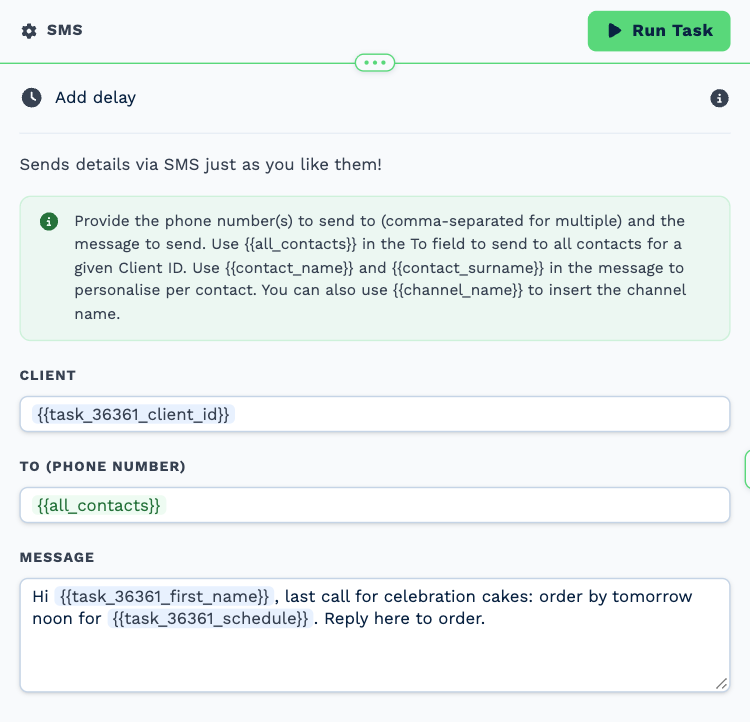
4. Last-call text
Task: SMS. Texts a last call before the ordering cut-off.
| Field | Set it to |
|---|---|
| Client | {{task_36646_client_id}} |
| To (phone number) | {{all_contacts}} |
| Message | Hi {{task_36646_first_name}}, last call for celebration cakes: order by tomorrow noon. Reply here to order. |
5. Tell the shop
Task: Workflow Note. Leaves a note on the client so the shop honours the offer.
| Field | Set it to |
|---|---|
| Action | Create Note |
| Client ID | {{task_36646_client_id}} |
| Note Type | Note |
| Priority | Low |
| Due Date | Now |
| Tag Users | Tinker Bell |
| Mark above users as | Done |
| Message | Celebration offer sent (cake plus six cupcakes). If they order, add the cupcakes to the ticket. |
Make it yours
- Change the offer in both messages.
- Add an If Statement on a "marketing opt-in" custom field before the first message.