Paystack Payment Processor
Overview
The Paystack task enables payment processing for African markets through the Paystack payment gateway. It supports two primary operations: charging stored payment methods for recurring transactions, and generating payment links for one-time payments.
Paystack is ideal for businesses serving customers in Nigeria, Ghana, South Africa, and Kenya, offering local payment methods and currencies optimized for the African market.
Type Number: 32
Category: Integration - Payment Processing
Geographic Focus: African markets (Nigeria, Ghana, South Africa, Kenya)
How It Works
Paystack integrates with your BaseCloud CRM to process payments through two distinct workflows:
- Charge Account: Charges a stored payment method using authorization codes from the billing_accounts table
- Create Payment Link: Generates a Paystack checkout URL for one-time payments with email collection
graph TB
    A[Paystack Task Triggers] --> B{Action Type?}
    B -->|charge_account| C[Lookup Client]
    C --> D[Find Active Billing Account]
    D --> E[Charge Authorization Code]
    E --> F[Return Transaction Result]
    B -->|create_payment_link| G[Validate Email & Amount]
    G --> H[Initialize Paystack Transaction]
    H --> I[Return Payment URL]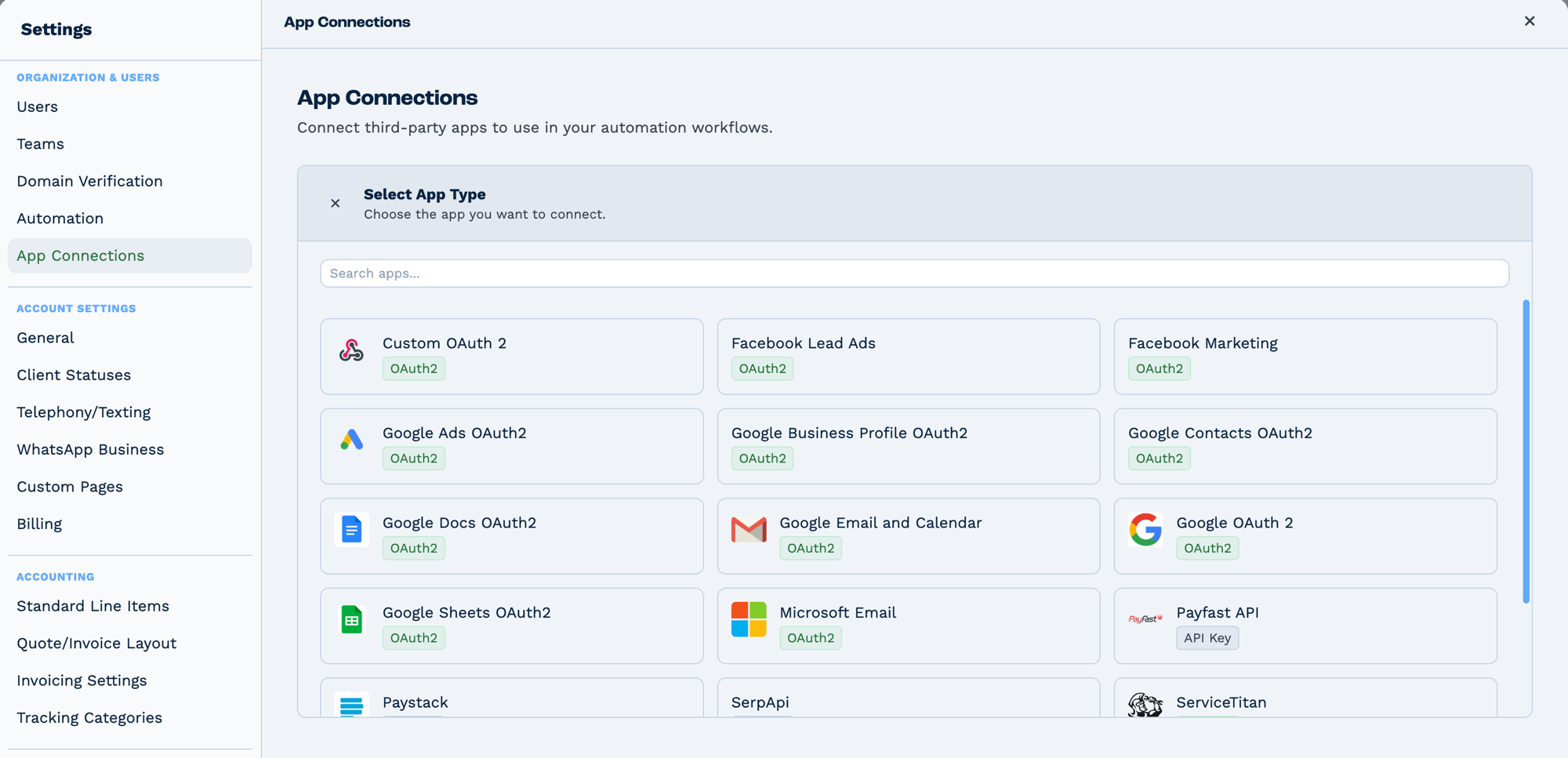
Connections live in Settings → App Connections, not on the task. Connect the app once and every task that needs it can use it. The badge on each tile says how it authenticates — OAuth2 sends you to the provider to sign in, API Key expects a key you paste in.
Prerequisites
Required: Paystack App Connection
Before using this task, you must configure a Paystack app connection:
- Get Paystack API Keys:
- Log into your Paystack Dashboard
- Navigate to Settings > API Keys & Webhooks
- Copy your Secret Key (starts with
sk_live_orsk_test_) -
Copy your Public Key (starts with
pk_live_orpk_test_) -
Create App Connection:
- Go to Settings > App Connections in BaseCloud
- Create new connection with Type ID = 4 (Paystack)
- Store credentials as JSON:
- Reference Connection:
- Use the
app_connection_idin your task configuration - Store connection ID in a variable for reusability
Required for charge_account: Billing Account Setup
To charge stored payment methods, clients must have active billing accounts:
- Stored in
billing_accountstable - Status must be "Active"
- Contains Paystack
authorization_codeandcustomer_email - Associated with client via
owner_id - Created when customer completes first payment via Paystack
Configuration
Builder fields
The Field column is the label as it appears in the task builder; Key is the name the value is stored under and referenced by.
| Field | Key | Type | Default | Notes |
|---|---|---|---|---|
| Paystack Connection | app_connection_id |
app-connection | – | |
| Action | paystack_action |
select | charge_account |
Options: Charge Account · Create Payment Link |
| Client ID | o_client_id |
textarea | – | Only shown when paystack_action is charge_account |
email |
textarea | – | ||
| Amount | amount |
textarea | – | |
| Currency | currency |
select | ZAR |
Options: ZAR — South African Rand · USD — US Dollar · NGN — Nigerian Naira · GHS — Ghanaian Cedi · KES — Kenyan Shilling |
| Metadata | metadata_rows |
dyn-rows | – | Only shown when paystack_action is charge_account |
Action: charge_account
Purpose: Charge a client's stored payment method for recurring or automated payments.
| Field | Required | Type | Description |
|---|---|---|---|
| app_connection_id | ✅ Yes | String | Reference to Paystack app connection |
| paystack_action | ✅ Yes | String | Set to charge_account |
| o_client_id | ✅ Yes | String | Client identifier from CRM |
| currency | ✅ Yes | String | Currency code (NGN, GHS, ZAR, USD, KES) |
| amount | ✅ Yes | Number | Amount in major units (e.g., 500.00 for ₦500) |
| Custom metadata | ❌ Optional | Various | Any fields with setting_1 = "metadata" |
Example Configuration:
app_connection_id: {{var_paystack_connection}}
paystack_action: charge_account
o_client_id: {{trigger_client_id}}
currency: NGN
amount: {{client_subscription_amount}}
metadata_invoice_id: {{invoice_id}}
metadata_subscription_type: monthly
Action: create_payment_link
Purpose: Generate a Paystack payment URL for one-time payments.
| Field | Required | Type | Description |
|---|---|---|---|
| app_connection_id | ✅ Yes | String | Reference to Paystack app connection |
| paystack_action | ✅ Yes | String | Set to create_payment_link |
| ✅ Yes | String | Customer email address | |
| currency | ✅ Yes | String | Currency code (NGN, GHS, ZAR, USD, KES) |
| amount | ✅ Yes | Number | Amount in major units (e.g., 5000.00 for ₦5,000) |
Example Configuration:
app_connection_id: {{var_paystack_connection}}
paystack_action: create_payment_link
email: {{client_email}}
currency: NGN
amount: {{invoice_total}}
Output Fields
The task generates workflow variables following the pattern task_32001_<field_name>:
Common Output Fields
| Variable | Type | Description |
|---|---|---|
task_32001_run |
Boolean | Whether task executed successfully (true/false) |
task_32001_run_text |
String | Human-readable result message |
task_32001_status |
Boolean | Paystack API status (true = success) |
task_32001_message |
String | Paystack response message |
charge_account Output
{
  "task_32001_run": true,
  "task_32001_run_text": "Transaction Successful",
  "task_32001_status": true,
  "task_32001_message": "Charge attempted",
  "task_32001_data_id": 123456789,
  "task_32001_data_domain": "live",
  "task_32001_data_status": "success",
  "task_32001_data_reference": "PAYSTACK-1707397234567-8901",
  "task_32001_data_amount": 50000,
  "task_32001_data_currency": "NGN",
  "task_32001_data_authorization_authorization_code": "AUTH_xxxxx",
  "task_32001_data_authorization_card_type": "visa",
  "task_32001_data_authorization_last4": "4081",
  "task_32001_data_authorization_bank": "TEST BANK",
  "task_32001_data_customer_email": "customer@example.com"
}
create_payment_link Output
{
  "task_32001_run": true,
  "task_32001_run_text": "Authorization URL created",
  "task_32001_status": true,
  "task_32001_message": "Authorization URL created",
  "task_32001_data_authorization_url": "https://checkout.paystack.com/xxxxxxx",
  "task_32001_data_access_code": "xxxxxxx",
  "task_32001_data_reference": "PAYSTACK-1707397234567-8901"
}
Real-World Examples
Send a payment link with an invoice
Form Submission
  └─ Match to Client   look the client up
      └─ Paystack      generate a payment link
          └─ Email     send the link
Charge a saved payment method
Follow up when a payment arrives
Webhook In  (Paystack charge succeeded)
  └─ Match to Client     contact_email from the payload
      └─ Workflow Note   log it against the client
Common Use Cases
- Recurring Subscriptions: Monthly/annual SaaS billing
- Invoice Payments: One-time payment links for invoices
- Donation Processing: Accept variable amount contributions
- Membership Fees: Annual membership renewals
- Course Enrollments: Education platform payments
- Event Tickets: Conference and event registrations
- Service Retainers: Professional services advance payments
- Top-up Services: Credit/wallet recharge systems
- Marketplace Transactions: Seller payouts and commissions
- Installment Payments: Split payment collections
Supported Currencies
Paystack supports multiple African currencies:
- NGN - Nigerian Naira (primary)
- GHS - Ghanaian Cedi
- ZAR - South African Rand
- USD - US Dollar
- KES - Kenyan Shilling
Note: Amount is automatically converted to minor units (kobo/pesewas). For example:
- Input:
500.00 NGN - Sent to Paystack:
50000(kobo)
Troubleshooting
"No active billing account found for this client"
Cause: Client doesn't have a stored payment method.
Solutions:
- Use
create_payment_linkaction to collect payment details first - After first successful payment, Paystack creates authorization code
- Webhook stores authorization code in
billing_accountstable - Subsequent charges use
charge_accountaction
"Paystack secret key not found in connection"
Cause: App connection credentials not properly configured.
Solutions:
- Verify credentials stored as valid JSON:
- Check Type ID = 4 for Paystack connection
- Ensure no extra spaces or line breaks in JSON
"Amount is not a number"
Cause: Amount field contains non-numeric value or variable is empty.
Solutions:
- Validate amount source (trigger field, database query, calculation)
- Use Formatter task to clean input
- Add If Condition to check amount before processing
- Example:
{{task_20001_formatted_amount}}
Payment status shows "failed" in Paystack dashboard
Possible Causes:
- Insufficient Funds: Customer's card declined
- Card Blocked: Bank blocked transaction
- Expired Card: Card expiration date passed
- Invalid Authorization: Authorization code revoked
Solutions:
- Check
task_32001_messagefor specific error - Send email to customer requesting card update
- Use
create_payment_linkto collect new payment method - Implement retry logic with delays
Webhook not updating order status
Cause: Webhook listener not configured or payment reference mismatch.
Solutions:
- Configure Paystack webhooks in dashboard:
- URL:
https://api.basecloudglobal.com/v2/hooks/paystack-webhook - Events:
charge.success,charge.failed - Verify webhook signature validation
- Store payment reference in database for matching
- Use Workflow Note to debug webhook data
Currency mismatch errors
Cause: Billing account currency differs from charge currency.
Solutions:
- Store currency in client profile
- Match currency to client's country
- Default to NGN for Nigerian clients
- Allow clients to select preferred currency
Limitations & Considerations
Technical Limitations
- Geographic Restriction: Optimized for African markets (Nigeria, Ghana, SA, Kenya)
- Currency Conversion: Limited multi-currency support compared to global processors
- Card Types: Primarily supports Visa, Mastercard, Verve
- Authorization Codes: Single-use; expired codes require new payment
- Amount Limits: Minimum ₦100, maximum varies by account verification level
Best Practices
- Test Mode: Use test keys (
sk_test_,pk_test_) during development - Reference Tracking: Include metadata for payment reconciliation
- Error Handling: Always check
task_32001_runstatus - Retry Logic: Implement exponential backoff for failed payments
- Customer Communication: Send clear payment failure explanations
- Webhook Validation: Always validate webhook signatures
- PCI Compliance: Never store raw card numbers
Business Considerations
- Transaction Fees: Paystack charges per-transaction fees (check pricing)
- Settlement Time: 2-7 business days for bank transfers
- Chargebacks: Monitor dispute rate to avoid account restrictions
- KYC Requirements: Business verification required for live mode
- Customer Support: Paystack provides merchant support for issues
Integration with Billing Accounts
Billing Account Structure
When customers make their first payment via Paystack, the system stores:
CREATE TABLE billing_accounts (
  id INT PRIMARY KEY,
  owner_id INT,                    -- CRM client_id
  authorization_code VARCHAR(255), -- Paystack auth code
  customer_code VARCHAR(255),      -- Paystack customer code
  customer_email VARCHAR(255),     -- Customer email
  signature VARCHAR(255),          -- Unique identifier
  card_type VARCHAR(50),           -- visa, mastercard, etc.
  last4 VARCHAR(4),                -- Last 4 card digits
  exp_month VARCHAR(2),            -- MM
  exp_year VARCHAR(4),             -- YYYY
  bank VARCHAR(255),               -- Issuing bank
  status VARCHAR(50),              -- Active, Inactive
  currency VARCHAR(3),             -- NGN, GHS, etc.
  type_id INT                      -- 4 for Paystack
);
Automatic Account Creation
Billing accounts are created automatically via webhook when:
- Customer completes payment via
create_payment_link - Paystack sends
charge.successwebhook - Webhook handler extracts authorization code
- New record inserted into
billing_accountstable - Status set to "Active"
Account Lookup Process
// 1. Find client by o_client_id
const match = await matchCompanyIdVal('o_client_id', oClientId, ownerId);

// 2. Get all billing accounts for client
const billingAccounts = await getAllDataRowByColumn('billing_accounts', 'owner_id', match.match.client_id);

// 3. Find first active account
let validAccount = billingAccounts.find(account => account.status === 'Active');

// 4. Use authorization_code for charge
const chargeData = {
  authorization_code: validAccount.authorization_code,
  email: validAccount.customer_email,
  amount: amount,
  currency: currency,
};
Security Best Practices
Credential Management
✅ DO:
- Store API keys in app_connection credentials (encrypted)
- Use environment-specific keys (test vs. live)
- Rotate keys periodically
- Limit key permissions in Paystack dashboard
❌ DON'T:
- Hardcode API keys in workflow tasks
- Share keys across multiple businesses
- Expose keys in email or logs
- Use live keys in test workflows
Payment Security
✅ DO:
- Validate webhook signatures
- Log all payment attempts
- Monitor for fraud patterns
- Require email verification for high amounts
❌ DON'T:
- Store customer card numbers
- Process payments without customer consent
- Skip amount validation
- Ignore failed payment notifications
Data Privacy
- GDPR Compliance: Handle EU customer data appropriately
- Customer Consent: Get explicit consent for recurring charges
- Data Retention: Delete authorization codes on customer request
- Audit Trail: Maintain payment logs for compliance
Related Tasks
- Type 40 - Stripe: Global payment processor alternative
- Type 2 - Email: Send payment confirmations and invoices
- Type 13 - New Client: Create clients for new customers
- Type 16 - Edit Client: Update client payment status
- Type 36 - PDF: Generate payment receipts
- Type 14 - Workflow Note: Log payment transactions
FAQ
Can I use Paystack for international clients outside Africa?
Yes, Paystack supports USD for international payments, but it's optimized for African markets. For better international coverage, consider Stripe.
How long do authorization codes remain valid?
Paystack authorization codes remain valid until explicitly revoked by the customer or the issuing bank. Always implement error handling for expired authorizations.
Can I charge amounts in different currencies for the same client?
Yes, but each billing account is tied to one currency. Clients paying in multiple currencies need separate billing accounts (one per currency).
What happens if a charge fails?
The task returns run: false with the Paystack error message in run_text. Implement retry logic with delays and customer notifications for best results.
How do I refund a payment?
Refunds must be processed through the Paystack dashboard or API directly. BaseCloud doesn't currently have a refund action in the Paystack task.
Can I split payments to multiple recipients?
Yes, configure subaccounts and split rules in your Paystack dashboard. The charge will automatically split based on your configuration.
How do I handle subscription cancellations?
Set the client's billing status to "Inactive" with an Edit Client task to prevent future automatic charges.
Are there transaction limits?
Yes, limits depend on your Paystack account verification level. Check your dashboard for specific limits and upgrade if needed.
How do I test without charging real cards?
Use Paystack test keys and test card numbers provided in Paystack documentation. Test payments don't charge real money.
Can I customize the payment page?
For create_payment_link, limited customization via Paystack dashboard settings (logo, colors). For more control, use Paystack Inline (requires frontend integration outside BaseCloud).
Summary
Paystack provides robust payment processing for African markets with two key actions:
- ✅ charge_account: Recurring charges on stored payment methods
- ✅ create_payment_link: One-time payment URL generation
- ✅ Automatic billing account integration
- ✅ Metadata support for transaction tracking
- ✅ Multi-currency support (NGN, GHS, ZAR, USD, KES)
- ✅ Webhook integration for real-time updates
- ⚠️ Geographic focus: Africa (Nigeria, Ghana, SA, Kenya)
- ⚠️ Requires app connection setup with API keys
- ⚠️ Billing account needed for recurring charges
Perfect for SaaS subscriptions, invoice payments, donations, memberships, and any recurring or one-time payment scenarios in African markets. For global coverage, consider Stripe as a complementary solution.