Year-end document chase
Year-end work stalls on missing paperwork, and chasing it is the least valuable hour in a practice. This workflow asks once by email, nudges once by text, and only then puts the client in front of an accountant, with a note that says exactly where things stand.

Before you start
- A date custom field on the client holding the financial year end
- A phone number for texts
The workflow
| Step | Task | Type | What it does |
|---|---|---|---|
| 1 | Year end soon | Date Trigger | Starts for each client 30 days before their year end |
| 2 | Request docs | Emails the list of documents you need | |
| 3 | Wait a week | Delay | Waits a week for the documents |
| 4 | Text a nudge | SMS | Texts a reminder |
| 5 | Wait again | Delay | Waits another week |
| 6 | Call the client | Workflow Note | Asks the accountant to check what arrived and phone about the rest |
About the variables
Values such as {{task_36333_…}} carry the number of the task they come from, so yours will
differ. Do not type them: click into a field and pick the value from an earlier task.
1. Year end soon
Task: Date Trigger. Starts for each client 30 days before their year end.
| Field | Set it to |
|---|---|
| Date Field | Your date field |
| Interval | 30 |
| Unit | Days |
| Time of Day (UTC) | 14:00 UTC |
Pick your own year-end field under Date Field.
2. Request docs
Task: Email. Emails the list of documents you need.
| Field | Set it to |
|---|---|
| Outgoing Email User | Wendy Darling |
| Client | {{task_36333_client_id}} |
| To | {{all_contacts}} |
| Subject | What we need for your year end |
Body
Hi {{task_36333_first_name}},
Your financial year ends on {{task_36333_schedule}}. To finish your accounts on time we need:
- Bank statements for the full year
- Sales and purchase invoices
- Payroll summaries
- Loan and asset finance statements
You can reply to this email with the files attached.
Kind regards,
The Neverland team
3. Wait a week
Task: Delay. Waits a week for the documents.
| Field | Set it to |
|---|---|
| Delay Type | Specified Time |
| Weeks | 1 |
4. Text a nudge
Task: SMS. Texts a reminder.
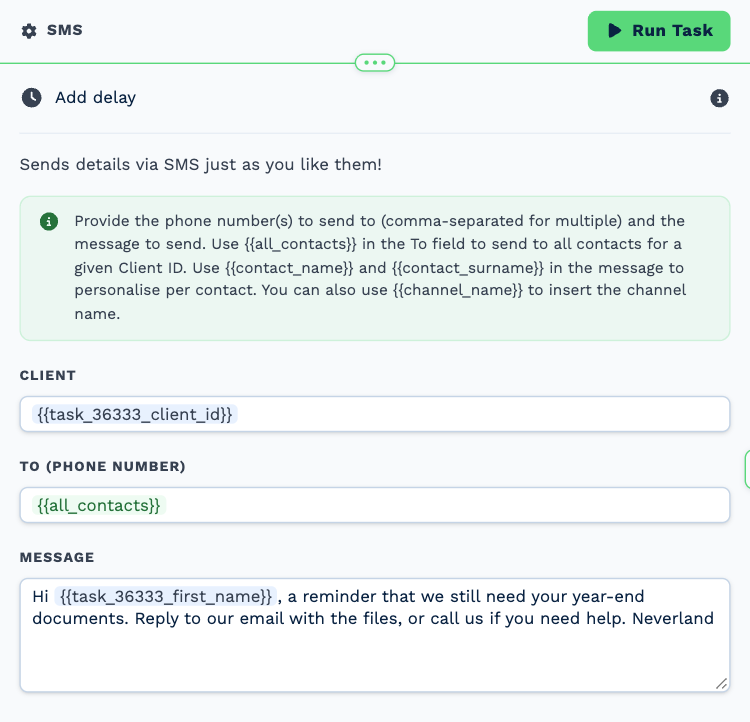
| Field | Set it to |
|---|---|
| Client | {{task_36333_client_id}} |
| To (phone number) | {{all_contacts}} |
Message
Hi {{task_36333_first_name}}, a reminder that we still need your year-end documents. Reply to our email with the files, or call us if you need help. Neverland
5. Wait again
Task: Delay. Waits another week.
| Field | Set it to |
|---|---|
| Delay Type | Specified Time |
| Weeks | 1 |
6. Call the client
Task: Workflow Note. Asks the accountant to check what arrived and phone about the rest.
| Field | Set it to |
|---|---|
| Action | Create Note |
| Client ID | {{task_36333_client_id}} |
| Note Type | Note |
| Priority | Medium |
| Due Date | Tomorrow (8AM) |
| Tag Users | John Darling |
Message
Year-end documents requested twice. Check what has arrived under Files and call the client about anything still missing.
Make it yours
- Edit the list in Request docs for each service line: tax, payroll, audit.
- Add an If Statement before the text to skip clients whose status already says the documents are in.