Policy renewal reminders
A policy that lapses quietly is lost revenue and an uninsured client. Renewals are predictable to the day, so the reminders should not depend on anyone remembering. This workflow starts thirty days out, tells the client, briefs the broker and follows up by text if the policy has still not been renewed.

Before you start
- A date custom field on the client holding the renewal date
- A client status that means the renewal is settled
- A verified sending domain for email and a phone number for texts
The workflow
| Step | Task | Type | What it does |
|---|---|---|---|
| 1 | Renewal soon | Date Trigger | Starts the workflow for each client 30 days before their renewal date |
| 2 | Renewal notice | Emails every contact on the client with the renewal date | |
| 3 | Brief broker | Workflow Note | Leaves the broker a checklist, due in a week |
| 4 | Wait two weeks | Delay | Gives the client two weeks to respond |
| 5 | Still to renew? | If Statement | Stops here for clients whose renewal is already settled |
| 6 | Text a reminder | SMS | Texts a short reminder to anyone who has not renewed |
About the variables
Values such as {{task_36327_…}} carry the number of the task they come from, so yours will
differ. Do not type them: click into a field and pick the value from an earlier task.
1. Renewal soon
Task: Date Trigger. Starts the workflow for each client 30 days before their renewal date.
| Field | Set it to |
|---|---|
| Date Field | Your date field |
| Interval | 30 |
| Unit | Days |
| Time of Day (UTC) | 14:00 UTC |
Pick your own renewal date field under Date Field. The time is in UTC.
2. Renewal notice
Task: Email. Emails every contact on the client with the renewal date.
| Field | Set it to |
|---|---|
| Outgoing Email User | Wendy Darling |
| Client | {{task_36327_client_id}} |
| To | {{all_contacts}} |
| Subject | Your policy renews on {{task_36327_schedule}} |
Body
Hi {{task_36327_first_name}},
Your policy with us renews on {{task_36327_schedule}}.
Nothing changes unless you want it to. If your circumstances are different this year (a new car, a move, building work), reply to this email and we will re-quote before the renewal date.
Kind regards,
The Neverland team
3. Brief broker
Task: Workflow Note. Leaves the broker a checklist, due in a week.
| Field | Set it to |
|---|---|
| Action | Create Note |
| Client ID | {{task_36327_client_id}} |
| Note Type | Note |
| Priority | Medium |
| Due Date | In One Week (8AM) |
| Tag Users | Wendy Darling |
Message
Renewal in 30 days.
- Check for claims in the last 12 months
- Compare the premium with last year
- Call the client if the premium went up by more than 10%
4. Wait two weeks
Task: Delay. Gives the client two weeks to respond.
| Field | Set it to |
|---|---|
| Delay Type | Specified Time |
| Weeks | 2 |
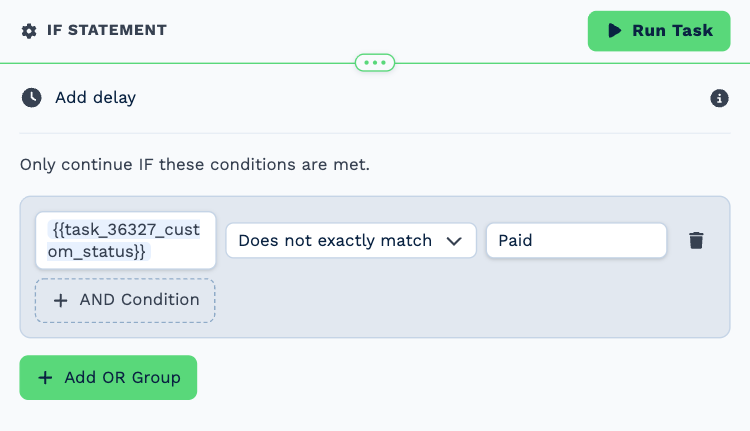
5. Still to renew?
Task: If Statement. Stops here for clients whose renewal is already settled.
| Field | Set it to |
|---|---|
| Condition | {{task_36327_custom_status}} does not exactly match Paid |
The example compares against the status Paid. Use whichever of your statuses means the renewal is done.
6. Text a reminder
Task: SMS. Texts a short reminder to anyone who has not renewed.
| Field | Set it to |
|---|---|
| Client | {{task_36327_client_id}} |
| To (phone number) | {{all_contacts}} |
Message
Hi {{task_36327_first_name}}, your policy renews in two weeks. Reply YES to renew as is, or call us to review your cover. Neverland
Make it yours
- Add a second Delay and a final call-back note three days before the renewal date.
- Swap the text for a WhatsApp Business template if your clients prefer WhatsApp.
- Use one copy of the workflow per policy type if the wording differs.