Online order to kitchen ticket
Orders from an online shop tend to live in the shop’s own inbox, away from the people baking. This workflow puts each order in front of the kitchen as a ticket and keeps the customer informed without anyone typing a message.

Before you start
- An online shop that can send a webhook when an order is placed
- A phone number for texts
The workflow
| Step | Task | Type | What it does |
|---|---|---|---|
| 1 | Order received | Webhook In | Receives the order from your shop |
| 2 | Find or create | Create New client | Finds the customer by email, or creates them |
| 3 | Kitchen ticket | Workflow Note | Writes the kitchen ticket: items, collection time and notes |
| 4 | Confirm order | SMS | Confirms the order to the customer by text |
| 5 | Until pick-up | Delay | Holds the workflow until the collection time |
| 6 | Order is ready | SMS | Tells the customer the order is ready |
About the variables
Values such as {{task_36419_…}} carry the number of the task they come from, so yours will
differ. Do not type them: click into a field and pick the value from an earlier task.
1. Order received
Task: Webhook In. Receives the order from your shop.
| Field | Set it to |
|---|---|
| Response Type | Immediate |
| Response Body | {"received": true} |
Copy this task’s webhook address into your shop’s order notification settings. The variable names follow the fields your shop sends.
2. Find or create
Task: Create New client. Finds the customer by email, or creates them.
| Field | Set it to |
|---|---|
| Match Before Creating | Contact email = {{task_36419_customer_email}} |
| Client Status | New Lead |
| Responsible Manager | Wendy Darling |
| Client Name | {{task_36419_customer_name}} |
| Contact First Name | {{task_36419_customer_name}} |
| Contact Email | {{task_36419_customer_email}} |
| Contact Cell Number | {{task_36419_customer_phone}} |
3. Kitchen ticket
Task: Workflow Note. Writes the kitchen ticket: items, collection time and notes.
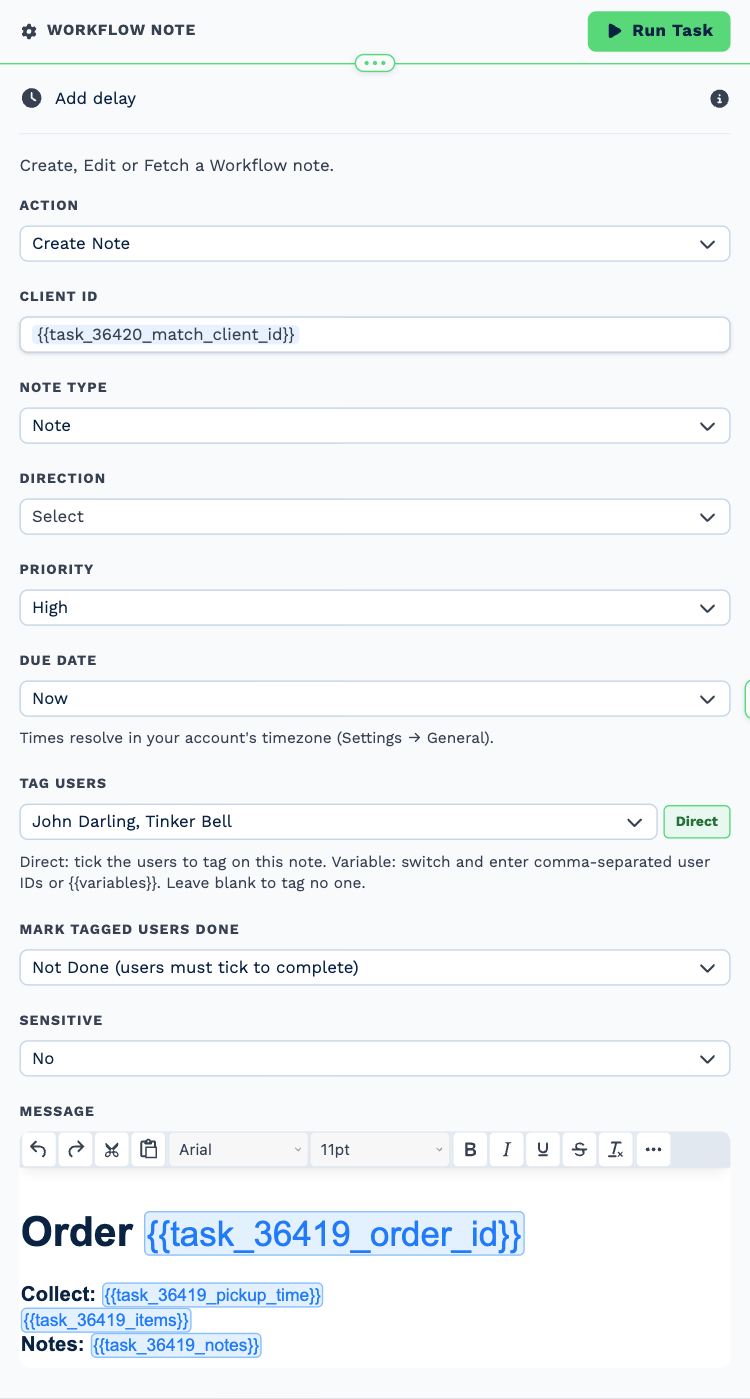
| Field | Set it to |
|---|---|
| Action | Create Note |
| Client ID | {{task_36420_match_client_id}} |
| Note Type | Note |
| Priority | High |
| Due Date | Now |
| Tag Users | Tinker Bell, John Darling |
Message
Order {{task_36419_order_id}}
Collect: {{task_36419_pickup_time}}
{{task_36419_items}}
Notes: {{task_36419_notes}}
4. Confirm order
Task: SMS. Confirms the order to the customer by text.
| Field | Set it to |
|---|---|
| Client | {{task_36420_match_client_id}} |
| To (phone number) | {{task_36419_customer_phone}} |
Message
Thanks {{task_36419_customer_name}}! We have your order {{task_36419_order_id}}. It will be ready to collect at {{task_36419_pickup_time}}.
5. Until pick-up
Task: Delay. Holds the workflow until the collection time.
| Field | Set it to |
|---|---|
| Delay Type | Specify Date & Time |
| Date | {{task_36419_pickup_time}} |
6. Order is ready
Task: SMS. Tells the customer the order is ready.
| Field | Set it to |
|---|---|
| Client | {{task_36420_match_client_id}} |
| To (phone number) | {{task_36419_customer_phone}} |
| Message | Your order {{task_36419_order_id}} is boxed and ready at the counter. See you soon! |
Make it yours
- Set Until pick-up to thirty minutes before the collection time instead.
- Tag whoever is on shift in Kitchen ticket.